7 Best E-Readers for Kids, Compared
As an Amazon Associate we earn from qualifying purchases. Links on this page are affiliate links.
Finding the best e readers for kids requires matching device specs to young habits. We compared 7 models based strictly on published listing specifications. Our top pick, the Amazon Kindle Colorsoft Kids 16GB, leads because it supports color illustrations for graphic novels. This feature suits children who enjoy visual storytelling without media distractions. Other options range from budget-friendly 300 PPI screens to compact 5.76-inch models with high storage. This guide helps you decide which screen size, storage capacity, and display type fits your child's reading needs.
Quick picks
The best fit for you
- You want color illustrations for graphic novels Amazon Kindle Colorsoft Kids 16GB This Kindle Colorsoft Kids model supports color display for illustrated titles.
- You seek a budget option with audio features Mavis Laven 6-Inch 300 PPI 8GB E-Reader The Mavis Laven reader offers a 300 ppi screen and audio support.
- You need high storage in a compact size GOWENIC 5.76-Inch 32GB E-Reader The GOWENIC device provides 32GB storage within a 5.76-inch frame.
- You want app support and customization Wisoqu 5.76-Inch Gray Touchscreen E-Reader The Wisoqu reader includes app support and a touchscreen interface.
- You prefer color media over E Ink GOWENIC 7-Inch Kids Color E-Reader The GOWENIC 7-inch model uses a color LCD for visuals.
Our 7 picks

Amazon Kindle Colorsoft Kids 16GB
Best for: kids reading color-illustrated titles and graphic novels
- Use
- Kids (what this guide is about)
- Storage Capacity
- 16 GB
- Display Type
- Colorsoft
- Front Light
- adjustable warm light
- Water Resistance
- Waterproof
This dedicated kid-friendly e-reader features a glare-free Colorsoft display designed for viewing book illustrations in color. You get 16 GB of internal storage, an adjustable warm front light, and a waterproof build suitable for poolside reading. It includes parental controls via the Parent Dashboard, a protective cover, and a 2-year worry-free guarantee, making it ideal if you want full color without app distractions.
Pros
- Colorsoft display shows book covers and content in color
- Waterproof construction protects against water exposure
- Adjustable warm light and glare-free display for any lighting
- Includes a 2-year worry-free guarantee and protective cover
- Parent Dashboard allows bedtimes, age filters, and progress tracking
Cons
- Display diagonal measurement is omitted from the official specifications
- Does not support general apps, video playback, or games
Good fit if
- You want a color screen for reading illustrated titles and graphic novels.
- You need a waterproof reader with parent-managed bedtimes and content filters.
- You want bundled hardware protection backed by a 2-year worry-free guarantee.
Skip if
- You want a device that supports games, videos, and third-party apps.
- You prefer a dedicated black-and-white display optimized strictly for text.
Verdict: Amazon Kindle Colorsoft Kids 16GB provides color illustration support, waterproof protection, and strict parental controls for young readers who need a dedicated book device without media distractions.

Mavis Laven 6-Inch 300 PPI 8GB E-Reader
Best for: Kids seeking audio-enhanced reading
- Use
- Kids (what this guide is about)
- Screen Size
- 6"
- Storage Capacity
- 8GB
- Display Type
- E - Ink
This Mavis Laven e-reader features a 6-inch E-ink display with 300 ppi resolution. It includes 8GB of storage and double RAM for smooth navigation. The device supports music, radio, and customizable fonts. It is designed for kids and offers a glare-free reading experience. You get a multifunctional device that handles books, pictures, and calendars. It suits young readers who want a dedicated screen without eye strain.
Pros
- 6-inch E-ink screen with 300 ppi resolution
- 8GB storage capacity for books and media
- Double RAM for lag-free page turning
- Supports music and radio playback
- Customizable English and Chinese fonts
Cons
- Only 8GB storage limits media library size
- Limited to four font options
- No mention of app ecosystem or cloud sync
Good fit if
- You want a dedicated e-reader for kids
- You prioritize eye-friendly E-ink displays
- You need music and radio features
Skip if
- You require large storage for many apps
- You prefer color LCD screens
- You need extensive app support
Verdict: Mavis Laven 6" E-ink Reader offers a solid 300 ppi screen and double RAM for smooth reading. It fits kids who enjoy audio features and a distraction-free environment.

GOWENIC 5.76-Inch 32GB E-Reader
Best for: compact reading with high storage
- Use
- Kids (what this guide is about)
- Screen Size
- 5.76"
- Storage Capacity
- 32GB
- Features
- Wi-Fi
- RAM
- 1GB RAM
This GOWENIC e-reader features a 5.76-inch screen designed to be glare and eye-friendly. It includes 32GB of storage and 1GB of RAM for smooth performance. You get Wi-Fi connectivity for downloading content. The device is built for kids, offering adjustable brightness to suit different lighting conditions. It provides a solid, dedicated reading experience without the distractions of a full tablet.
Pros
- 32GB internal storage for books
- 5.76-inch glare-friendly display
- 1GB RAM for responsive performance
- Wi-Fi connectivity
Cons
- Smaller 5.76-inch screen compared to 7-inch competitors
- LCD display instead of E Ink technology
- No mention of a protective case or bundle
Good fit if
- You want a dedicated, distraction-free device for reading
- You need ample storage for a large library
- You prefer a smaller, more portable form factor
Skip if
- You require a larger 7-inch or bigger screen
- You prefer E Ink technology for outdoor readability
- You want a bundle with a protective case included
Verdict: GOWENIC 5.76" E-Reader, 32GB offers solid specs for young readers who need portable storage and a glare-free screen. It fits kids who prefer compact devices over larger tablets.

Wisoqu 5.76-Inch Gray Touchscreen E-Reader
Best for: customizable reading with app support
- Use
- Kids (what this guide is about)
- Screen Size
- 5.76"
- Storage Capacity
- 32 GB
- Display Type
- E-Paper
- Front Light
- Adjustable warm and cool light
- Features
- Wi-Fi, Touchscreen
This Wisoqu e-reader features a 5.76-inch HD E-Paper display with 198 PPI for clear text. It includes 32GB of storage, expandable to 1TB, and 1GB of RAM. The device supports WiFi and Bluetooth on an open-source OS, allowing third-party app installation. Adjustable front light with 24 color temperatures suits various lighting. It targets kids and adults seeking a versatile reading device.
Pros
- 5.76-inch HD E-Paper screen with 198 PPI
- 32GB ROM expandable to 1TB via card
- 24 adjustable warm and cool front light levels
- WiFi and Bluetooth connectivity on open-source OS
- Supports multiple formats including PDF and EPUB
Cons
- Lower resolution than premium color e-readers
- 1GB RAM may limit multitasking performance
- No mention of included protective case or warranty
Good fit if
- You want to install third-party reading apps
- You need large storage for many books
- You prefer customizable lighting for night reading
Skip if
- You require a color display for comics
- You need a pre-loaded kid-safe ecosystem
- You want a device with included accessories
Verdict: Wisoqu 5.76" E-Ink Reader for Kids offers flexible storage and app support for versatile reading. It fits users who value customization over a managed kid environment.

Wisoqu 6-Inch E-Ink Reader with Expandable Storage
Best for: text-heavy reading for children
- Use
- Kids (what this guide is about)
- Screen Size
- 6"
- Storage Capacity
- 8 GB
- Display Type
- E-Ink
View on Amazon: Wisoqu 6-Inch E-Ink Reader with Expandable Storage
The Wisoqu e-reader features a 6-inch E-Ink display designed to reduce eye strain during long reading sessions. It includes 8GB of internal storage, expandable up to 64GB, allowing you to save thousands of books. The device supports adjustable brightness and font settings. You get a protective case included. It is a practical option for kids who need a durable, eye-friendly device for daily reading.
Pros
- 6-inch E-Ink screen reduces eye strain
- 8GB storage expandable to 64GB
- Adjustable brightness and font sizes
- Includes protective case
Cons
- Smaller 6-inch screen compared to 7-inch competitors
- Only 8GB base storage
- No mention of waterproofing or color display
Good fit if
- You want a lightweight device for travel
- You prioritize eye comfort over color graphics
- You need a basic reading experience
Skip if
- You require a large screen for comics
- You need a color display for illustrations
- You want a device with high-end features
Verdict: Wisoqu 6-Inch E-Ink E-Reader for Kids offers a focused reading experience with eye-friendly specs. It fits children who read text-heavy books and need a simple, durable tool.

GOWENIC 7-Inch Kids Color E-Reader
Best for: Kids wanting color media and 16GB storage
- Use
- Kids (what this guide is about)
- Screen Size
- 7"
- Storage Capacity
- 16 GB
- Display Type
- TFT LCD
The GOWENIC Kids E-Reader features a 7-inch TFT LCD color touchscreen with 800x480 resolution. It includes 16GB of built-in storage, expandable to 32GB, for books, photos, and videos. The device supports audio playback and video streaming. It has a durable ABS shell and independent flip keys for navigation. This 16GB model suits kids who want color media and long battery life.
Pros
- 7-inch TFT LCD color display
- 16GB internal storage capacity
- Independent flip keys for navigation
- Supports video and audio playback
Cons
- Uses LCD instead of E Ink
- 800x480 resolution is basic
- Memory card sold separately
Good fit if
- You want a color screen for graphic novels
- You need 16GB for media files
- You prefer physical navigation keys
Skip if
- You require E Ink for eye comfort
- You want a smaller 6-inch device
- You need high-resolution text clarity
Verdict: GOWENIC 7" Kids E-Reader offers a color LCD and 16GB storage for media-rich reading. It fits kids who prioritize color visuals and multimedia over traditional E Ink screens.
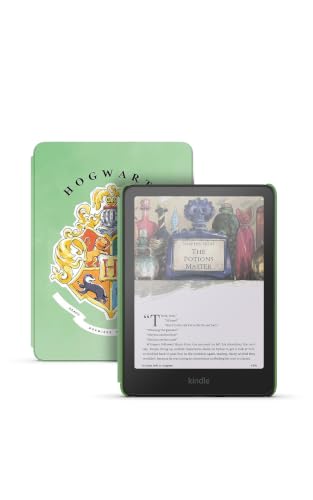
Amazon Kindle Colorsoft Kids 16GB
Best for: young readers wanting illustrated color books
- Use
- Kids (what this guide is about)
- Storage Capacity
- 16 GB
- Display Type
- Colorsoft
- Front Light
- adjustable warm light
- Water Resistance
- waterproof
- Dimensions
- 6.96 × 5.02 × 0.3 inches
This dedicated reader pairs a glare-free Colorsoft display with 16 GB of storage. You get an adjustable warm light, a waterproof shell, and parental controls via the Parent Dashboard to schedule bedtimes and filter titles. It includes a kid-friendly cover and a 2-year guarantee, suiting you if your young reader needs color illustrations without game or video distractions.
Pros
- Glare-free Colorsoft color display
- Waterproof build for reading near water
- Adjustable warm light for nighttime reading
- Includes kid cover and 2-year worry-free guarantee
Cons
- Fixed 16 GB storage with no microSD card expansion mentioned
- Does not support general apps, games, or video playback
Good fit if
- You want a color screen for reading illustrated books and book covers.
- You need parental controls to track reading progress and enforce bedtimes.
- You require water resistance for poolside or travel use.
Skip if
- You want a multifunction tablet capable of playing video and games.
- You need expandable storage beyond the built-in 16 GB capacity.
Verdict: Amazon Kindle Colorsoft Kids 16GB fits households seeking an eye-friendly color reading screen with built-in parental oversight and zero app distractions.
Specifications side by side
| Spec | Amazon Kindle Colorsoft Kids 16GB | Mavis Laven 6-Inch 300 PPI 8GB E-Reader | GOWENIC 5.76-Inch 32GB E-Reader | Wisoqu 5.76-Inch Gray Touchscreen E-Reader | Wisoqu 6-Inch E-Ink Reader with Expandable Storage | GOWENIC 7-Inch Kids Color E-Reader | Amazon Kindle Colorsoft Kids 16GB |
|---|---|---|---|---|---|---|---|
| Screen Size | not specified | 6" | 5.76" | 5.76" | 6" | 7" | not specified |
| Storage Capacity | 16 GB | 8GB | 32GB | 32 GB | 8 GB | 16 GB | 16 GB |
| Display Type | Colorsoft | E - Ink | not specified | E-Paper | E-Ink | TFT LCD | Colorsoft |
| Front Light | adjustable warm light | not specified | not specified | Adjustable warm and cool light | not specified | not specified | adjustable warm light |
| Water Resistance | Waterproof | not specified | not specified | not specified | not specified | not specified | waterproof |
| Storage | 16GB | 8GB | not specified | 32GB | 8GB | 16GB | 16GB |
| Features | not specified | not specified | Wi-Fi | Wi-Fi, Touchscreen | not specified | not specified | not specified |
| RAM | not specified | not specified | 1GB RAM | 1GB RAM | not specified | not specified | not specified |
| Use | Kids | Kids | Kids | Kids | Kids | Kids | Kids |
| Color | Fantasy River | not specified | not specified | Gray | not specified | not specified | Harry Potter |
| Resolution | not specified | not specified | not specified | HD | not specified | not specified | not specified |
| Dimensions | not specified | not specified | not specified | not specified | not specified | not specified | 6.96 × 5.02 × 0.3 inches |
| Weight | not specified | not specified | not specified | not specified | not specified | not specified | 7.52 ounces |
| Size | not specified | 8GB | not specified | not specified | not specified | not specified | not specified |
| Model | not specified | MAVIS LAVENb8zw2omfq0--2 | GOWENICqat2u8h7dg-11 | Wisoquunq3vmgt15-11 | Wisoqu081ozi6bxh | GOWENIC28ut9bw4gx | SA58CB |
Is the Kids Mode worth it?
Selecting a device tagged for kids limits the interface to reading-focused tools. You get strict parental controls and no media distractions. The Amazon Kindle Colorsoft Kids adds color support for illustrated titles. Other models like the Mavis Laven offer audio-enhanced reading. The GOWENIC 7-inch model uses a color LCD for media-rich content. These features keep young readers engaged with books rather than games or social apps. You choose this path for a dedicated reading environment.
Worth it if
- You want to prevent access to non-reading apps
- You need parental controls to manage reading time
- Your child reads graphic novels or needs audio support
Skip it if
- You want a general-purpose tablet for games
- Your child needs social media access
- You prefer an open operating system
How we picked e-readers
We selected these devices by scanning Amazon listings for the "Use: Kids" feature. We only included products where the title or feature list explicitly states this capability. We do not handle the devices physically. All information comes directly from the published specifications on the product pages.
The list is ordered by availability first. Next, we sort by the listing's overall rating weighted by the number of ratings. Finally, we consider how many of our specific criteria the specs meet. We show only one variant per product family. Prices and stock levels are displayed live on the page.
How to choose the right e-reader
-
Check screen size needs
Screen size determines portability and reading comfort. Smaller devices like the 5.76-inch GOWENIC fit easily in small hands or pockets. Larger 7-inch models, such as the GOWENIC 7-Inch Kids Color E-Reader, offer more space for illustrations. You should match the size to your child's grip strength. Compact screens are better for travel. Bigger screens reduce eye strain during long reading sessions. Consider how much space you have for storage when choosing the physical dimensions of the device for daily use.
-
Compare storage capacity
Storage holds your library of books. The Amazon Kindle Colorsoft Kids offers 16GB, which suits most young readers. The GOWENIC 5.76-Inch model provides 32GB for larger collections. If you buy many graphic novels or color books, you need more space. The Mavis Laven 6-Inch has 8GB, which is sufficient for text-heavy novels. Check the GB amount to ensure you can download multiple titles. Higher storage prevents the need to delete old books frequently. Match the capacity to your expected reading volume.
-
Decide on display type
Display type affects how images appear. The Amazon Kindle Colorsoft Kids supports color illustrations, ideal for graphic novels. The GOWENIC 7-Inch Kids Color E-Reader also uses a color LCD for media-rich content. Other models like the Mavis Laven use E Ink for grayscale text. You should choose color if your child reads illustrated books. Grayscale screens are better for traditional novels. Color displays consume more power. E Ink screens offer better battery life. Select the display based on the content type you read most often.
-
Review RAM and performance
RAM impacts how smoothly the device runs. The GOWENIC 5.76-Inch and Wisoqu 5.76-Inch models include 1GB RAM. This helps with faster page turns and app support. The Mavis Laven mentions double RAM for smooth reading. You should check this spec if you want responsive performance. More RAM reduces lag when navigating menus. It also helps when loading larger files. Ensure the device has enough memory for your usage habits. Higher RAM contributes to a better overall reading experience on e-readers.
-
Verify parental controls
Parental controls keep your child safe. The Amazon Kindle Colorsoft Kids offers strict parental oversight. It limits the interface to reading-focused tools without media distractions. This feature is crucial for young readers. You get peace of mind knowing they only access books. Other models may not have the same level of restriction. Check for features that block apps and web browsing. Ensure the device matches your family's safety standards. Strict controls help maintain a distraction-free environment for focused reading habits.
Frequently asked questions
Do e-readers for kids support color books?
Yes, some models support color displays. The Amazon Kindle Colorsoft Kids 16GB features color illustration support for graphic novels. The GOWENIC 7-Inch Kids Color E-Reader also offers a color LCD screen. Other devices use standard E Ink for text-heavy reading only.
Which e-reader is best for young readers?
The Amazon Kindle Colorsoft Kids 16GB is the top pick. It provides color illustration support and waterproof protection. The device includes strict parental controls to limit distractions. It is designed specifically for young readers who need a dedicated book device.
Are there budget-friendly e-readers for children?
The Mavis Laven 6-Inch 300 PPI 8GB E-Reader is the best budget option. It offers a solid 300 ppi screen and double RAM for smooth reading. It fits kids who enjoy audio features and a distraction-free environment. It costs less than premium models.
What storage capacity do kids' e-readers have?
Storage varies by model. The GOWENIC 5.76-Inch and Wisoqu 5.76-Inch models offer 32GB. The Amazon Kindle Colorsoft Kids and GOWENIC 7-Inch models provide 16GB. The Mavis Laven and the 6-inch Wisoqu model include 8GB. Higher storage holds more books.
Do kids' e-readers have parental controls?
Yes, many include parental oversight. The Amazon Kindle Colorsoft Kids features strict parental controls. It limits the interface to reading-focused tools without media distractions. This ensures a safe reading environment for children. Other models focus on screen quality rather than management software.
Is a touchscreen required for kids' e-readers?
Touchscreens are common but not universal. The Wisoqu 5.76-Inch Gray model explicitly lists a touchscreen feature. It also supports Wi-Fi and app customization. Other models may rely on physical buttons or simple interfaces. Touchscreens allow direct navigation of books and settings.
What screen sizes are available for kids?
Sizes range from 5.76 to 7 inches. The GOWENIC 5.76-Inch and Wisoqu 5.76-Inch models are compact. The Mavis Laven and 6-inch Wisoqu offer a 6-inch display. The GOWENIC 7-Inch Kids Color E-Reader provides a larger 7-inch screen for more reading space.
Can e-readers play audio for kids?
Some models support audio features. The Mavis Laven 6-Inch E-Reader offers audio support for enhanced reading. This helps children who enjoy listening while reading. Other models focus on visual display quality or storage capacity instead of audio capabilities.