Best Tablets for Meetings in 2026: 8 Picks Ranked by Specs
As an Amazon Associate we earn from qualifying purchases. Links on this page are affiliate links.
A meeting tablet should let you write by hand, record what is said and turn it into text you can search afterwards, without the distractions of a laptop. We compared 8 tablets and e-ink notebooks whose listings describe meeting features such as transcription, AI summaries or microphone arrays; picks come from those listings, not from testing. Our top pick is the iFLYTEK AINOTE Air 2: an 8.2-inch, 8.1 oz e-ink notebook with real-time transcription in 18 languages, translation across 14, AI meeting summaries and a reading light. If you prefer a colour LCD, the TCL Note A1 adds an 8-microphone array and a 120Hz screen.
Our top pick: iFLYTEK AINOTE Air 2 8.2-Inch E-Paper Tablet.
Quick picks
The best fit for you
- You want the best all-round meeting notebook iFLYTEK AINOTE Air 2 8.2-Inch E-Paper Tablet 18-language transcription, 8.1 oz.
- You want colour, apps and strong microphones TCL Note A1 11.5-Inch Paper Tablet 8-mic array, 120Hz, T-Pen Pro.
- You want a large e-ink page for minutes iFLYTEK AINOTE 2 10.65" E-Ink Tablet 10.65-inch, 4.2 mm thin.
- You present slides and take notes on one device Lenovo Idea Tab Pro Gen 2 13-Inch Tablet 13-inch 3.5K, AI Live Transcript.
- You want meeting tools on a budget XP-Pen 10.95-Inch Paper-Like Android Tablet Android LCD with pen and folio.
- You want pure handwriting with no distractions reMarkable 7.3" Paper Pro Move with Folio 7.3-inch colour, no apps.
Our 8 picks

iFLYTEK AINOTE Air 2 8.2-Inch E-Paper Tablet
Best for: Professionals
- Use
- ✓ Reading, Note-Taking, Meetings
- Screen Size
- 8.2"
- Display Type
- E Ink
- Stylus Compatibility
- Pen
- Features
- Stylus Included
- Color
- Gray
View on Amazon: iFLYTEK AINOTE Air 2 8.2-Inch E-Paper Tablet Affiliate link
iFLYTEK AINOTE Air 2 (gray): an 8.2-inch matte e-ink notebook with pen, real-time transcription in 18 languages, translation in 14, AI summaries with note Q&A, symbol-based to-dos and a 24-level warm/cool light. 8.1 oz.
Pros
- Strongest meeting feature set
- Very light
- Reading light
Cons
- Small page for A4 documents
- AI needs a connection
Good fit if
- You record and summarise meetings every week
Skip if
- You want a colour screen
Verdict: Our top pick.

TCL Note A1 11.5-Inch Paper Tablet
Best for: Team leads
- Screen Size
- 11.5"
- Storage Capacity
- 256GB
- Display Type
- NXTPAPER PURE
- RAM
- 8GB
- Stylus Compatibility
- T-Pen Pro
- Use
- Note-Taking, Study
View on Amazon: TCL Note A1 11.5-Inch Paper Tablet Affiliate link
TCL Note A1 NXTPAPER has an 8-microphone array with noise reduction and directional pickup, AI transcription, summaries and translation, an 11.5-inch 2.2K 120Hz 3:2 colour display and the 8192-level T-Pen Pro with a flip case. 8GB/256GB.
Pros
- 8-mic array
- Colour 120Hz screen
- Android apps
Cons
- Pricier than e-ink rivals
- Needs a software update after setup
Good fit if
- You want recording quality and apps on one device
Skip if
- You want e-ink battery life
Verdict: Best LCD for meetings.

iFLYTEK AINOTE 2 10.65" E-Ink Tablet
Best for: Note-takers
- Use
- ✓ Note-Taking, Meetings
- Screen Size
- 10.65"
- Display Type
- E Ink
- Features
- Stylus Included
- Dimensions
- 9.7 × 7 × 0.17 inches
View on Amazon: iFLYTEK AINOTE 2 10.65" E-Ink Tablet Affiliate link
iFLYTEK AINOTE 2: a 10.65-inch front-light-free e-ink notebook, 4.2 mm thin, with recording, 18-language transcription, AI assistance (Wi-Fi required), Google Calendar sync and the pen included.
Pros
- Large page
- Very thin
- Calendar sync
Cons
- No front light
- AI needs Wi-Fi
Good fit if
- You take long minutes in bright rooms
Skip if
- You often meet in dim rooms
Verdict: Best large e-ink.

Lenovo Idea Tab Pro Gen 2 13-Inch Tablet
Best for: Presenters
- Screen Size
- 13″
- Storage Capacity
- 128GB
- Display Type
- LTPS IPS
- Processor
- Snapdragon 8s Gen 4
- RAM
- 8GB
- Stylus Compatibility
- Pen
View on Amazon: Lenovo Idea Tab Pro Gen 2 13-Inch Tablet Affiliate link
Lenovo Idea Tab Pro Gen 2 bundle: a 13-inch 3.5K 144Hz display, Snapdragon 8s Gen 4, AI Live Transcript that saves to Lenovo Notepad, AI Notes summaries, Smart Capture for PDFs, a pen and a folio.
Pros
- Live transcription
- Big bright screen for slides
- Pen and folio
Cons
- Heavier than e-ink notebooks
- LCD battery life
Good fit if
- You present and annotate in the same meeting
Skip if
- You want a pocket notebook
Verdict: Best for presentations.

XP-Pen 10.95-Inch Paper-Like Android Tablet
Best for: Students and freelancers
- Screen Size
- 10.95''
- Storage Capacity
- 128GB
- Display Type
- LCD
- Stylus Compatibility
- X3 Pro Pencil 2
- Use
- Reading, Note-Taking
- Form Factor
- Folio
View on Amazon: XP-Pen 10.95-Inch Paper-Like Android Tablet Affiliate link
XPPen Magic Note Pad: a 10.95-inch Android 14 tablet with a nano-etched paper-feel LCD, X3 Pro Pencil 2, magnetic folio, XPPen Notes with sound recording and handwriting-to-text, a 13MP front camera and two mics. Not e-ink.
Pros
- Lowest price here
- Pen and folio included
- Camera for calls
Cons
- No meeting summaries listed
- Narrow viewing angle
Good fit if
- You want calls and notes on a budget
Skip if
- You want e-ink
Verdict: Best budget.
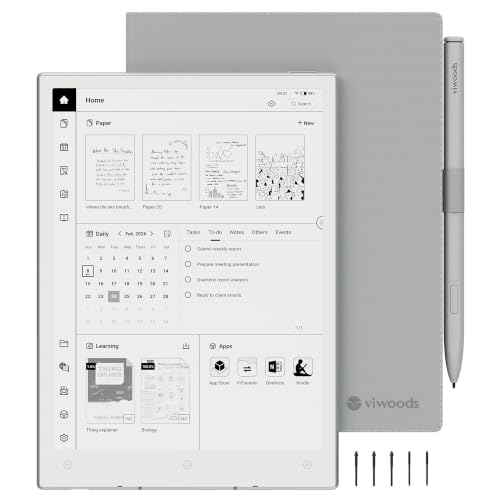
VIWOODS AiPaper Mini 8.2" E Ink Tablet
Best for: Managers
- Use
- ✓ Meetings
- Screen Size
- 8.2"
- Storage Capacity
- 128GB
- Display Type
- E Ink
- Connectivity
- WLAN, Bluetooth
- Stylus Compatibility
- W2 Stylus Pro
View on Amazon: VIWOODS AiPaper Mini 8.2" E Ink Tablet Affiliate link
VIWOODS AiPaper Mini bundle: an 8.2-inch 292 PPI e-ink notebook (230 g) with AI meeting summaries, handwriting-to-text, Google/Outlook calendar sync, warm light, 128GB, the W2 Stylus Pro and a folio.
Pros
- Calendar sync
- 128GB
- Pen and folio
Cons
- Small page
- Summary language list not given
Good fit if
- You plan your day and meetings on one notebook
Skip if
- You need many transcription languages
Verdict: A planner-style pick.

Penstar 10.3" Color E-Ink Tablet
Best for: Office users
- Use
- ✓ Meetings
- Screen Size
- 10.3"
- Storage Capacity
- 128GB
- Display Type
- Kaleido 3
- Processor
- Octa-core
- RAM
- 4GB
View on Amazon: Penstar 10.3" Color E-Ink Tablet Affiliate link
Penstar eNote Pro C: a 10.3-inch colour Kaleido 3 e-ink notebook with an 8-microphone array, real-time voice-to-text, AI meeting summary, split-screen reading and notes, the B6 pen and a folio.
Pros
- 8 microphones
- Colour notes
- Front light
Cons
- Muted colour
- Lesser-known brand
Good fit if
- You want colour minutes with recording
Skip if
- You want the lightest notebook
Verdict: A colour meeting notebook.
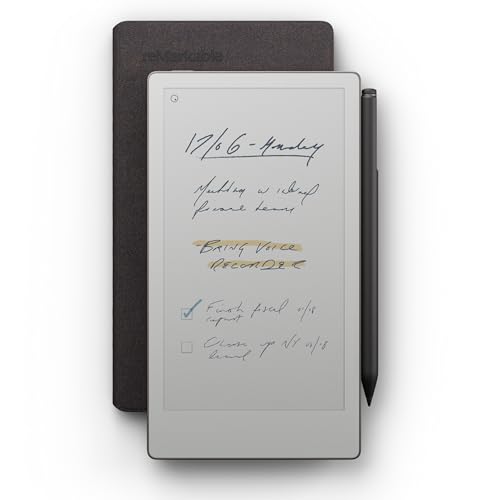
reMarkable 7.3" Paper Pro Move with Folio
Best for: Consultants
- Screen Size
- 7.3"
- Display Type
- Canvas Color
- Stylus Compatibility
- Marker Plus
- Features
- Color Display
- Use
- Reading
- Color
- Silver
View on Amazon: reMarkable 7.3" Paper Pro Move with Folio Affiliate link
reMarkable Paper Pro Move: a 7.3-inch Canvas Color notebook with reading light, Marker Plus and a Basalt folio, sold as a way to take notes face to face without a wall of laptops. No notifications, handwriting-to-text conversion.
Pros
- Distraction-free
- Pocketable
- Colour and light
Cons
- No recording listed
- Small page
Good fit if
- You want to listen and write, not record
Skip if
- You need transcripts
Verdict: Best distraction-free.
Specifications side by side
| Spec | iFLYTEK AINOTE Air 2 8.2-Inch E-Paper Tablet | TCL Note A1 11.5-Inch Paper Tablet | iFLYTEK AINOTE 2 10.65" E-Ink Tablet | Lenovo Idea Tab Pro Gen 2 13-Inch Tablet | XP-Pen 10.95-Inch Paper-Like Android Tablet | VIWOODS AiPaper Mini 8.2" E Ink Tablet | Penstar 10.3" Color E-Ink Tablet | reMarkable 7.3" Paper Pro Move with Folio |
|---|---|---|---|---|---|---|---|---|
| Screen Size | 8.2" | 11.5" | 10.65" | 13″ | 10.95'' | 8.2" | 10.3" | 7.3" |
| Storage Capacity | not stated | 256GB | not stated | 128GB | 128GB | 128GB | 128GB | not stated |
| Display Type | E Ink | NXTPAPER PURE | E Ink | LTPS IPS | LCD | E Ink | Kaleido 3 | Canvas Color |
| Processor | not stated | not stated | not stated | Snapdragon 8s Gen 4 | not stated | not stated | Octa-core | not stated |
| Connectivity | not stated | not stated | not stated | not stated | not stated | WLAN, Bluetooth | not stated | not stated |
| RAM | not stated | 8GB | not stated | 8GB | not stated | not stated | 4GB | not stated |
| Stylus Compatibility | Pen | T-Pen Pro | not stated | Pen | X3 Pro Pencil 2 | W2 Stylus Pro | Digital Stylus B6 | Marker Plus |
| Storage | not stated | 256GB | not stated | 128GB | 128GB | not stated | 128GB | not stated |
| Features | Stylus Included | not stated | Stylus Included | Touchscreen | not stated | Stylus Included | Stylus Included | Color Display |
| Use | Reading, Note-Taking, Meetings | Note-Taking, Study | Note-Taking, Meetings | not stated | Reading, Note-Taking | Meetings | Meetings | Reading |
| Material | not stated | not stated | not stated | not stated | not stated | not stated | Leather | not stated |
| Color | Gray | Aerolite Grey | AINOTE 2 | Gray | not stated | AiPaper Mini+W2 Stylus Pro+Cover+5 Nibs | Blue | Silver |
| Form Factor | not stated | not stated | not stated | Folio | Folio | not stated | Folio | Folio |
| Dimensions | 7.6 × 5.4 × 0.25 inches | 10.2 × 7.74 × 0.22 inches | 9.7 × 7 × 0.17 inches | 7.56 × 11.7 × 0.3 inches | 10 × 7 × 0.2 inches | 7.5 × 5.3 × 0.2 inches | 9.2 × 7.8 × 0.2 inches | 8.98 × 5.51 × 2.01 inches |
| Weight | 8.16 ounces | not stated | not stated | 1.31 pounds | 10.6 ounces | not stated | 15 ounces | 1.05 pounds |
| Size | AINOTE Air 2 Bundle | 11.5” | AINOTE 2 | 13 inches | 10.95 | not stated | eNote Pro Color | 7.3" |
| Model | Air | TCL Note A1 | AINOTE 2 | B0H4RTMVKM | B0dx234nwp | 81bf3036-7306-4176-9a17-26e646cf851b | eNote Pro Color | RM03A |
What to look for in a meeting tablet
-
Language support
iFLYTEK lists 18 transcription languages on both AINOTE models; check that yours is covered.
-
Online vs offline AI
iFLYTEK says AINOTE 2 AI assistance requires Wi-Fi; plan for venues without a connection.
-
Microphones
TCL Note A1 and Penstar eNote Pro C list 8-microphone arrays; XPPen lists two.
-
Calendar sync
AINOTE 2 and VIWOODS AiPaper Mini sync with Google Calendar (VIWOODS also Outlook).
-
Front light for dim rooms
The AINOTE 2 has no front light; the AINOTE Air 2, VIWOODS, Penstar and reMarkable do.
Frequently asked questions
Which tablet is best for transcribing meetings?
The iFLYTEK AINOTE Air 2, with real-time transcription in 18 languages and AI meeting summaries.
Do these meeting tablets work offline?
Handwriting works offline; AI summaries and assistance generally need Wi-Fi, as iFLYTEK states for AINOTE 2.
Is the XPPen Magic Note Pad good for video calls?
It lists a 13MP front camera, two speakers and two microphones, plus a notes app that records sound.
Which meeting tablet is lightest?
The iFLYTEK AINOTE Air 2 at 8.1 oz (230 g), matched by the 230 g VIWOODS AiPaper Mini.
Does the reMarkable Paper Pro Move record audio?
Its listing does not mention recording; it focuses on handwriting, PDF notes and handwriting-to-text.
See also
- best 8 2 tablets
- best tablets for note taking
- best HD tablets
- best e readers under 100
- best e readers under 150
- Best E-Readers Under $200 in 2026: 10 Picks Ranked by Specs
- Best E-Readers Under $300: 9 Spec-Based Picks
- 7 Best E-Readers Under $500, Compared
- best portable power banks for tablets
- best logitech g mechanical keyboards