Best 10.3" E-Readers in 2026: 9 Picks Ranked by Specs
As an Amazon Associate we earn from qualifying purchases. Links on this page are affiliate links.
Selecting the right 103 e reader depends on your reading and writing workflow. We compared 9 products based on the specifications published on their listings. The Penstar 10.3" eNote Pen-Only Paper Tablet leads the list because its slim 0.22-inch thickness and pen-only surface eliminate touch interference.
Across the lineup, options range from 32GB to 256GB of storage, with monochrome and color display options. This guide helps you compare physical dimensions, memory, and stylus features to choose the best model for your workflow.
Quick picks
The best fit for you
- You want distraction-free handwriting and document annotation Penstar 10.3" eNote Pen-Only Paper Tablet The Penstar eNote offers a focused, high-resolution surface with programmable physical buttons and zero touch interference.
- You need audiobooks and color note-taking on Android PocketBook InkPad Eo 10.3-Inch Color E-Reader The PocketBook InkPad Eo combines an E Ink Kaleido 3 display with stereo speakers and Android 11 flexibility.
- You want cellular-connected color note-taking and multitasking Bigme 10.3" Color E-Paper Tablet This Bigme tablet delivers top-tier memory, 256GB storage, and cellular connectivity for full-featured Android note-taking.
- You want text-to-speech listening and multi-format note-taking PocketBook InkPad One 10.3" E-Reader The PocketBook InkPad One combines versatile format compatibility with dedicated Text-to-Speech and stylus support.
Our 9 picks

Penstar 10.3" eNote Pen-Only Paper Tablet
Best for: distraction-free handwriting and document annotation
- Screen Size
- 10.3" (what this guide is about)
- Display Type
- PureView
- Stylus Support
- Digital Stylus B5
- Color
- Gray
- Form Factor
- Folio
- Dimensions
- 8.9 × 7.8 × 0.22 inches
The Penstar eNote provides a 10.3-inch E Ink display with a sharp 300 PPI resolution for reading and writing. Its pen-only screen eliminates accidental finger touches, while the stylus features 8,192 pressure levels for precise note-taking. You get nine customizable physical buttons and support for over 30 file formats. It suits you if you want a dedicated digital notepad for drafting, reviewing documents, and recording meeting transcripts.
Pros
- Sharp 300 PPI 10.3-inch paper-like display
- Included stylus supports 8,192 pressure sensitivity levels
- Nine customizable physical shortcut keys
- Voice-to-text audio transcription across 52 languages via network
- Direct document markup across 30 supported file formats
Cons
- No built-in front light or backlight for dark environments
- Pen-only screen does not support finger touch navigation
- Voice transcription requires an active network connection
Good fit if
- You want a dedicated pen-input notepad with zero finger touch distractions.
- You need physical shortcut buttons for quick tool switching.
- You work with diverse document formats like PDF, EPUB, and MOBI.
Skip if
- You read in low-light environments without an external lamp.
- You prefer navigating your tablet using finger touch or hand gestures.
Verdict: Penstar eNote 10.3" Digital Paper Tablet delivers a focused, high-resolution handwriting surface with programmable physical buttons and zero touch interference. It is a solid choice if you prioritize pen accuracy and distraction-free document review over integrated lighting.
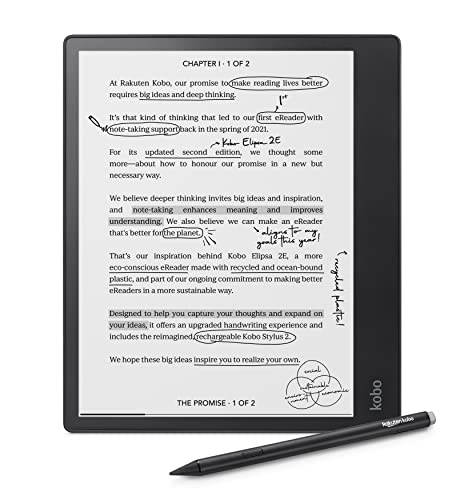
Kobo Elipsa 2E 10.3" eReader with Stylus
Best for: Wi-Fi book access and document markup
- Screen Size
- 10.3" (what this guide is about)
- Storage Capacity
- 32 GB
- Display Type
- E Ink Carta 1200
- Front Light
- ComfortLight PRO
- Stylus Support
- Includes Kobo Stylus 2
- Battery Life
- Up to several weeks
The Kobo Elipsa 2E is a 10.3-inch monochrome e-reader designed for reading and digital note-taking. It features an E Ink Carta 1200 touchscreen with ComfortLight PRO for adjustable brightness and color temperature. Built-in Wi-Fi connects you directly to the Kobo bookstore, while 32GB of storage holds thousands of files. This device suits you if you want a large reading display, wireless library access, and bundled pen support for markup.
Pros
- ComfortLight PRO front light with adjustable brightness and color temperature
- Includes rechargeable Kobo Stylus 2 for writing on eBooks and PDFs
- 32GB internal storage for eBooks, audiobooks, and notes
- Built-in Wi-Fi for direct downloads from the Kobo Store
Cons
- Monochrome display lacks color rendering for illustrations
- Weighs 0.85 pounds, which is heavier than standard handheld e-readers
Good fit if
- You want built-in Wi-Fi to browse and download titles directly.
- You need an adjustable warm and cool front light for nighttime use.
- You plan to write notes and markup PDFs using an included rechargeable stylus.
Skip if
- You require a color screen for graphics or color documents.
- You prefer a smaller, pocket-sized device under 0.85 pounds.
Verdict: Kobo Elipsa 2E 10.3" E-Reader provides a spacious Carta 1200 display, rechargeable stylus, and direct Wi-Fi bookstore integration. It delivers ample 32GB storage and adjustable warm lighting for reading and document markup.

PocketBook InkPad Eo 10.3-Inch Color E-Reader
Best for: audiobooks and color note-taking on Android
- Screen Size
- 10.3" (what this guide is about)
- Display Type
- E Ink Kaleido 3
- Front Light
- SMARTlight
- Stylus Support
- Included stylus
- Features
- Audiobooks, Bluetooth, Built-in Speaker
- Weight
- 1.04 pounds
View on Amazon: PocketBook InkPad Eo 10.3-Inch Color E-Reader
The PocketBook InkPad Eo pairs a 10.3-inch E Ink Kaleido 3 color screen with built-in stereo speakers and Bluetooth 5.0. It runs on Android 11, giving you access to third-party apps alongside standard reading features. An included stylus and integrated camera allow you to write and annotate on photos. This tablet suits you if you switch frequently between color reading, note-taking, and listening to audiobooks.
Pros
- Built-in stereo speakers and Bluetooth 5.0 for audio playback
- 10.3-inch E Ink Kaleido 3 glare-free color touchscreen
- Android 11 operating system supports third-party apps
- Included stylus and built-in camera for annotating photos
Cons
- Weighs over 1 pound at approximately 1.04 pounds
- No water resistance rating listed in specifications
Good fit if
- You listen to audiobooks directly via built-in speakers or Bluetooth.
- You want a 10.3-inch color E Ink screen for reading and handwriting.
- You require Android 11 to install third-party applications.
Skip if
- You prefer a lightweight reader under 1 pound for handheld reading.
- You only need a standard monochrome display for reading plain text.
Verdict: PocketBook InkPad Eo 10.3" Color E-Reader combines an E Ink Kaleido 3 display with stereo speakers and Android 11 flexibility. It is well suited if you prioritize audiobook listening, active note-taking, and app support on a large screen.

Bigme 10.3" Color E-Ink Tablet
Best for: high-capacity color note-taking and multitasking
- Screen Size
- 10.3" (what this guide is about)
- Storage Capacity
- 256GB
- Display Type
- Kaleido 3
- Front Light
- 36 level Adjustable Colour Temperature
- Stylus Support
- Digital Stylus
- Battery Life
- a week
This 10.3-inch device pairs a Kaleido 3 color E Ink screen with open Android 14 software. You get 8GB of RAM, 256GB of internal storage, and an octa-core 2.4GHz processor for running reading and note-taking apps. It measures just 5.5mm thick and includes an 8-megapixel rear camera. It suits you if you need color markups, broad file format support, and expandable storage up to 1TB.
Pros
- 10.3-inch Kaleido 3 color display with 36-level front-light adjustment
- High memory and capacity with 8GB RAM and 256GB onboard storage
- Octa-core 2.4GHz processor running open Android 14
- Storage expandable up to 1TB using a TF card
- Slim 5.5mm body with an integrated 8MP rear camera
Cons
- 3700 mAh battery capacity is modest for an active color tablet
- Listed product weight is 2.82 pounds
Good fit if
- You need a color E Ink display for marking documents, reading, and note-taking.
- You want open Android 14 to run reading apps and access diverse document formats.
- You require large internal memory with expandable storage options up to 1TB.
Skip if
- You prefer a monochrome display dedicated strictly to text reading.
- You want a lightweight reader for extended one-handed use.
Verdict: Bigme 10.3" Color Note-Taking Tablet offers spacious 256GB storage, 8GB RAM, and open Android 14 on a large color E Ink display. It is a capable choice if you need app versatility and color markup capability on a 10.3-inch screen.

Bigme 10.3" Color E-Paper Tablet
Best for: cellular-connected color note-taking and multitasking
- Screen Size
- 10.3" (what this guide is about)
- Storage Capacity
- 256 GB
- Display Type
- Color E-Paper
- Stylus Support
- Included stylus pen
- RAM
- 8GB RAM
- Color
- White
The Bigme 10.3" Color E-Paper Tablet with 4G is a large-format digital notebook and reading device. You get a 10.3-inch color e-paper screen paired with an octa-core processor, 8GB of RAM, and 256GB of onboard storage. It runs Android 14 and includes built-in 4G LTE cellular connectivity with a 6900mAh battery. You will find this hardware useful if you want maximum mobile multitasking, handwriting with an included stylus, and heavy app use.
Pros
- Generous 256GB storage and 8GB RAM
- Built-in 4G LTE mobile data connectivity
- Large 6900mAh battery
- Runs Android 14 with support for productivity apps
- Stylus pen included in the box
Cons
- Heavier than standard e-readers at 0.97 pounds
- Offered only in white
Good fit if
- You need standalone 4G LTE cellular data on a 10.3-inch color e-paper screen.
- You want high local capacity with 256GB storage and 8GB RAM to run Android 14 apps.
- You plan to write, sketch, or annotate with an included stylus.
Skip if
- You prefer a lighter handheld reader than this 0.97-pound chassis.
- You want a black color option.
Verdict: Bigme 10.3" Color E-Paper Tablet with 4G delivers top-tier memory, 256GB storage, and cellular connectivity for full-featured Android note-taking. It gives you expansive hardware capability if you need color e-paper productivity away from Wi-Fi.

Geniatech Kloudnote Slim 10.3-Inch E-Reader
Best for: everyday digital note-taking and lightweight reading
- Screen Size
- 10.3" (what this guide is about)
- Storage Capacity
- 64 GB
- Stylus Support
- With pen
- Battery Life
- Up to 40 hours
- Use
- Reading
- Dimensions
- 9.08 × 0.2 × 7.2 inches
The Geniatech Kloudnote Slim is a 10.3-inch electronic ink notepad and reading tablet. It features a 1404x1872 resolution display at 227 ppi, an included stylus, and 64GB of onboard storage. You also get a 3000mAh battery that offers up to 40 hours of working time. It suits you if you want a large writing canvas with preloaded note templates and cloud sync without unnecessary hardware extras.
Pros
- 64GB of internal storage for documents and notes
- Includes a stylus and 39 built-in note templates
- Slim 0.2-inch profile and lightweight 0.86-pound build
- 3000mAh battery provides up to 40 hours of operating time
Cons
- Display density is 227 ppi instead of 300 ppi
- Audio listening feature does not work on PDF documents
- Free proprietary cloud capacity is capped at 500MB
Good fit if
- You need a large 10.3-inch screen for handwritten notes using templates.
- You want 64GB of storage along with support for OneDrive and Dropbox.
- You prefer a slim 0.2-inch body that weighs under 0.9 pounds.
Skip if
- You require a sharper 300 ppi panel for fine text rendering.
- You want text-to-speech audio playback directly from PDF books.
- You need more than 2GB of system RAM for heavy app multitasking.
Verdict: Geniatech Kloudnote Slim 10.3-Inch Tablet delivers a spacious 10.3-inch writing surface, 64GB of storage, and 39 note templates in a slim 0.2-inch body. It provides essential digital note-taking and reading features without extra hardware bloat.

PocketBook InkPad One 10.3" E-Reader
Best for: Text-to-Speech listening and multi-format note-taking
- Screen Size
- 10.3" (what this guide is about)
- Display Type
- E Ink
- Front Light
- SMARTlight (brightness and color temp)
- Stylus Support
- Active stylus included
- Features
- Bluetooth, Text-to-Speech
- Use
- Reading, Note-Taking
The PocketBook InkPad One is a 10.3-inch E Ink device designed for reading and digital note-taking. It pairs an active stylus with an open ecosystem that reads 25 file formats, including Adobe and LCP DRM. You also get built-in Text-to-Speech and Bluetooth connectivity to listen to audiobooks. If you need a large screen for document review, handwritten notes, and versatile format handling, this tablet gives you broad reading flexibility.
Pros
- Built-in Text-to-Speech and Bluetooth audio support
- Supports 25 file formats, including Adobe and LCP DRM
- Includes active stylus for handwriting and note-taking
- SMARTlight frontlight adjusts brightness and color temperature
Cons
- Button-free frame lacks physical page-turn controls
- Monochrome screen provides no color display capability
- Internal storage capacity is not specified in the data
Good fit if
- You want Text-to-Speech or Bluetooth playback for books.
- You manage documents across multiple file and DRM formats.
- You take handwritten notes using an active stylus.
Skip if
- You prefer hardware page-turn buttons over full touch controls.
- You need a color E Ink screen for charts or color media.
Verdict: PocketBook InkPad One 10.3" Note-Taking E-Reader combines versatile format compatibility with dedicated Text-to-Speech and stylus support. It suits anyone seeking hands-free listening and expansive monochrome document markups.

Kobo Elipsa 2E 10.3-Inch eReader Bundle
Best for: bundled stylus note-taking and monochrome reading
- Screen Size
- 10.3" (what this guide is about)
- Storage Capacity
- 32 GB
- Display Type
- E Ink Carta HD
- Front Light
- Adjustable warm light
- Stylus Support
- Included stylus pen
- Battery Life
- Weeks
The Kobo Elipsa 2E is a 10.3-inch digital notebook and e-reader. It features an anti-glare E Ink Carta HD display with adjustable warm lighting for reading in different lighting environments. With 32GB of internal storage, built-in Wi-Fi, and an included stylus pen and SleepCover bundle, you can store documents and take notes directly on the screen. It suits you if you need a large screen for reading and handwriting.
Pros
- 10.3-inch anti-glare E Ink Carta HD screen
- Adjustable warm lighting system
- Includes stylus pen and SleepCover
- 32GB of internal storage
- Built-in Wi-Fi connectivity
Cons
- Black-and-white display does not show color
- No memory card slot listed for expandable storage
Good fit if
- You want an included stylus pen and SleepCover in the package.
- You need 32GB of storage for documents and e-books.
- You want an anti-glare screen with adjustable warm lighting.
Skip if
- You need a color screen for full-color media.
- You require expandable memory card storage.
Verdict: Kobo Elipsa 2E 10.3-Inch eReader Bundle pairs an anti-glare Carta HD display with adjustable warm lighting and 32GB of storage. It provides a complete handwriting and reading setup with the included stylus and cover.

Penstar eNote Pro Color 10.3-Inch Tablet
Best for: color note-taking with battery-free stylus input
- Screen Size
- 10.3" (what this guide is about)
- Storage Capacity
- 128 GB
- Display Type
- Kaleido 3
- Front Light
- Adjustable warm and cold reading light
- Stylus Support
- Digital Stylus B6 included
- Battery Life
- Up to 3 weeks
The Penstar eNote Pro C is a 10.3-inch color digital paper tablet encased in blue. It features a Kaleido 3 screen delivering 300 ppi for black-and-white text and 150 ppi for color, powered by an octa-core processor, 4GB of RAM, and 128GB of internal storage. Running Android 14 with an included 8192-level stylus, this device suits you if you need split-screen note-taking, document annotation, and broad file support.
Pros
- 10.3-inch Kaleido 3 display with 300 ppi monochrome and 150 ppi color resolution
- Battery-free stylus featuring 8192 pressure levels and 10 replacement nibs
- 128GB onboard storage and 4GB RAM running Android 14
- 6500mAh battery rated for up to three weeks of use
Cons
- Color resolution drops to 150 ppi compared to 300 ppi in monochrome
- Display is not optimized for video playback or fast scrolling
Good fit if
- You need a color E Ink screen for annotating documents and reading graphics.
- You want a high-precision stylus that operates without battery charging.
- You require split-screen multitasking supported by Android 14.
Skip if
- You prioritize smooth video playback or high-frame-rate scrolling.
- You need full 300 ppi resolution across colored graphics.
Verdict: Penstar 10.3" Color eNote Tablet balances a Kaleido 3 color screen with 128GB of storage and an 8192-level stylus. It provides a capable, Android 14-driven platform for active writing and multi-format document review.
Specifications side by side
| Spec | Penstar 10.3" eNote Pen-Only Paper Tablet | Kobo Elipsa 2E 10.3" eReader with Stylus | PocketBook InkPad Eo 10.3-Inch Color E-Reader | Bigme 10.3" Color E-Ink Tablet | Bigme 10.3" Color E-Paper Tablet | Geniatech Kloudnote Slim 10.3-Inch E-Reader | PocketBook InkPad One 10.3" E-Reader | Kobo Elipsa 2E 10.3-Inch eReader Bundle | Penstar eNote Pro Color 10.3-Inch Tablet |
|---|---|---|---|---|---|---|---|---|---|
| Screen Size | 10.3" | 10.3" | 10.3" | 10.3" | 10.3" | 10.3" | 10.3" | 10.3" | 10.3" |
| Storage Capacity | not specified | 32 GB | not specified | 256GB | 256 GB | 64 GB | not specified | 32 GB | 128 GB |
| Display Type | PureView | E Ink Carta 1200 | E Ink Kaleido 3 | Kaleido 3 | Color E-Paper | not specified | E Ink | E Ink Carta HD | Kaleido 3 |
| Front Light | not specified | ComfortLight PRO | SMARTlight | 36 level Adjustable Colour Temperature | not specified | not specified | SMARTlight (brightness and color temp) | Adjustable warm light | Adjustable warm and cold reading light |
| Stylus Support | Digital Stylus B5 | Includes Kobo Stylus 2 | Included stylus | Digital Stylus | Included stylus pen | With pen | Active stylus included | Included stylus pen | Digital Stylus B6 included |
| Battery Life | not specified | Up to several weeks | not specified | a week | not specified | Up to 40 hours | not specified | Weeks | Up to 3 weeks |
| Storage | not specified | 32GB | not specified | 256GB | 256GB | not specified | not specified | 32GB | not specified |
| Features | not specified | Wi-Fi, Touchscreen, Stylus Included | Audiobooks, Bluetooth, Built-in Speaker | Touchscreen | Stylus Included | not specified | Bluetooth, Text-to-Speech | not specified | Stylus Included |
| RAM | not specified | not specified | not specified | 8GB RAM | 8GB RAM | not specified | not specified | not specified | not specified |
| Use | not specified | not specified | not specified | Note-Taking | not specified | Reading | Reading, Note-Taking | not specified | not specified |
| Color | Gray | Black | Mist Grey | colorful | White | Grey | Matte Black | Black | Blue |
| Form Factor | Folio | not specified | not specified | not specified | not specified | not specified | not specified | not specified | not specified |
| Technology | not specified | not specified | not specified | not specified | not specified | not specified | Active | not specified | not specified |
| Dimensions | 8.9 × 7.8 × 0.22 inches | 8.95 × 0.31 × 7.59 inches | not specified | 9.31 × 0.22 × 7.26 inches | 8.87 × 7.74 × 0.24 inches | 9.08 × 0.2 × 7.2 inches | 8.07 × 1.18 × 10.8 inches | 8.95 × 7.59 × 0.31 inches | 9.2 × 7.8 × 0.2 inches |
| Weight | not specified | 13.6 ounces | 1.04 pounds | 2.82 pounds | 15.5 ounces | 13.8 ounces | not specified | 13.6 ounces | 15 ounces |
| Size | 10.3 inches | 10.3" touchscreen | not specified | not specified | not specified | not specified | not specified | not specified | eNote Pro Color |
| Model | not specified | N605-KU-BK-K-BU | PB1042-M-WW | B1051 Pro | not specified | KloudNote Slim 10.3” | not specified | N605-KU-BK-K-BU+N605-AC-BK-E-PU | eNote Pro Color |
Is a 10.3-inch screen worth it?
A 10.3-inch screen provides a large reading and writing canvas that closely matches standard document pages. Physical footprints span roughly 7.6 to 7.8 inches in width and up to 9.3 inches in length. This extra area gives you room for full-format viewing, margin notes, and multi-template note-taking without constant zooming or panning. In exchange, these devices carry weights from 0.85 pounds to over one pound. That footprint makes single-handed reading difficult, meaning you will typically use two hands, a folio stand, or a desk surface during longer sessions.
Worth it if
- You need an expansive surface for full-size document markup and stylus note-taking.
- You review multi-column files or templates without scaling them down.
Skip it if
- You prioritize a pocket-sized form factor that allows comfortable one-handed holding.
- You want an ultra-light device that weighs well under 0.85 pounds.
How We Picked 10.3-Inch E-Readers
To create this guide of 9 devices for 2026, we identified models with a 10.3-inch display stated directly in their published title or specifications. Every listed detail comes entirely from manufacturer specifications without physical testing. Only one size or model variant from each device family appears on the list.
Available products appear first, followed by Amazon sales rank so you see better-selling devices at the top. You can compare models using key published specifications, including internal storage, display technology, device weight, and bundled accessories like digital pens to find the right fit for your reading and writing needs.
How to Choose a 10.3-Inch E-Reader
-
System Memory for App Multitasking
Check the random access memory if you plan to run Android applications alongside your reading. Standard note tablets focus purely on single documents, but heavier workflows demand more memory. Devices like the Bigme 10.3" Color Note-Taking Tablet provide 8GB of RAM to manage multitasking and modern Android 14 software smoothly. If you only intend to read static files or write basic notes, lower memory configurations will serve you well without slowing down basic page turns.
-
Audio Support for Spoken Listening
Review the audio hardware if you prefer spoken content over silent reading. Some large-format tablets include built-in stereo speakers or Bluetooth to stream audio directly from the device. The PocketBook InkPad Eo features integrated speakers and Bluetooth connectivity designed specifically for audiobook playback and media files. If you only read monochrome text without narration, you can safely skip models with dedicated audio components to keep your device setup simple and strictly focused on print.
-
Network Connectivity for Mobile Syncing
Consider how you plan to download documents when working away from standard wireless networks. Most e-readers rely strictly on local Wi-Fi connections to sync notes and fetch library books. However, models like the Bigme 10.3" Color E-Paper Tablet include integrated 4G cellular capability for direct internet access anywhere. Choose a cellular-enabled model if you frequently travel and need immediate document synchronization in transit without hunting for public Wi-Fi hotspots or configuring mobile phone tethering.
-
Chassis Thickness for Handheld Comfort
Examine the depth specification if you plan to hold the tablet in hand for long reading sessions. A 10.3-inch screen demands a larger chassis footprint, making overall thickness a key factor in daily handling. The Geniatech Kloudnote Slim measures just 0.2 inches thick, allowing for a comfortable grip during daily document review. If you plan to read away from a desk, choose a thinner profile to reduce wrist strain when supporting the large screen.
-
Stylus Pressure Sensitivity Levels
Look closely at the stylus specifications if digital sketching or precise handwriting is your primary priority. Certain models include basic passive styluses, while others feature advanced pens with pressure detection. The Penstar eNote Pro Color includes an 8192-level stylus that registers subtle shifts in hand pressure for detailed sketching and natural line weights. If you only annotate text margins or check off lists, high levels of pressure sensitivity are unnecessary for clear, legible handwriting.
Frequently asked questions
Which 10.3-inch e-reader has the most storage?
The Bigme 10.3" Color E-Paper Tablet offers the highest capacity with 256GB of internal storage. This model also includes 8GB of RAM for multitasking. You can store extensive libraries and large color documents without needing external media.
Does any 10.3-inch e-reader support color displays?
Yes, several models feature color E Ink technology. The PocketBook InkPad Eo uses an E Ink Kaleido 3 display, while the Bigme 10.3" Color E-Paper Tablet and Penstar eNote Pro Color also support color. These screens allow for color annotations and vibrant document viewing.
Can I listen to audiobooks on a 10.3-inch e-reader?
The PocketBook InkPad Eo is designed for this with built-in stereo speakers. It also supports Bluetooth connectivity for wireless audio devices. This combination lets you enjoy audiobooks hands-free on a large, distraction-free screen without needing headphones.
Which 10.3-inch e-reader works without Wi-Fi?
The Bigme 10.3" Color E-Paper Tablet with 4G provides cellular connectivity. This allows you to sync content and use Android apps away from Wi-Fi networks. It is ideal for productivity and note-taking when you are traveling or in areas without internet access.
Do any 10.3-inch e-readers include physical buttons?
The Penstar 10.3" eNote Pen-Only Paper Tablet features programmable physical buttons. These allow you to navigate documents and control the device without touching the screen. This design reduces smudges and provides a more traditional, distraction-free writing experience.
Is there a lightweight option among these 10.3-inch e-readers?
The Kobo Elipsa 2E weighs 13.6 ounces, making it one of the lighter choices. The Geniatech Kloudnote Slim is also compact at 13.8 ounces. These weights help reduce hand fatigue during long reading or note-taking sessions compared to heavier tablets.
Which e-reader supports text-to-speech functionality?
The PocketBook InkPad One 10.3" Note-Taking E-Reader includes dedicated text-to-speech capabilities. You can listen to your documents hands-free while multitasking. It also supports various file formats for versatile note-taking and document review on its large screen.