Kobo Elipsa 2E 10.3" eReader Review: Who It Fits and Who Should Skip It
As an Amazon Associate we earn from qualifying purchases. Links on this page are affiliate links.
This kobo elipsa 2e review focuses on a large-format e-reader built for reading and writing. It features a 10.3-inch E Ink Carta 1200 display and includes the Kobo Stylus 2. The device offers 32GB of storage for your library and notes. It also provides ComfortLight PRO to adjust brightness and color temperature. This setup helps reduce blue light exposure before bed. The unit weighs 13.6 ounces and measures 7.59 by 8.95 inches. It is designed for users who want a distraction-free environment with no ads. You get several weeks of battery life on a single charge depending on usage.
What stands out
- 10.3-inch E Ink Carta 1200 touchscreen
- Includes rechargeable Kobo Stylus 2
- 32GB storage for up to 24,000 eBooks
- ComfortLight PRO with adjustable color temperature
- Patented markup technology for annotations
Who it fits
Good fit for
This device suits readers who also take notes on PDFs or documents. The large 10.3-inch screen makes it ideal for studying or reviewing files. You will appreciate the included stylus for direct markup. It is also good for those who want to reduce blue light at night. The ComfortLight PRO feature allows you to adjust the color temperature. If you carry many books, the 32GB storage holds a large library. The lightweight design at 13.6 ounces makes it easy to hold for long sessions.
Who should skip it
You should look elsewhere if you want a color display. This model uses a grayscale E Ink screen. It is also not suitable if you need a compact pocket device. The 10.3-inch size is quite large compared to standard six-inch readers. It may be too heavy for one-handed reading for some users. If you prefer a tablet with app ecosystems, this is not it. It is a dedicated e-reader without smart features. Those wanting immediate instant messaging or social media integration will find it lacking.
Verdict: The Kobo Elipsa 2E is a practical tool for readers who need a large screen for note-taking. It combines a high-quality display with useful writing tools for focused study.
Key specs explained for Kobo Elipsa 2E
Display Type: E Ink Carta 1200
This panel technology refreshes faster than older e-ink screens, reducing motion blur when turning pages or writing. You get a sharper, clearer image with better contrast. It is ideal for reading documents or PDFs where text clarity matters. Compare this to standard E Ink displays in budget readers, which may feel sluggish or show ghosting during fast navigation.
Front Light: ComfortLight PRO
This feature lets you adjust both brightness and color temperature. You can reduce blue light in the evening to help you sleep better. It ensures a glare-free experience whether you are reading in bright sunlight or a dark room. This is more versatile than basic front lights that only change brightness levels without color adjustment.
Screen Size: 10.3"
This large display size provides ample space for reading books and viewing documents side by side. It is suitable for users who find smaller screens cramped for detailed work or annotations. You can read two columns of text comfortably. Compare this to 6-inch readers, which are portable but require more scrolling for large files or complex layouts.
Storage Capacity: 32 GB
This amount of internal memory holds up to 24,000 eBooks or thousands of documents and notes. You can store your entire library locally without needing constant cloud access. It is sufficient for most heavy readers who download many files. Compare this to devices with 8GB or 16GB, which may fill up quickly if you store many high-resolution PDFs.
Stylus Support: Includes Kobo Stylus 2
The device comes with a dedicated stylus for writing notes and annotating PDFs directly on the screen. You can highlight text or draw diagrams without carrying a separate tool. This integration makes it a practical choice for students or professionals. Compare this to e-readers that require purchasing a stylus separately or lack handwriting support entirely.
Design and Build Quality
The Kobo Elipsa 2E presents a straightforward, utilitarian aesthetic. According to the listing, the exterior shell is constructed from recycled plastic and ocean-bound plastic. This material choice targets eco-conscious users who prioritize sustainable manufacturing. The device comes in a standard black finish. It lacks premium metallic accents or leather textures. You get a durable, matte surface that resists fingerprints. This practical approach keeps the focus on function rather than luxury. The build feels solid enough for daily carrying. It does not claim to be water-resistant. You should handle it with care around liquids.
In terms of physical dimensions, the listing specifies a 10.3-inch touchscreen. The unit measures 7.59 inches in height and 8.95 inches in length. It is 0.31 inches thick and weighs 13.6 ounces. This size makes it larger than a standard phone but smaller than an A4 sheet of paper. The weight is moderate for its screen area. You can hold it in one hand for short periods. However, extended reading sessions may require two hands or a stand. The layout is simple, with no visible physical buttons mentioned. You interact entirely through the glare-free touchscreen. This design minimizes clutter but requires precise touch input. The included Kobo Stylus 2 rests magnetically on the device. This keeps the stylus secure during transport. The overall form factor suits desk work or lap reading. It is less ideal for pocket carry. The large footprint demands a bag or a stable surface. You will need ample space to use it comfortably.
Setup And Daily Use
Setting up the Kobo Elipsa 2E begins with connecting the device to a Wi-Fi network. This step is required to access the Kobo Store and download your library. The device supports Wi-Fi connectivity, allowing you to browse and purchase millions of eBooks and audiobooks directly. You do not need a computer to manage your content, as the built-in touchscreen interface handles navigation and selection.
For daily use, the 10.3-inch E Ink Carta 1200 display provides a glare-free reading experience. You can adjust the brightness and color temperature using ComfortLight PRO. This feature reduces blue light emission, which helps you read comfortably in low-light conditions without disrupting your sleep cycle. The screen size offers ample space for reading documents and PDFs.
Writing is handled by the included Kobo Stylus 2. You can write directly on eBooks and PDFs, creating highlights, underlines, or margin notes. Kobo’s markup technology ensures your annotations remain visible even if you change the font size. This is useful for studying or reviewing technical documents.
The device includes 32GB of storage. This capacity allows you to store up to 24,000 eBooks along with your notes and annotations. Battery life lasts for several weeks on a single charge, depending on your usage. This means you can carry your entire library without frequent charging. The stylus is rechargeable and ergonomically redesigned for comfortable writing sessions.
Before You Buy This Device
You will need to check if your local library supports Kobo’s OverDrive integration before purchasing. This device relies on Wi-Fi for syncing your library and accessing the Kobo Store. While it handles eBooks well, PDF annotation may require specific software compatibility on your computer. The included Kobo Stylus 2 is essential for note-taking, so keep it charged. You should also consider a protective case, as the large 10.3-inch screen is more prone to damage than smaller readers. This model sits between basic e-readers and full tablets. It offers distraction-free reading with writing capabilities, unlike standard phones or iPads. However, it lacks the app ecosystem of a tablet. If you need heavy productivity apps, look elsewhere. For focused reading and document markup, this device fits that niche. Ensure your workflow supports its specific file formats. Regular updates will maintain its performance over time.
Check before you buy
- Verify OverDrive compatibility with your local library.
- Check PDF annotation software support on your computer.
- Ensure you have a protective case for the large screen.
- Confirm Wi-Fi access for syncing your library.
The product at a glance
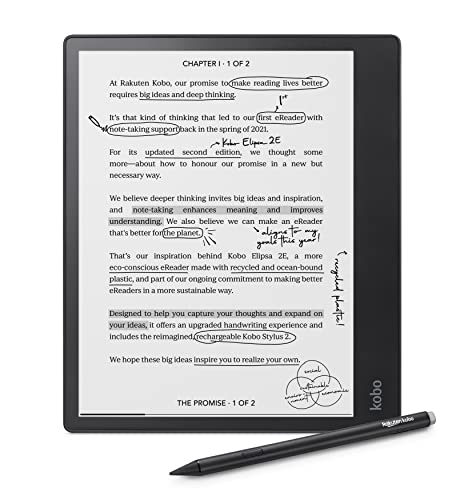
Kobo Elipsa 2E 10.3" eReader with Stylus
Best for: reading and annotating large documents
- Screen Size
- 10.3"
- Storage Capacity
- 32 GB
- Display Type
- E Ink Carta 1200
- Front Light
- ComfortLight PRO
- Stylus Support
- Includes Kobo Stylus 2
- Battery Life
- Up to several weeks
View on Amazon: Kobo Elipsa 2E 10.3" eReader with Stylus Affiliate link
The Kobo Elipsa 2E features a 10.3-inch E Ink Carta 1200 display with ComfortLight PRO. It includes the Kobo Stylus 2 for writing on PDFs and eBooks. You get 32 GB of storage for up to 24,000 books. The device weighs 13.6 ounces and offers several weeks of battery life. This eReader suits readers who also need to annotate documents.
Pros
- 10.3-inch E Ink Carta 1200 touchscreen
- Includes rechargeable Kobo Stylus 2
- ComfortLight PRO with adjustable color temperature
- 32 GB storage for large libraries
- Patented markup technology preserves annotations
Cons
- 13.6 ounces weight is heavier than standard 6-inch readers
- 10.3-inch size reduces portability for one-handed use
- No mention of waterproof rating in specifications
Good fit if
- You read and annotate large PDFs or documents
- You prefer a larger 10.3-inch screen for notes
- You want included stylus support for markup
Skip if
- You need a lightweight device for one-handed reading
- You prioritize a smaller, more portable form factor
- You require a waterproof device for bath or pool use
Verdict: Kobo Elipsa 2E 10.3" E Ink Reader is ideal for users who need a large screen for document annotation and note-taking. It fits those who value stylus integration and long battery life over compact portability.
Specifications side by side
| Spec | Kobo Elipsa 2E 10.3" eReader with Stylus |
|---|---|
| Screen Size | 10.3" |
| Storage Capacity | 32 GB |
| Display Type | E Ink Carta 1200 |
| Front Light | ComfortLight PRO |
| Stylus Support | Includes Kobo Stylus 2 |
| Battery Life | Up to several weeks |
| Storage | 32GB |
| Features | Wi-Fi, Touchscreen, Stylus Included |
| Color | Black |
| Dimensions | 8.95 × 0.31 × 7.59 inches |
| Weight | 13.6 ounces |
| Size | 10.3" touchscreen |
| Model | N605-KU-BK-K-BU |
Frequently asked questions
Does the Kobo Elipsa 2E include a stylus?
Yes, the device comes with the Kobo Stylus 2 included in the box. This allows you to annotate PDFs and take notes directly on the 10.3-inch touchscreen. The stylus is designed to fit into the device for easy storage and charging.
How much storage does the Kobo Elipsa 2E have?
The Kobo Elipsa 2E provides 32GB of internal storage. This capacity is sufficient for holding a large library of eBooks, audiobooks, and extensive notes. You can store thousands of documents without needing external memory cards or cloud reliance for offline access.
Is the screen on the Kobo Elipsa 2E color?
No, the Kobo Elipsa 2E features a monochrome E Ink Carta display. It is available in a black color option. The screen is optimized for reading text and viewing grayscale images, providing a paper-like experience without the glare of traditional LCDs.
What are the physical dimensions of the Kobo Elipsa 2E?
The device measures 7.59 inches in height and 8.95 inches in length. It is 0.31 inches thick and weighs 13.6 ounces. These dimensions make it a substantial tablet-sized reader, suitable for desk use or lap reading rather than pocket portability.
Does the Kobo Elipsa 2E support Wi-Fi?
Yes, the Kobo Elipsa 2E includes built-in Wi-Fi connectivity. This feature enables you to connect to your network to download eBooks, sync notes, and access the Kobo Store. You can also transfer files via USB or use Wi-Fi sync for library management.
Who is the ideal user for the Kobo Elipsa 2E?
This e-reader is ideal for users who need a large screen for document annotation and note-taking. It fits those who value stylus integration and long battery life over compact portability. It is particularly suited for students and professionals handling large PDFs.