The Best reMarkable Tablet Cases in 2026: 2 Picks
As an Amazon Associate we earn from qualifying purchases. Links on this page are affiliate links.
Finding the best reMarkable tablet cases means looking at how they fit your daily workflow. reMarkable offers folio-style options in various materials and sizes to protect your device. The reMarkable Paper Pro 11.8" Type Folio Keyboard leads as the top pick because it supports hybrid typing and sketching workflows. We compared 2 products based strictly on the specifications published on their listings. This guide focuses on practical specs like dimensions, weight, and form factor to help you choose the right accessory for your needs.
Quick picks
| # | Product | Best for | Price |
|---|---|---|---|
| 1 | reMarkable Paper Pro 11.8" Type Folio Keyboard Best overall | hybrid typing and sketching workflows | Check price of reMarkable Paper Pro 11.8" Type Folio Keyboard on Amazon |
| 2 | reMarkable Paper Pro Leather Book Folio Best budget | Users wanting genuine leather and auto wake | Check price of reMarkable Paper Pro Leather Book Folio on Amazon |
Our 2 picks
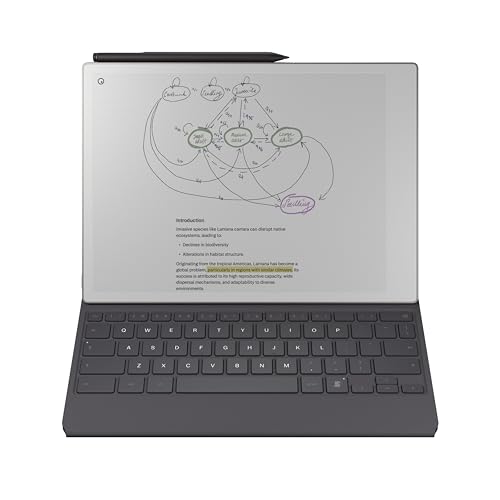
reMarkable Paper Pro 11.8" Type Folio Keyboard
Best for: hybrid typing and sketching workflows
- Compatible Screen Size
- 11.8"
- Form Factor
- Keyboard Folio
- Stand Functionality
- Upright and near-flat
- Dimensions
- 12.1 × 8.93 × 0.65 inches
- Weight
- 1.54 pounds
View on Amazon: reMarkable Paper Pro 11.8" Type Folio Keyboard Affiliate link
This keyboard folio adds focused typing to your 11.8-inch Paper Pro tablet. It features a slim, tactile keyboard that folds away neatly. The design supports upright and near-flat positions for flexible use. Weighing 1.54 pounds, it measures 12.1 by 8.93 inches. You get a protective cover with integrated input tools. It suits those who need to type and sketch simultaneously.
Pros
- Integrated tactile keyboard for focused typing
- Folds away to serve as a protective cover
- Supports upright and near-flat typing angles
- Allows simultaneous typing and freehand sketching
Cons
- Tablet is not included in the package
- Requires Connect subscription for cross-device sync
- Heavier at 1.54 pounds compared to basic folios
Good fit if
- You need a physical keyboard for long-form writing
- You want to sketch in margins while typing
- You prefer a minimalist, typewriter-style layout
Skip if
- You do not own the 11.8-inch Paper Pro
- You want a lightweight case without a keyboard
- You need offline note-taking without a subscription
Verdict: reMarkable Paper Pro Mosaic Keyboard Folio is the best overall choice for users who type frequently. It integrates seamlessly with your 11.8-inch tablet for hybrid workflows.

reMarkable Paper Pro Leather Book Folio
Best for: Users wanting genuine leather and auto wake
- Compatible Screen Size
- 11.8"
- Form Factor
- Book Folio
- Primary Material
- Genuine Leather, Microfibre
- Stylus Holder
- Strap
- Dimensions
- 12.1 × 8.93 × 1.79 inches
View on Amazon: reMarkable Paper Pro Leather Book Folio Affiliate link
This is a genuine leather folio case for the 11.8-inch reMarkable Paper Pro. It features a book-like design with secure magnets to hold the tablet in place. The interior uses soft microfiber to protect the display. A dedicated strap keeps your Marker or Marker Plus attached. Special sensors allow the device to wake and sleep automatically when you open or close the cover.
Pros
- Made from high-quality genuine leather
- Includes a strap for Marker storage
- Auto wake and sleep via sensors
- Soft microfiber interior lining
Cons
- No built-in keyboard for typing
- Only one color option available in leather
- Strap may loosen over time
Good fit if
- You want a classic notebook feel
- You need secure stylus storage
- You prefer genuine leather materials
Skip if
- You need a built-in keyboard
- You want multiple color choices
- You prefer synthetic materials
Verdict: reMarkable Paper Pro Leather Folio suits users who value genuine leather and automatic wake features. It is ideal for those who want secure stylus storage and a classic notebook aesthetic.
Specifications side by side
| Spec | reMarkable Paper Pro 11.8" Type Folio Keyboard | reMarkable Paper Pro Leather Book Folio |
|---|---|---|
| Compatible Screen Size | 11.8" | 11.8" |
| Form Factor | Keyboard Folio | Book Folio |
| Primary Material | not stated | Genuine Leather, Microfibre |
| Stand Functionality | Upright and near-flat | not stated |
| Stylus Holder | not stated | Strap |
| Material | not stated | Leather |
| Dimensions | 12.1 × 8.93 × 0.65 inches | 12.1 × 8.93 × 1.79 inches |
| Weight | 1.54 pounds | not stated |
| Size | Folio | Folio |
| Color | Basalt-Mosiac Weave | Black - Leather-M |
| Model | RM08B-1002NW | RM07B-2005NW |
reMarkable Case Options Compared
The list features two folio designs for the 11.8-inch Paper Pro. The top choice is the Paper Pro 11.8" Type Folio Keyboard. It measures 12.1 by 8.93 inches and weighs 1.54 pounds. This model suits users who need hybrid typing and sketching workflows. Its basalt-mosaic weave finish adds a distinct look.
The second option is the Paper Pro Leather Book Folio. It shares the same dimensions but weighs slightly more at 1.79 inches in height. This black leather case appeals to shoppers who want genuine materials and auto wake features. It also provides secure stylus storage. Both options protect your device while offering different functional benefits.
Where reMarkable fits
The current reMarkable lineup focuses exclusively on the 11.8-inch Paper Pro. Both options are folio designs, meaning they wrap around the tablet rather than covering just the back. You can choose between a keyboard-integrated folio for typing or a leather folio for a classic notebook feel. There are no slim covers or rugged cases listed. The range does not include options for smaller tablet sizes or different form factors like sleeves. You need to decide if a full folio protection and typing accessory matches your needs, as no other styles are available in this selection.
How to choose the right one
-
Check keyboard integration
If you type notes or emails often, look for a folio with an integrated keyboard. The top pick includes a mosaic weave design that supports hybrid workflows. This allows you to switch between sketching and typing without changing devices. Verify that the keyboard connects seamlessly to your 11.8-inch tablet. This feature reduces the need for external accessories and keeps your workspace tidy. It is ideal for users who need to draft documents quickly while on the go.
-
Evaluate material durability
Consider the build material for long-term protection and feel. The second option offers genuine leather for a classic notebook aesthetic. Leather provides a premium touch and may age well over time. Check if the material offers adequate cushioning for your device. Some users prefer the durability of synthetic weaves, while others value the look of natural leather. Ensure the material complements your daily carry style and provides sufficient scratch resistance for your tablet.
-
Measure folio dimensions
Verify the physical size to ensure a proper fit. Both listed options measure 12.1 inches in length and 8.93 inches in width. These dimensions match the 11.8-inch Paper Pro screen area. Confirm that the folio wraps securely around your tablet without excess bulk. A precise fit prevents the device from sliding out during transport. Check the internal pocket size if you plan to store extra styluses or paper. Accurate measurements ensure your case functions as intended without interfering with the tablet’s edges.
-
Assess weight and portability
Weight impacts how comfortable the case is to carry. The top choice weighs 1.54 pounds due to its keyboard component. This added weight supports typing but may feel heavy for extended handheld use. The leather folio lacks a keyboard, potentially making it lighter for simple reading. Decide if you prioritize typing capability over minimal weight. Consider your daily commute and how much extra mass you are willing to carry. Balance your need for functionality with your preference for a lightweight setup.
-
Review storage options
Look for internal pockets to hold accessories securely. The leather folio is described as having secure stylus storage. This keeps your active stylus within reach and protected from loss. Check if the folio design includes slots for paper or additional tools. Adequate storage prevents items from rattling inside your bag. Ensure the storage compartments are accessible without fully opening the case. This feature adds convenience for users who carry multiple writing tools alongside their tablet.
Frequently asked questions
Which reMarkable case is best for typing?
The reMarkable Paper Pro 11.8" Type Folio Keyboard is the best overall choice for users who type frequently. It integrates seamlessly with your 11.8-inch tablet for hybrid workflows. This folio measures 12.1 by 8.93 inches and weighs 1.54 pounds. It features a Basalt-Mosaic Weave color option.
Does reMarkable offer a leather case?
Yes, the reMarkable Paper Pro Leather Book Folio is available for those who value genuine leather. It suits users wanting auto wake features and secure stylus storage. This model has a classic notebook aesthetic. It measures 12.1 by 8.93 inches with a height of 1.79 inches.
What size tablets do these cases fit?
Both listed cases are designed specifically for the 11.8-inch reMarkable Paper Pro. The lineup focuses exclusively on this tablet size. You can choose between a keyboard-integrated folio or a leather folio. Both options wrap around the tablet rather than covering just the back.
How thick is the leather folio case?
The reMarkable Paper Pro Leather Book Folio has a height of 1.79 inches. This dimension refers to the case's depth when closed. The case is available in Black with a Leather-M finish. It provides a secure fit for your device while maintaining a classic look.
Is there a keyboard case for reMarkable?
The top pick includes an integrated keyboard for hybrid typing and sketching workflows. The reMarkable Paper Pro 11.8" Type Folio Keyboard supports frequent typists. It features a Mosaic Weave design in Basalt color. The case weighs 1.54 pounds and measures 12.1 inches in length.
What is the weight of the keyboard folio?
The reMarkable Paper Pro 11.8" Type Folio Keyboard weighs 1.54 pounds. This model is the best overall choice for hybrid workflows. It measures 8.93 inches in width and 12.1 inches in length. The case height is 0.65 inches when closed.