Best Tablets with Stylus Included: 10 Spec-Based Picks
As an Amazon Associate we earn from qualifying purchases. Links on this page are affiliate links.
You need the best tablets with stylus included to capture ideas without carrying multiple devices. Our top pick is the Amazon Kindle Scribe 10.2" 16GB. It leads because its 16GB storage handles extensive PDF annotations efficiently. We compared 10 models using only the specifications published on their listings. Each device includes a stylus for direct input. This guide helps you decide which screen size and storage capacity fit your daily workflow.
Quick picks
The best fit for you
- You need a dedicated device for reading and writing Amazon Kindle Scribe 10.2" 16GB The 10.2-inch E Ink display provides clear text and excellent battery life for focused tasks.
- You want an Android tablet with a large screen Lenovo Idea Tab 11" with Pen The 11-inch 2.5K display offers ample space for daily tasks and includes a stylus.
- You require color for document annotation Penstar 10.3" Color E-Ink Tablet The 10.3-inch color E Ink screen allows you to view and mark up detailed documents.
- You prioritize portability for commuting or travel VIWOODS AiPaper Mini 8.2" E Ink Tablet The 8.2-inch size and lightweight design make it easy to carry in a bag.
- You need AI transcription for meetings Iflytek AINOTE Air 2 8.2-Inch E Ink Tablet This model includes AI transcription and multi-language support for accurate note-taking during discussions.
Our 10 picks

Amazon Kindle Scribe 10.2" 16GB
Best for: Dedicated note-taking and PDF annotation
- Features
- Stylus Included (what this guide is about)
- Screen Size
- 10.2"
- Storage Capacity
- 16 GB
- Stylus Compatibility
- Premium Pen
- Dimensions
- 9.06 × 7.72 × 0.23 inches
- Weight
- 15.2 ounces
The Kindle Scribe pairs a 10.2-inch, 300 ppi glare-free display with the included Premium Pen. It is purpose-built for writing and reading without distractions. You get 16 GB of storage for notes and documents. The device offers weeks of battery life for writing and months for reading. Built-in AI tools help summarize or convert your handwriting. It is ideal for users who want a dedicated writing tablet with strong e-ink clarity.
Pros
- 10.2-inch front-lit e-ink display with 300 ppi resolution
- Includes Premium Pen that requires no charging or setup
- 16 GB internal storage for notes and documents
- Built-in AI tools to summarize or convert handwriting
- Active Canvas expands margins for note-taking while reading
Cons
- 16 GB storage is the smallest capacity option available
- No color display limits photo or video annotation
- E-ink refresh rate is slower than LCD screens
Good fit if
- You prioritize a distraction-free writing environment
- You need a tablet with weeks of battery life
- You want to mark up PDFs directly on the page
Skip if
- You require high storage capacity for large media libraries
- You need a color screen for graphic design
- You want a device with social media apps
Verdict: The Amazon Kindle Scribe 10.2" with Premium Pen is a focused tool for readers and writers who value battery life and e-ink clarity over speed or color. It fits users who want to replace physical notebooks with a single, dedicated device for thinking and reading.
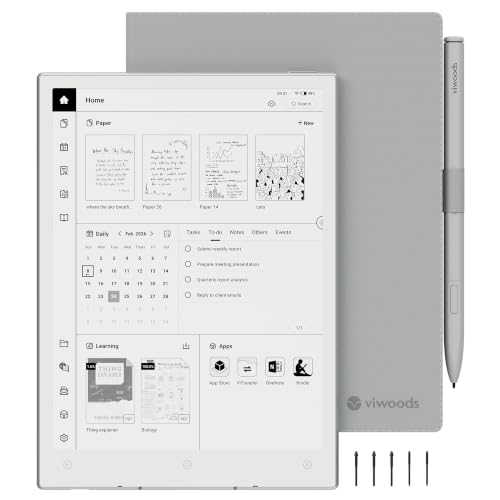
VIWOODS AiPaper Mini 8.2" E Ink Tablet
Best for: portable note-taking and reading
- Features
- Stylus Included (what this guide is about)
- Screen Size
- 8.2"
- Storage Capacity
- 128GB
- Display Type
- E Ink
- Connectivity
- WLAN, Bluetooth
- Stylus Compatibility
- W2 Stylus Pro
The VIWOODS AiPaper Mini is a compact 8.2-inch E Ink tablet weighing 230g. It includes the W2 Stylus Pro for note-taking and annotation. The display offers 292 PPI resolution and 20 adjustable warm light levels. You get 128GB of local storage and sync via Bluetooth, WLAN, or USB. This bundle also includes a folio cover and five replacement nibs.
Pros
- Includes W2 Stylus Pro for precise writing
- 292 PPI E Ink display with warm light
- 128GB storage capacity for notes and files
- Lightweight 230g portable design
- Syncs via Bluetooth, WLAN, and USB
Cons
- 8.2-inch screen limits large document viewing
- E Ink refresh latency is not instantaneous
- No mention of cellular connectivity options
Good fit if
- You need a lightweight tablet for travel
- You prefer eye-friendly E Ink displays
- You want a bundled pen and cover
Skip if
- You require a large 10-inch display
- You need instant screen refresh speeds
- You prefer color LCD screens
Verdict: VIWOODS AiPaper Mini 8.2" E Ink Tablet suits readers and note-takers who prioritize portability and eye comfort over large screens. It is ideal for commuters carrying books and notebooks.

Lenovo Idea Tab 11" with Pen
Best for: Android note-taking with included pen
- Features
- Stylus Included (what this guide is about)
- Screen Size
- 11"
- Storage Capacity
- 128 GB
- Processor
- Dimensity 6300
- RAM
- 8GB
- Stylus Compatibility
- Lenovo Tab Pen
This Lenovo tablet includes the Lenovo Tab Pen for direct writing and drawing. You get an 11-inch display with 2.5K resolution and 90 Hz refresh rate. The system runs Android 15 with 8GB of RAM and 128GB of storage. It suits users who want a full Android experience with included stylus support for note-taking or casual use.
Pros
- Lenovo Tab Pen included
- 11-inch 2.5K display
- 90 Hz refresh rate
- 8GB RAM and 128GB storage
Cons
- 11-inch screen is larger than 8.2-inch e-ink alternatives
- LCD display lacks e-ink paper-like texture
- 90 Hz refresh rate is lower than 120 Hz options
Good fit if
- You need a stylus included with your tablet
- You prefer an 11-inch display for media and notes
- You want 8GB of RAM for multitasking
Skip if
- You require an e-ink display for eye comfort
- You need a smaller 8.2-inch form factor
- You want a dedicated e-note device without Android
Verdict: Lenovo Idea Tab 11" with Pen fits users who want an 11-inch Android tablet with a 2.5K display and included stylus for daily tasks.

Penstar 10.3" Color E-Ink Tablet
Best for: document annotation and long-read color e-ink
- Features
- Stylus Included (what this guide is about)
- Screen Size
- 10.3"
- Storage Capacity
- 128GB
- Display Type
- Kaleido 3
- Processor
- Octa-core
- RAM
- 4GB
The Penstar eNote Pro C is a 10.3-inch color E Ink tablet designed for focused reading and note-taking. It features a Kaleido 3 display with 300ppi black-and-white resolution and includes a stylus with 8192 levels of pressure sensitivity. Powered by Android 14 with 4GB RAM and 128GB storage, it supports split-screen multitasking and over 35 file formats. The device weighs 15 ounces and offers a battery life of up to three weeks.
Pros
- 10.3-inch Kaleido 3 color E Ink display
- 8192 levels of pressure sensitivity for precise writing
- Android 14 operating system with split-screen support
- 128GB storage capacity for extensive document libraries
- Up to 3 weeks of battery life
Cons
- Lower 150ppi color resolution compared to 300ppi monochrome
- Heavier 15-ounce build compared to smaller tablets
- E Ink technology is not optimized for fast scrolling
Good fit if
- You need a large color screen for reading and annotating documents
- You want a tablet with long battery life for travel
- You require split-screen multitasking for productivity
Skip if
- You prioritize high-speed video playback or gaming
- You prefer a lightweight device under 1 pound
- You need high-resolution color graphics for media
Verdict: The Penstar eNote Pro C 10.3" Color E Ink Tablet is ideal for users who need a large, color-capable screen for reading and detailed note-taking with minimal charging. It fits those who value battery longevity and document organization over fast refresh rates.

iFlytek AINOTE Air 2 8.2" E Ink Tablet
Best for: multilingual note-takers needing portability
- Features
- Stylus Included (what this guide is about)
- Screen Size
- 8.2"
- Display Type
- E Ink
- Stylus Compatibility
- Stylus included
- Use
- Note-Taking, Meetings
- Color
- Gray
The iFLYTEK AINOTE Air 2 is an 8.2-inch E Ink tablet designed for note-taking and meetings. It includes a stylus for low-latency writing on a paper-like screen. You get 24 adjustable brightness levels and dual-color temperature lighting for eye comfort. The device supports real-time voice-to-text and translation in 18 languages. It syncs notes via OneDrive and Google Play.
Pros
- 8.2-inch HD E Ink display with included stylus
- 24-level adjustable dual-color temperature reading light
- Real-time voice-to-text and 18-language transcription
- OneDrive cloud sync and Google Play access
Cons
- 8.2-inch screen is smaller than 10.3-inch competitors
- Weighs 1 pound, making it less portable than lighter models
- No mention of cellular connectivity or built-in speaker
Good fit if
- You need a compact device for travel or meetings
- You require accurate transcription in multiple languages
- You prefer an E Ink display for reading and writing
Skip if
- You need a large screen for detailed document editing
- You want a tablet with a built-in speaker
- You require cellular data connectivity without Wi-Fi
Verdict: The iFLYTEK AINOTE Air 2 8.2" E Ink Tablet fits professionals who prioritize language translation and portable note-taking over large screen real estate.

Penstar eNote 2 10.3" Digital Notebook
Best for: large-screen note-takers seeking leather protection
- Features
- Stylus Included (what this guide is about)
- Screen Size
- 10.3"
- Storage Capacity
- 128GB
- Display Type
- E-Ink
- Processor
- Octa-core
- RAM
- 4GB
The Penstar eNote 2 is a 10.3-inch E-Ink tablet with a leather folio cover. It features an octa-core processor, 4GB RAM, and 128GB storage. The display offers 300 ppi resolution for clear text. You get a digital stylus with 8,192 pressure levels and no charging needed. The device runs Android 14 and includes a built-in microphone and four speakers for voice-to-text and audio support.
Pros
- 10.3-inch E-Ink display with 300 ppi resolution
- 8,192-level pressure sensitivity stylus requires no charging
- Octa-core processor with 4GB RAM and 128GB storage
- Includes leather folio cover and digital stylus
Cons
- Heavier build at 2.14 pounds
- Only 4GB of RAM
- No mention of Bluetooth connectivity
Good fit if
- You prefer a larger 10.3-inch screen for note-taking
- You want a leather folio case included
- You need voice-to-text features via the built-in microphone
Skip if
- You need a lighter device for one-handed use
- You require Bluetooth connectivity
- You prefer a smaller 8.2-inch form factor
Verdict: Penstar eNote 2 10.3" E-Ink Tablet suits readers who value a large display and leather protection. It fits professionals who need voice-to-text tools and ample storage.
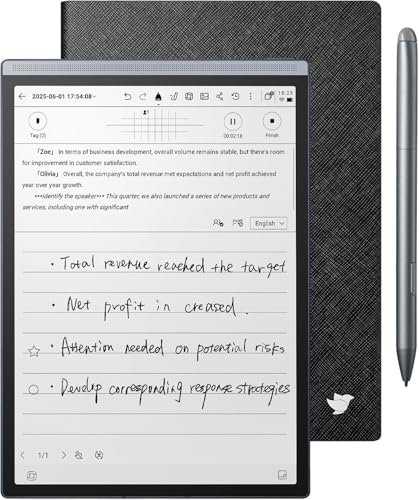
Iflytek AINOTE Air 2 8.2-Inch Tablet Bundle
Best for: multilingual note-takers and meeting attendees
- Features
- Stylus Included (what this guide is about)
- Screen Size
- 8.2"
- Storage Capacity
- 32GB
- Display Type
- E-Ink
- Stylus Compatibility
- Low-latency stylus
- Use
- Note-Taking, Meetings
The iFLYTEK AINOTE Air 2 Bundle is an 8.2-inch E Ink tablet designed for note-taking and meetings. It includes a low-latency stylus for paper-like writing and direct PDF markup. The device features 32GB of local storage and 100GB of cloud backup. You get voice-to-text translation in 18 languages and AI meeting summaries. The package includes a PU leather case and supports up to 7 days of battery life.
Pros
- 8.2-inch E Ink display with low-latency stylus for natural writing
- AI voice-to-text in 18 languages and automatic meeting summaries
- 32GB local storage plus 100GB cloud backup for file management
- 24-level adjustable dual-color front light for reading comfort
Cons
- Smaller 8.2-inch screen limits workspace compared to 10.3-inch competitors
- 32GB local storage is lower than the 128GB found in similar models
- 2600mAh battery capacity is modest for heavy daily usage
Good fit if
- You need accurate voice-to-text translation in multiple languages
- You prefer a compact 8.2-inch tablet for portability
- You want AI-generated meeting summaries and to-do lists
Skip if
- You require large 10-inch or larger screens for drawing
- You need high local storage above 32GB without cloud sync
- You prefer color displays for media consumption
Verdict: The iFLYTEK AINOTE Air 2 8.2" E Ink Tablet suits professionals who prioritize multilingual voice translation and AI meeting assistance over large screen real estate. It is ideal for users who travel frequently and need a compact, paper-like writing experience with strong cloud integration.

iFLYTEK AINOTE Air 2 8.2" E Ink Tablet
Best for: portable note-taking and meeting transcription
- Features
- Stylus Included (what this guide is about)
- Screen Size
- 8.2"
- Display Type
- E Ink
- Stylus Compatibility
- Stylus
- Use
- Note-Taking, Meetings
- Color
- Gray
The iFLYTEK AINOTE Air 2 is an 8.2-inch E Ink tablet designed for note-taking and meetings. It includes a stylus for low-latency writing on a paper-like screen. The device features dual-color temperature reading light with 24 brightness levels. It supports cloud syncing via OneDrive and Google Play. This model weighs 10.6 ounces and measures 5.4 by 7.6 inches. It suits users who need portable digital notebooks.
Pros
- 8.2-inch HD E Ink display with stylus included
- Dual-color temperature reading light with 24 adjustable brightness levels
- Cloud sync with OneDrive and Google Play integration
- Real-time voice-to-text and multi-language translation support
- Lightweight design at 10.6 ounces for portability
Cons
- 8.2-inch screen is smaller than the 10.3-inch options in this list
- E Ink display has slower refresh rates than LCD tablets
- Limited to note-taking and reading rather than general computing tasks
Good fit if
- You need a portable device for meeting notes and transcription
- You prefer writing on a paper-like E Ink surface
- You require cloud sync with OneDrive for your documents
Skip if
- You need a large screen for detailed document editing
- You want to watch videos or play games
- You prefer a high-refresh-rate LCD display for smooth scrolling
Verdict: The iFLYTEK AINOTE Air 2 8.2" E Ink Tablet fits professionals who prioritize portability and note-taking features over screen size. It is ideal for users who travel frequently and need reliable cloud sync and transcription tools.

Musnap 10.65" E-Ink Tablet with Stylus
Best for: Large-screen E-ink note-taking and reading
- Features
- Stylus Included (what this guide is about)
- Screen Size
- 10.65"
- Storage Capacity
- 128GB
- Display Type
- E-ink
- Processor
- Octa-core (2.2GHz)
- RAM
- 8GB
The Musnap X 10.65" E Ink Tablet offers a 10.65-inch flexible screen with 2560x1920 resolution and 300 PPI. It includes a stylus pen for note-taking and runs Android 14 with 8GB RAM and 128GB storage. The 4000mAh battery provides month-long standby. This device suits users who need a large, paper-like display for reading and document annotation.
Pros
- 10.65-inch E-ink screen with 300 PPI resolution
- Includes stylus pen for precise writing and sketching
- 8GB RAM and 128GB storage for multitasking
- Android 14 operating system supports third-party apps
- Ultra-thin 0.19-inch design for portability
Cons
- Smaller screen size compared to 13-inch competitors
- Limited to 128GB internal storage capacity
- No mention of expandable storage via microSD
Good fit if
- You prefer a large 10.65-inch display for detailed work
- You need a stylus for natural writing and annotation
- You want Android 14 for app flexibility
Skip if
- You require a screen larger than 10.65 inches
- You need more than 128GB of internal storage
- You prefer a traditional LCD or OLED display
Verdict: The Musnap X 10.65" E Ink Tablet fits readers who want a large, high-resolution E-ink screen with a stylus. It is ideal for those who value portability and Android app support over maximum storage.
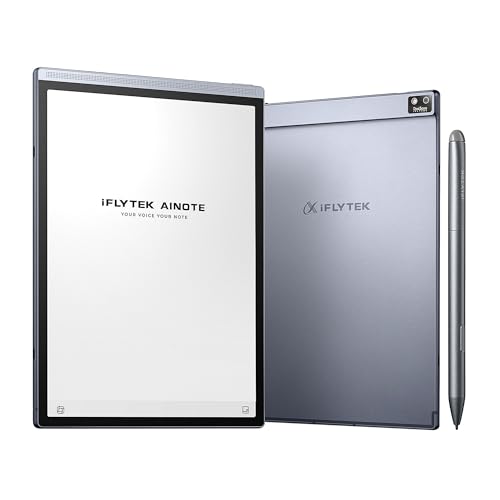
Iflytek AINOTE Air 2 8.2-Inch E Ink Tablet
Best for: AI transcription and multi-language note-taking
- Features
- Stylus Included (what this guide is about)
- Screen Size
- 8.2"
- Display Type
- E Ink
- Stylus Compatibility
- Stylus
- Use
- Note-Taking
- Length
- 8.2 inches
The iFLYTEK AINOTE Air 2 Bundle is an 8.2-inch E Ink tablet designed for note-taking and productivity. It includes a stylus with 4,096 pressure levels for a natural writing feel. The device supports real-time voice-to-text in 16 languages and handwriting conversion in 85. It features a dual-color reading light with 24 brightness levels. This tablet suits users who need AI transcription and schedule management tools.
Pros
- 8.2-inch E Ink display with 4,096 pressure levels
- Real-time voice-to-text in 16 languages
- Handwriting to text conversion in 85 languages
- Dual-color reading light with 24 brightness levels
Cons
- Voice transcription and handwriting conversion cannot run simultaneously
- No mention of cellular connectivity or large storage capacity
- Limited to 8.2-inch screen size for larger document viewing
Good fit if
- You need real-time meeting summaries and transcription
- You prefer a paper-like writing experience on E Ink
- You require multi-language support for notes and audio
Skip if
- You need to convert handwriting while recording audio
- You require a larger screen for detailed document review
- You want a standard Android tablet with app ecosystem
Verdict: The iFLYTEK AINOTE Air 2 8.2" E Ink Tablet is a specialized tool for professionals who rely on AI transcription and multi-language support. It fits users who prioritize accurate voice-to-text and handwriting conversion over general tablet functionality.
Specifications side by side
| Spec | Amazon Kindle Scribe 10.2" 16GB | VIWOODS AiPaper Mini 8.2" E Ink Tablet | Lenovo Idea Tab 11" with Pen | Penstar 10.3" Color E-Ink Tablet | iFlytek AINOTE Air 2 8.2" E Ink Tablet | Penstar eNote 2 10.3" Digital Notebook | Iflytek AINOTE Air 2 8.2-Inch Tablet Bundle | iFLYTEK AINOTE Air 2 8.2" E Ink Tablet | Musnap 10.65" E-Ink Tablet with Stylus | Iflytek AINOTE Air 2 8.2-Inch E Ink Tablet |
|---|---|---|---|---|---|---|---|---|---|---|
| Screen Size | 10.2" | 8.2" | 11" | 10.3" | 8.2" | 10.3" | 8.2" | 8.2" | 10.65" | 8.2" |
| Storage Capacity | 16 GB | 128GB | 128 GB | 128GB | not specified | 128GB | 32GB | not specified | 128GB | not specified |
| Display Type | not specified | E Ink | not specified | Kaleido 3 | E Ink | E-Ink | E-Ink | E Ink | E-ink | E Ink |
| Processor | not specified | not specified | Dimensity 6300 | Octa-core | not specified | Octa-core | not specified | not specified | Octa-core (2.2GHz) | not specified |
| Connectivity | not specified | WLAN, Bluetooth | not specified | not specified | not specified | not specified | not specified | not specified | not specified | not specified |
| RAM | not specified | not specified | 8GB | 4GB | not specified | 4GB | not specified | not specified | 8GB | not specified |
| Stylus Compatibility | Premium Pen | W2 Stylus Pro | Lenovo Tab Pen | Digital Stylus B6 | Stylus included | Digital Stylus B5 | Low-latency stylus | Stylus | Stylus Pen | Stylus |
| Storage | 16GB | not specified | 128GB | not specified | not specified | not specified | not specified | not specified | 8GB | not specified |
| Features | Stylus Included | Stylus Included | Stylus Included | Stylus Included | Stylus Included | Stylus Included | Stylus Included | Stylus Included | Stylus Included | Stylus Included |
| Use | not specified | not specified | not specified | not specified | Note-Taking, Meetings | not specified | Note-Taking, Meetings | Note-Taking, Meetings | Reading, Meetings, Study | Note-Taking |
| Material | not specified | not specified | not specified | not specified | not specified | Leather | not specified | not specified | not specified | not specified |
| Color | Tungsten | AiPaper Mini+W2 Stylus Pro+Cover+5 Nibs | Gray | Blue | Gray | Gray | Black Bundle | Gray | grey | Grey |
| Form Factor | not specified | not specified | not specified | not specified | not specified | Folio | not specified | not specified | not specified | not specified |
| Resolution | not specified | not specified | 2.5K | not specified | not specified | not specified | not specified | not specified | not specified | not specified |
| Dimensions | 9.06 × 7.72 × 0.23 inches | 7.5 × 5.3 × 0.2 inches | 8.31 × 4.91 × 0.33 inches | 9.2 × 7.8 × 0.2 inches | not specified | 8.9 × 7.8 × 0.22 inches | 8.15 × 5.83 × 1.08 inches | not specified | 9.62 × 0.19 × 7.47 inches | not specified |
| Weight | 15.2 ounces | not specified | not specified | 15 ounces | 1 pounds | 2.14 pounds | not specified | 10.6 ounces | not specified | 8.16 ounces |
| Length | not specified | not specified | not specified | not specified | 7.6 inches | not specified | not specified | 7.6 inches | not specified | 8.2 inches |
| Width | not specified | not specified | not specified | not specified | 5.4 inches | not specified | not specified | 5.4 inches | not specified | 8.2 inches |
| Size | 16 GB | not specified | 11 inches | eNote Pro Color | Air 2 | eNote 2 Bundle with Two B5 Pens and Leather Folio | not specified | Air 2 | not specified | not specified |
| Model | C4A6T4 | 81bf3036-7306-4176-9a17-26e646cf851b | TB336FU | eNote Pro Color | XF-DX-B282E | eNote 2 | AINOTE Air 2 | AINOTE Air 2 | X | Air 2 |
If you need extra runtime away from a wall outlet, you can compare the best portable power banks for tablets.
Check Storage, RAM, and Screen Size
-
Prioritize storage for PDFs
You should check the storage capacity before buying. The Amazon Kindle Scribe offers 16GB, which handles extensive PDF annotations efficiently. If you store many large documents, ensure the device has enough space. The Lenovo Idea Tab provides 128GB, giving you ample room for apps and files. The Musnap tablet includes 8GB, which may limit your library size. Match the storage to your document volume to avoid running out of space during work.
-
Select screen size for portability
Your workflow determines the ideal screen size. The VIWOODS AiPaper Mini features an 8.2-inch display, making it easy to carry in a bag. This size suits commuters who prioritize portability. If you need more room, the Lenovo Idea Tab offers an 11-inch screen. The Penstar eNote 2 provides a 10.3-inch display for detailed annotation. Choose a smaller size for travel and a larger one for desk use. The dimensions affect how comfortable the device is to hold.
-
Consider RAM for multitasking
Random Access Memory affects how smoothly the tablet runs. The Lenovo Idea Tab includes 8GB of RAM, supporting better performance for daily tasks. More RAM helps when switching between apps or handling large files. Other devices in this list do not specify RAM in their published data. You should verify this spec if you plan to run multiple Android apps. Higher RAM ensures faster response times during note-taking sessions.
-
Choose display type for eyes
E Ink displays reduce eye strain during long reading sessions. Most devices here use E Ink technology for clarity. The Amazon Kindle Scribe and Penstar Color E-Ink Tablet both use this screen type. The Lenovo Idea Tab uses a standard display for color and speed. E Ink is better for battery life and reading comfort. Standard displays offer faster refresh rates but may cause more fatigue. Select E Ink if you read and write for hours daily.
-
Evaluate material and build
The build material impacts durability and feel. The Penstar eNote 2 includes a leather folio, offering premium protection. This material provides a classic notebook feel. Other devices use plastic or metal bodies without specified materials. The iFlytek AINOTE Air 2 is lightweight at 10.6 ounces. Consider the weight if you carry the device often. A leather cover adds protection but increases bulk. Check the weight and dimensions to ensure it fits your bag.
Frequently asked questions
Which tablet is best for dedicated note-taking and PDF annotation?
The Amazon Kindle Scribe 10.2" 16GB is the top choice. It features a 10.2-inch E Ink display that provides clarity for reading and writing. The 16GB storage capacity efficiently handles extensive PDF annotations. This device is designed for users who value battery life and a focused writing experience over speed or color.
What is the best portable tablet for commuters?
The VIWOODS AiPaper Mini 8.2" E Ink Tablet is ideal for portability. It has an 8.2-inch screen that fits easily into bags for on-the-go use. The device weighs very little, making it comfortable for long periods. It suits readers who prioritize eye comfort and compact size for carrying books and notebooks.
Which Android tablet offers the best value with a stylus?
The Lenovo Idea Tab 11" with Pen is the best budget option. It features an 11-inch 2.5K display that provides ample space for daily tasks. The device includes 8GB of RAM and 128GB of storage for smooth performance. It is a versatile choice for users who want an Android experience with an included pen.
Is there a color E-Ink tablet for document annotation?
The Penstar 10.3" Color E-Ink Tablet supports color displays for detailed work. It has a 10.3-inch screen that is suitable for reading and annotating documents with color elements. The device is designed for users who value battery longevity and document organization. It fits those who need a large, color-capable screen for professional tasks.
Which tablet is best for multilingual note-taking and meetings?
The iFLYTEK AINOTE Air 2 8.2" E Ink Tablet is specialized for professionals. It supports multilingual voice translation and AI meeting assistance. The 8.2-inch screen offers a compact, paper-like writing experience. This device is ideal for users who travel frequently and need reliable cloud sync and transcription tools for accurate note-taking.
What tablet includes a leather folio for protection?
The Penstar eNote 2 10.3" Digital Notebook comes with a leather folio. It features a 10.3-inch E Ink display for large-screen note-taking. The leather case provides protection and a premium feel. This device suits readers who value a large display and includes voice-to-text tools for professional use.
Which tablet has the largest E-Ink screen included?
The Musnap 10.65" E-Ink Tablet with Stylus offers the largest screen in this list. It has a 10.65-inch high-resolution E Ink display for reading and writing. The device includes 8GB of storage and supports Android apps. It is ideal for those who value portability and a large viewing area for study or meetings.