7" vs 11" Tablets in 2026: Key Differences
As an Amazon Associate we earn from qualifying purchases. Links on this page are affiliate links.
Choosing between a 7 vs 11 tablet often comes down to how you plan to use the device. Both Amazon models offer e-ink displays for comfortable reading and long battery life. The key difference lies in the screen size and functionality. The smaller 7-inch model focuses purely on reading with weeks of battery life. The larger 11-inch model adds color, writing capabilities, and note-taking tools. Your choice depends on whether you prioritize portability or productivity features.
Key differences
| Aspect | Amazon Kindle Paperwhite 7-Inch 16GB | Amazon Kindle Scribe Colorsoft 11-inch 32GB |
|---|---|---|
| Screen Size | 7 inches | 11 inches |
| Display Type | Paperwhite | Colorsoft |
| Storage Capacity | 16GB | 32GB |
| Weight | 7.52 ounces | 14.1 ounces |
| Stylus | Not listed | Pen included |
Which one should you choose?
Choose Amazon Kindle Paperwhite 7-Inch 16GB if
- You want a lightweight device that fits easily in a pocket or small bag.
- You only need a dedicated reading device without distractions or extra apps.
- You prefer a smaller screen for one-handed reading and longer battery life per charge.
Choose Amazon Kindle Scribe Colorsoft 11-inch 32GB if
- You need a color display for reading comics, textbooks, or magazines.
- You want to take handwritten notes, annotate documents, or sketch ideas.
- You prefer a larger screen for split-view reading and writing simultaneously.
Verdict: The 7-inch Kindle Paperwhite is ideal if your primary goal is reading books with maximum portability and battery life. The 11-inch Kindle Scribe Colorsoft suits those who need a digital notebook with color display and writing tools. Choose the smaller model for pure reading and the larger one for creative or academic work.
7 vs 11 Inch Tablet Comparison
Screen Size
The Amazon Kindle Paperwhite 16GB features a compact 7-inch display, designed for portability and one-handed reading. Its glare-free screen keeps pages sharp in bright sunlight or dark rooms. In contrast, the Amazon Kindle Scribe Colorsoft 32GB offers a much larger 11-inch Colorsoft display. This larger canvas provides ample space for reading documents, writing notes, and reviewing files without frequent scrolling. The Scribe’s size makes it better for multitasking and detailed work, while the Paperwhite’s smaller footprint is ideal for commuting or holding for long periods. If you prioritize a large workspace, the 11-inch model wins.
Display Type
Both devices use advanced e-ink technology for eye comfort, but they serve different purposes. The Paperwhite uses a standard Paperwhite display with a higher contrast ratio and 25% faster page turns. It adjusts from white to amber for night reading. The Scribe features a Colorsoft display that delivers high-contrast, paper-like color. This allows you to see documents and images in full color without distracting flashes. The Scribe also has a textured surface for a pen-on-paper feel, enhancing the writing experience. For pure text reading, the Paperwhite is sufficient. For color documents and note-taking, the Scribe is superior.
Storage Capacity
Storage determines how many books, documents, and notes you can keep on the device. The Amazon Kindle Paperwhite 16GB comes with 16GB of internal storage. This is plenty for thousands of e-books and a few PDFs. The Amazon Kindle Scribe Colorsoft 32GB offers 32GB of storage, which is double the capacity. This extra space is useful for storing more large PDF documents, notebooks, and color images. If you plan to keep a massive library of local files or extensive notebooks, the Scribe provides more room. For standard reading, both capacities are likely sufficient.
Stylus Support
Input methods differ significantly between these two models. The Paperwhite is designed primarily for reading and does not support a stylus. You navigate using touch controls. The Scribe includes a built-in notebook and supports a pen for writing. The included pen never needs charging and has a built-in eraser and shortcut button. It allows you to take notes, mark up PDFs, and write directly on pages. This makes the Scribe a viable tool for students, professionals, and journalers. If you need to write or annotate, the Scribe is the only choice.
Portability and Weight
Physical dimensions affect how comfortable the device is to hold. The Paperwhite is ultra-thin at 0.31 inches and weighs only 7.52 ounces. Its compact 6.96 by 5.02 inches size fits easily in a pocket or small bag. The Scribe is slightly thinner at 0.21 inches but heavier at 14.1 ounces due to its larger screen and internal components. It measures 9.6 by 7.4 inches. The Paperwhite is significantly lighter and smaller, making it better for long reading sessions on the go. The Scribe is bulkier but offers more screen real estate for work.
Which Model Suits Your Reading Needs
Readers seeking maximum portability and battery life
The 7-inch Kindle Paperwhite weighs just 7.52 ounces and measures 0.31 inches thick. Its 16GB storage holds thousands of books. A single USB-C charge lasts up to 12 weeks. The glare-free display adjusts from white to amber for any lighting. This compact form factor fits easily in a pocket or small bag for travel.
Users needing a color display and writing tools
The 11-inch Kindle Scribe Colorsoft features a paper-like color display with front light. It includes a pen that never needs charging, offering a textured writing experience. You can import documents from cloud services and annotate PDFs. The 32GB storage supports extensive notebooks and large files. AI tools help summarize notes or convert handwriting to text.
Students or professionals who annotate documents
This 11-inch model allows you to write between lines as text shifts. The built-in notebook and cloud integration support workflow efficiency. You can export annotated PDFs or sync with OneNote. The 32GB capacity handles large document libraries. The responsive pen includes an eraser and shortcut button for quick tool access while reviewing materials.
Quick picks
| # | Product | Best for | Price |
|---|---|---|---|
| 1 | Amazon Kindle Paperwhite 7-Inch 16GB | portable text-only reading | Check price of Amazon Kindle Paperwhite 7-Inch 16GB on Amazon |
| 2 | Amazon Kindle Scribe Colorsoft 11-inch 32GB | large-screen color writing and reading | Check price of Amazon Kindle Scribe Colorsoft 11-inch 32GB on Amazon |
The products compared

Amazon Kindle Paperwhite 7-Inch 16GB
Best for: portable text-only reading
- Screen Size
- 7" (what this guide is about)
- Storage Capacity
- 16GB
- Display Type
- Paperwhite
- Dimensions
- 6.96 × 5.02 × 0.31 inches
- Weight
- 7.52 ounces
View on Amazon: Amazon Kindle Paperwhite 7-Inch 16GB Affiliate link
The Amazon Kindle Paperwhite 16GB features a 7-inch glare-free display with adjustable white-to-amber lighting. This e-reader offers 16GB of storage and weighs 7.52 ounces. It provides up to 12 weeks of battery life on a single charge. The device is waterproof and includes a faster page-turn speed. It suits readers who want a compact, distraction-free tool for books.
Pros
- 7-inch glare-free Paperwhite display
- 16GB storage capacity
- Up to 12 weeks of battery life
- Waterproof design
- Adjustable white to amber lighting
Cons
- 7-inch screen is smaller than 11-inch alternatives
- 16GB storage is limited for large libraries
- E-ink display does not support color video
Good fit if
- You prefer a lightweight device for one-handed reading
- You want long battery life between charges
- You read primarily in black and white
Skip if
- You need a large screen for comics or PDFs
- You require color display for illustrations
- You want a device for watching videos
Verdict: Amazon Kindle Paperwhite 16GB 7-inch is a focused e-reader for those who prioritize portability and battery life over screen size. It fits readers who want a lightweight, waterproof device for text-based books.
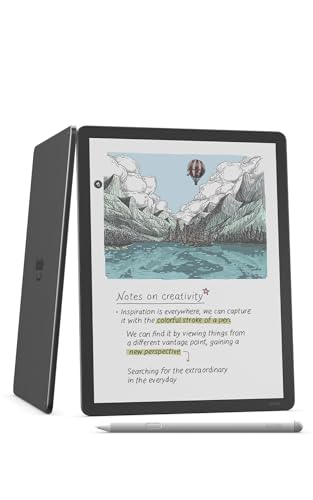
Amazon Kindle Scribe Colorsoft 11-inch 32GB
Best for: large-screen color writing and reading
- Screen Size
- 11" (what this guide is about)
- Storage Capacity
- 32GB
- Display Type
- Colorsoft
- Stylus Compatibility
- Pen included
- Features
- Color Display
- Dimensions
- 9.6 × 7.4 × 0.21 inches
View on Amazon: Amazon Kindle Scribe Colorsoft 11-inch 32GB Affiliate link
The Amazon Kindle Scribe Colorsoft 32GB features an 11-inch Colorsoft display with front light. It includes a pen that never needs charging and offers 32GB of storage. The device is 5.4mm thin and weighs 400g. You can take notes, read, and use AI tools. It suits those who want a large, color e-reader for writing and document review.
Pros
- 11-inch Colorsoft display with front light
- Included pen never needs charging
- 32GB storage capacity
- 5.4mm thin and 400g weight
Cons
- No mention of expandable storage
- No mention of Bluetooth connectivity
- No mention of waterproofing
Good fit if
- You want a large 11-inch color display for writing
- You need a pen that never requires charging
- You prefer a lightweight 400g device
Skip if
- You need expandable storage beyond 32GB
- You require Bluetooth connectivity for headphones
- You need a waterproof device for bath use
Verdict: Amazon Kindle Scribe Colorsoft 11" is ideal for readers and writers who need a large, color screen and a reliable pen for note-taking.
Specifications side by side
| Spec | Amazon Kindle Paperwhite 7-Inch 16GB | Amazon Kindle Scribe Colorsoft 11-inch 32GB |
|---|---|---|
| Screen Size | 7" | 11” |
| Storage Capacity | 16GB | 32GB |
| Display Type | Paperwhite | Colorsoft |
| Stylus Compatibility | not stated | Pen included |
| Storage | 16GB | 32GB |
| Features | not stated | Color Display |
| Dimensions | 6.96 × 5.02 × 0.31 inches | 9.6 × 7.4 × 0.21 inches |
| Weight | 7.52 ounces | 14.1 ounces |
| Color | Jade | Graphite |
| Model | SA568B | PA2MA5 |
Frequently asked questions
Can I read in the bathtub with a 7-inch tablet?
Yes, the Amazon Kindle Paperwhite 7-Inch 16GB is waterproof. This feature allows you to read safely in the bath or by the pool without worrying about water damage. The 11-inch Scribe model does not have this specific waterproof rating mentioned in its specs, making the 7-inch version the safer choice for wet environments.
Which tablet is lighter to hold for long periods?
The 7-inch Amazon Kindle Paperwhite is significantly lighter. It weighs only 7.52 ounces, making it easy to hold with one hand for extended reading sessions. The 11-inch Kindle Scribe Colorsoft weighs 14.1 ounces, which is nearly double the weight. You will likely feel more fatigue holding the larger device for long periods.
Does the 11-inch model support color displays?
Yes, the Amazon Kindle Scribe Colorsoft 11-inch features a color display. This allows you to view color images, charts, and comics in full spectrum. The 7-inch Kindle Paperwhite uses a standard e-ink screen that displays only grayscale images. If color visuals are important to you, the larger 11-inch model is the necessary choice.
How much storage do these tablets provide?
The 7-inch Kindle Paperwhite offers 16GB of storage. The 11-inch Kindle Scribe Colorsoft provides 32GB of storage. The larger device gives you double the space to store books, documents, and notes. Both amounts are sufficient for most users, but the 11-inch model offers more room for extensive libraries or large files.
Is the 11-inch tablet good for writing notes?
Yes, the Amazon Kindle Scribe Colorsoft 11-inch is designed for writing. It includes a reliable pen for note-taking and annotation on its large screen. The 7-inch Paperwhite is focused on reading text-only content and does not include writing capabilities. If you need to take notes or annotate documents, the 11-inch model is the better tool.
Which tablet fits better in a small bag?
The 7-inch Amazon Kindle Paperwhite fits better in small bags. It measures 6.96 inches in length and 5.02 inches in width. The 11-inch Kindle Scribe is larger, measuring 9.6 inches in length and 7.4 inches in width. The compact size of the 7-inch model makes it easier to carry in pockets or small purses.