Display Type Explained: What It Means for E-Readers
As an Amazon Associate we earn from qualifying purchases. Links on this page are affiliate links.
Display Type Explained for E-Readers
The display type explained reveals how your device renders text and images. This spec defines the underlying technology behind the screen you look at daily. You will encounter three main categories in the current market. Each offers a different balance of clarity, color, and power efficiency.
E Ink Carta is the standard for black and white e-readers. It uses electrophoretic technology to reflect ambient light. This mimics the look of paper. You get sharp text with zero glare. The screen consumes power only when the image changes. This allows for weeks of battery life. If you read mostly novels or documents, this type prioritizes eye comfort and endurance over speed.
E Ink Kaleido 3 adds color to the e-ink family. It uses a color filter array over the standard e-ink layer. You get vibrant images for comics, magazines, or children’s books. The trade-off is slightly reduced contrast for text. The color resolution is lower than the black and white areas. This type suits readers who want visual variety without sacrificing the paper-like feel. It remains highly power efficient compared to other color screens.
TFT LCD displays are common in tablets and some hybrid devices. They use liquid crystals and a backlight to create images. You see bright, vivid colors with high refresh rates. This technology is ideal for video, gaming, or web browsing. However, the backlight can cause eye strain during long reading sessions. Battery life is significantly shorter than e-ink options. You must charge these devices frequently.
Choosing the right type depends on your primary use case. Paper-like screens offer superior readability in sunlight. Backlit screens provide versatility for multimedia. Check the listing carefully to see which technology is used. This single spec dictates your reading experience more than any other feature.
E Ink Kaleido 3 vs Carta vs LCD
E Ink Kaleido 3
This technology adds color to the standard E Ink foundation. You get a display that mimics paper while showing vibrant images and comics. The trade-off is slightly lower contrast for black text compared to monochrome screens. Battery life remains strong because the screen only uses power when changing. The Kobo Libra Colour and Kobo Clara Colour use this panel. You should choose this if you read graphic novels or color maps. It suits readers who want eye comfort without sacrificing visual richness. The color filter array reduces overall sharpness, but the experience is still gentle on your eyes during long sessions.
E Ink Carta
This is the standard for high-quality black and white reading. It offers the sharpest text and highest contrast available on e-readers. The screen looks almost exactly like printed paper. You get the best battery life because no extra power is needed for color filters. The PocketBook Era Lite and PocketBook Verse Pro rely on this display. This option is ideal for novelists and students who prioritize text clarity above all else. It is the best choice for reading in bright sunlight. The trade-off is the lack of color. If you only read text-based books, this panel provides the most comfortable and readable experience available.
TFT LCD
This is a standard color screen similar to what you find on tablets. It offers bright, vivid colors and high refresh rates. The trade-off is significant eye strain and poor battery life. The screen emits light directly into your eyes, which can cause fatigue during long reading sessions. The Wisoqu and Sanpyl devices use this technology. You should only choose this if you need a multimedia device for videos and photos. It is not suitable for dedicated book reading. The display is brighter than E Ink, but it lacks the paper-like quality. This option suits users who want a general-purpose tablet rather than a specialized e-reader for text.
Choose Your Display Wisely
Who needs it
You should prioritize the E Ink Kaleido 3 panel if you consume a significant amount of color content. This technology is ideal for reading graphic novels, comics, or magazines where visual fidelity matters. The screen mimics paper while showing vibrant images, making it a strong choice for visual readers. You will appreciate the balance of readability and color without the need for a backlight that causes eye strain. If your library includes many illustrated books, this display type ensures you do not miss details. The trade-off is slightly lower contrast for black text, but for most users, the color benefit outweighs this minor reduction in sharpness. It is the best option for those who want a single device for both text and rich media. You get a versatile screen that handles various formats well. This spec directly impacts your daily reading experience if visuals are key to your enjoyment. Choose this if you value color accuracy and paper-like feel over pure text contrast.
Who can skip it
You can ignore the color display if you only read standard novels or text-heavy books. In this case, the standard E Ink Carta panel is sufficient. It offers higher contrast for black text, providing sharper and clearer reading for long sessions. You do not need the extra cost or complexity of color technology if your content is monochrome. The LCD display is another option to skip unless you need video or app support. LCD screens consume more power and can cause eye fatigue during extended reading. They lack the paper-like texture of E Ink. Prioritize battery life and text clarity over color if you are a dedicated reader. The Carta display is optimized for this specific use case. You will find it easier on the eyes for long periods. Focus on this spec if you want the most authentic reading experience. Avoid color displays if you rarely look at images. Stick to the basics for the best text performance.
Display Glossary Terms
PPI
Pixels per inch. This measures screen sharpness. Higher numbers mean crisper text. Most e-readers aim for 300 PPI or more for a paper-like look.
Backlight
Light source behind the screen. LCDs use this to shine through. E Ink uses front lights to bounce off the surface. Backlights allow reading in dark rooms.
Refresh Rate
How fast the screen updates. E Ink is slow, causing ghosting. LCDs update instantly. Faster rates mean smoother video and scrolling without visible delays.
Color Gamut
The range of colors a display shows. Wider gamuts look more vibrant. E Ink Kaleido 3 offers basic color. Standard LCDs provide full, rich color spectra.
Glare
Reflection of light on the screen. Glossy screens reflect more. Matte finishes reduce glare for outdoor reading. This affects visibility under bright sunlight or lamps.
Resolution
Total pixel count on the screen. Common sizes are 1080p or 4K. Higher resolution means more detail. It impacts how sharp images and text appear.
Aspect Ratio
The shape of the screen. Standard is 16:9 for video. E-readers often use 4:3. This ratio determines how much content fits on one page.
Quick picks
| # | Product | Best for | Price |
|---|---|---|---|
| 1 | Kobo Libra Colour 7-Inch eReader with Clear Case | Color e-ink reading and waterproof use | Check price of Kobo Libra Colour 7-Inch eReader with Clear Case on Amazon |
| 2 | PocketBook Era Lite 7" E-Reader | Text readers wanting library access and battery life | Check price of PocketBook Era Lite 7" E-Reader on Amazon |
| 3 | Wisoqu 7-Inch TFT LCD E-Reader | multimedia entertainment and larger screens | Check price of Wisoqu 7-Inch TFT LCD E-Reader on Amazon |
| 4 | PocketBook Verse Pro 6-Inch E-Reader | Waterproof reading with audio support | Check price of PocketBook Verse Pro 6-Inch E-Reader on Amazon |
| 5 | Sanpyl 7-Inch TFT LCD Multimedia E-Reader | multimedia reading and video playback | Check price of Sanpyl 7-Inch TFT LCD Multimedia E-Reader on Amazon |
| 6 | Kobo Clara Colour 6-Inch Color E-Reader | Color e-ink readers who need waterproofing | Check price of Kobo Clara Colour 6-Inch Color E-Reader on Amazon |
Our 6 picks

Kobo Libra Colour 7-Inch eReader with Clear Case
Best for: Color e-ink reading and waterproof use
- Display Type
- E Ink Kaleido 3 (what this guide is about)
- Screen Size
- 7"
- Stylus Support
- Kobo Stylus 2 compatible
- Water Resistance
- IPX8
- Features
- Waterproof, Dark Mode
View on Amazon: Kobo Libra Colour 7-Inch eReader with Clear Case Affiliate link
The Kobo Libra Colour uses a 7-inch E Ink Kaleido 3 display to show full-color eBooks, comics, and graphic novels without glare. It includes physical page-turn buttons and supports the Kobo Stylus 2 for color annotations. The device is IPX8 waterproof, allowing submersion in up to 2 meters of water for 60 minutes. This bundle includes a clear protective case. It suits readers who want color visuals on an e-ink screen.
Pros
- 7-inch E Ink Kaleido 3 color display
- IPX8 waterproof rating for 2 meters depth
- Physical page-turn buttons
- Kobo Stylus 2 compatibility for color notes
- Includes clear protective case
Cons
- Stylus sold separately
- Color resolution lower than LCD screens
- Bundle includes clear case only, not sleep cover
Good fit if
- You want full-color e-ink visuals
- You read in wet environments
- You prefer physical page-turn buttons
Skip if
- You need the highest possible color resolution
- You want a bundled stylus included
- You prefer a smaller 6-inch screen
Verdict: Kobo Libra Colour 7" E Ink Kaleido 3 offers color e-ink reading with waterproof durability and physical buttons. It fits users who prioritize color graphics and water resistance over maximum display sharpness.

PocketBook Era Lite 7" E-Reader
Best for: Text readers wanting library access and battery life
- Display Type
- E Ink Carta (what this guide is about)
- Screen Size
- 7"
- Front Light
- Adaptive SMARTlight
- Battery Life
- Up to 2 months
- Water Resistance
- IPX4
- Features
- Bluetooth, Text-to-Speech
View on Amazon: PocketBook Era Lite 7" E-Reader Affiliate link
The PocketBook Era Lite uses an E Ink Carta 1300 display for sharp, paper-like readability. Its 7-inch screen offers ample space for text. The device includes adaptive SMARTlight for adjustable screen tones and IPX4 water resistance. You get up to two months of battery life. It supports Bluetooth for audiobooks and includes the Libby app. This e-reader suits readers who want open ecosystem access without color.
Pros
- E Ink Carta 1300 screen for high contrast
- Adaptive SMARTlight with adjustable color tones
- IPX4 water resistance for splash protection
- Bluetooth connectivity for audiobooks
- Open ecosystem with 25 format support
Cons
- Monochrome display lacks color for comics or magazines
- No mention of stylus or handwriting support
- Heavier build at 13.5 ounces compared to 6-inch models
Good fit if
- You prefer larger screens for comfortable reading
- You want to borrow library books via Libby
- You need water resistance for bath or poolside use
Skip if
- You require a color display for graphic novels
- You want a lightweight device under 10 ounces
- You need handwriting or stylus input
Verdict: PocketBook Era Lite 7" E Ink Carta is a solid choice for text-focused readers who value battery life and open format support. It fits those who prioritize readability and library integration over color visuals.

Wisoqu 7-Inch TFT LCD E-Reader
Best for: multimedia entertainment and larger screens
- Display Type
- TFT LCD (what this guide is about)
- Screen Size
- 7in
- Storage Capacity
- 16G
- Use
- Travel
View on Amazon: Wisoqu 7-Inch TFT LCD E-Reader Affiliate link
This Wisoqu e-reader uses a 7-inch TFT LCD screen rather than E Ink technology. It includes 16GB of storage and features independent flipping keys for chapter navigation. You get adjustable font sizes and brightness settings. The device also supports music, video, and photo playback. Its lightweight design allows for one-handed use during travel.
Pros
- 7-inch TFT LCD display for high-definition text
- 16GB storage capacity for books and media
- Independent flipping keys for easy chapter preview
- Built-in music, video, and photo functionality
Cons
- TFT LCD screen lacks the glare-free quality of E Ink
- No mention of waterproof rating or durability specs
- Limited to 16GB storage compared to larger capacities
Good fit if
- You want a device for video and music playback
- You prefer a larger 7-inch screen for reading
- You need independent keys for navigation
Skip if
- You require a glare-free E Ink display
- You prioritize long battery life over multimedia features
- You need waterproof protection for reading
Verdict: Wisoqu 7in TFT LCD E-Reader suits readers who want multimedia entertainment alongside their books. It fits those who prefer a larger screen and physical navigation keys over the eye-friendly benefits of E Ink technology.

PocketBook Verse Pro 6-Inch E-Reader
Best for: Waterproof reading with audio support
- Display Type
- E Ink Carta (what this guide is about)
- Screen Size
- 6"
- Storage Capacity
- 16 GB
- Front Light
- Adjustable SMARTlight
- Water Resistance
- IPX8
- Features
- Waterproof, Bluetooth, Wi-Fi, Text-to-Speech, Touchscreen
View on Amazon: PocketBook Verse Pro 6-Inch E-Reader Affiliate link
The PocketBook Verse Pro features a 6-inch E-Ink Carta HD display for glare-free reading. It includes IPX8 waterproof protection, allowing immersion in fresh water up to 2 meters. The device supports Bluetooth audio and Text-to-Speech in 26 languages. With 16 GB of storage and adjustable SMARTlight, it suits readers who want durability and audio capabilities alongside a paper-like screen.
Pros
- E-Ink Carta HD display reduces eye strain
- IPX8 waterproof rating for swimming or bath reading
- Bluetooth connectivity for wireless audio
- 16 GB storage capacity
Cons
- 6-inch screen is smaller than 7-inch competitors
- Lacks color display technology found in Kaleido models
- No mention of physical page-turn buttons
Good fit if
- You need waterproof protection for reading near water
- You prefer listening to audiobooks via Bluetooth
- You want a compact 6-inch form factor
Skip if
- You require a color screen for comics or magazines
- You prefer a larger 7-inch display for PDFs
- You want physical buttons for page navigation
Verdict: The PocketBook Verse Pro Waterproof E-Reader is a durable option for readers who need IPX8 protection and Bluetooth audio. It fits those who prioritize a compact 6-inch E-Ink Carta HD screen over larger or color displays.

Sanpyl 7-Inch TFT LCD Multimedia E-Reader
Best for: multimedia reading and video playback
- Display Type
- TFT LCD (what this guide is about)
- Screen Size
- 7"
- Storage
- 32GB
View on Amazon: Sanpyl 7-Inch TFT LCD Multimedia E-Reader Affiliate link
The Sanpyl uses a 7-inch TFT LCD display rather than E Ink. This screen type offers high-definition visuals suitable for color media, including music, video, and photos. It includes 32GB of storage and adjustable brightness. You get a lightweight design for one-handed use. This device suits readers who want a multimedia tablet experience instead of a dedicated e-reader with glare-free paper-like screens.
Pros
- 7-inch TFT LCD screen for clear text
- 32GB storage capacity for media files
- Built-in music, video, and photo playback
- Independent flipping key for chapter navigation
- Adjustable font size and screen brightness
Cons
- TFT LCD display causes glare in bright light
- Higher battery drain than E Ink models
- No E Ink glare-free technology
Good fit if
- You want to watch videos on a portable device
- You prefer color screens for comics or magazines
- You need a device with built-in media players
Skip if
- You read outdoors in direct sunlight
- You prioritize weeks of battery life
- You want a glare-free paper-like experience
Verdict: The Sanpyl 7" TFT LCD E-Reader is a multimedia device rather than a dedicated e-reader. It fits users who want to watch videos and view photos on a portable screen, but it lacks the eye comfort of E Ink displays.
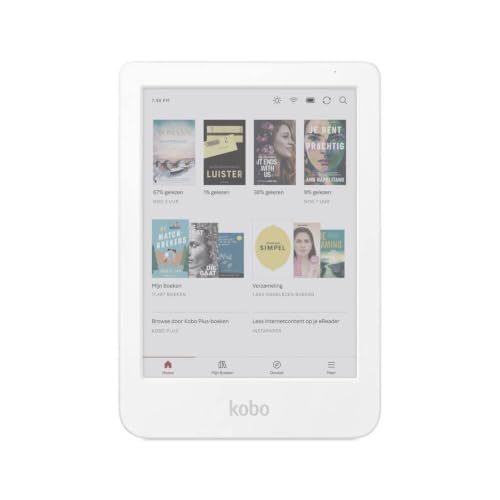
Kobo Clara Colour 6-Inch Color E-Reader
Best for: Color e-ink readers who need waterproofing
- Display Type
- E Ink Kaleido 3 (what this guide is about)
- Screen Size
- 6"
- Storage Capacity
- 16 GB
- Front Light
- ComfortLight PRO
- Battery Life
- Weeks
- Water Resistance
- IPX8
View on Amazon: Kobo Clara Colour 6-Inch Color E-Reader Affiliate link
The Kobo Clara Colour uses a 6-inch E Ink Kaleido 3 display to show color in comics and covers. It features ComfortLight PRO for adjustable blue light reduction and a dark mode. The device is IPX8 waterproof and includes 16GB of storage. You get weeks of battery life. This e-reader suits those who want color without sacrificing the eye-friendly nature of e-ink technology.
Pros
- 6-inch E Ink Kaleido 3 color display
- IPX8 waterproof rating for 2 meters
- ComfortLight PRO with dark mode
- 16GB storage capacity
- Weeks of battery life
Cons
- 6-inch screen is smaller than 7-inch competitors
- Color resolution is lower than standard displays
- No mention of high refresh rate for fast page turns
Good fit if
- You want color for comics and covers
- You need waterproof protection for reading by the pool
- You prefer a compact 6-inch form factor
Skip if
- You need a 7-inch screen for larger text
- You require full-color LCD for photo-heavy books
- You want a device with a high refresh rate
Verdict: Kobo Clara Colour 6" Kaleido 3 offers color e-ink in a waterproof, compact body. It fits readers who prioritize eye comfort and portability over screen size.
Specifications side by side
| Spec | Kobo Libra Colour 7-Inch eReader with Clear Case | PocketBook Era Lite 7" E-Reader | Wisoqu 7-Inch TFT LCD E-Reader | PocketBook Verse Pro 6-Inch E-Reader | Sanpyl 7-Inch TFT LCD Multimedia E-Reader | Kobo Clara Colour 6-Inch Color E-Reader |
|---|---|---|---|---|---|---|
| Screen Size | 7" | 7" | 7in | 6" | 7" | 6" |
| Storage Capacity | not stated | not stated | 16G | 16 GB | not stated | 16 GB |
| Display Type | Colour E Ink Kaleido 3 | E Ink Carta 1300 | TFT LCD | E-Ink Carta HD | TFT LCD | E Ink Kaleido 3 |
| Front Light | not stated | Adaptive SMARTlight | not stated | Adjustable SMARTlight | not stated | ComfortLight PRO |
| Stylus Support | Kobo Stylus 2 compatible | not stated | not stated | not stated | not stated | not stated |
| Battery Life | not stated | Up to 2 months | not stated | not stated | not stated | Weeks |
| Water Resistance | IPX8 | IPX4 | not stated | IPX8 | not stated | IPX8 |
| Storage | not stated | not stated | not stated | 16GB | 32GB | not stated |
| Features | Waterproof, Dark Mode | Bluetooth, Text-to-Speech | not stated | Waterproof, Bluetooth, Wi-Fi, Text-to-Speech, Touchscreen | not stated | Waterproof, Audiobooks, Dark Mode, Color Display |
| Use | not stated | not stated | Travel | not stated | not stated | not stated |
| Color | not stated | Stone Green | not stated | Azure | not stated | White |
| Resolution | not stated | not stated | not stated | HD | not stated | not stated |
| Dimensions | not stated | 6.3 × 1.1 × 7.09 inches | not stated | 5.24 × 1.14 × 7.13 inches | not stated | 0.71 × 8.9 × 10.8 inches |
| Weight | not stated | 13.5 ounces | not stated | 6.56 ounces | not stated | 10.6 ounces |
| Model | not stated | 1 | not stated | PB634-A-WW | Sanpylv0ex9zrgq1-12 | N367-KU-WH-K-CK |
| Size | not stated | not stated | 16G | not stated | 16G | 112 x 160 x 9.2 mm |
Frequently asked questions
Does E Ink Kaleido 3 support color reading?
Yes, it supports color. This display type adds color to the standard E Ink foundation. You get a display that mimics paper while showing vibrant images and comics. The trade-off is slightly lower contrast for black text compared to monochrome screens.
Is E Ink Carta better for battery life?
It often is. E Ink Carta is a solid choice for text-focused readers who value battery life. Devices like the PocketBook Era Lite 7" use this screen for its efficiency. It fits those who prioritize readability and library integration over color visuals.
Can I use TFT LCD for multimedia?
Yes, it is suitable for multimedia. The Sanpyl 7" TFT LCD E-Reader is a multimedia device rather than a dedicated e-reader. It fits users who want to watch videos and view photos on a portable screen, though it lacks eye comfort.
Are color e-ink readers waterproof?
Some are. The Kobo Libra Colour 7" E Ink Kaleido 3 offers color e-ink reading with waterproof durability. It fits users who prioritize color graphics and water resistance over maximum display sharpness. This makes it a durable option for reading anywhere.
Does E Ink Carta have high resolution?
Some models do. The PocketBook Verse Pro 6-Inch uses an E Ink Carta HD screen. It prioritizes a compact 6-inch display over larger or color options. This resolution ensures crisp text for dedicated readers who prefer a smaller, portable form factor.
Is TFT LCD good for eye comfort?
It is generally not. The Sanpyl 7" TFT LCD E-Reader lacks the eye comfort of E Ink displays. It suits readers who want multimedia entertainment alongside their books. You prefer a larger screen and physical navigation keys over the eye-friendly benefits of E Ink technology.