Iflytek AINOTE Air 2 8.2-Inch Review: Specs, Pros and Cons
As an Amazon Associate we earn from qualifying purchases. Links on this page are affiliate links.
This iflytek ainote air 2 bundle review looks at a compact digital notebook built for focused work. The device centers on an 8.2-inch E Ink display paired with a stylus that supports 4,096 pressure levels. You get a paper-like writing feel on a screen that weighs just 8.16 ounces. The bundle includes the necessary tools for immediate use. It is designed specifically for note-taking and reading, avoiding the distractions of full-featured tablets. The specs highlight its role as a dedicated productivity tool rather than a general-purpose computer.
What stands out
- 8.2-inch E Ink screen with 4,096 pressure levels for natural handwriting
- Real-time voice-to-text transcription in 16 languages
- Handwritten note conversion to text in 85 languages
- Dual-color reading light with 24 adjustable brightness levels
- AI features for meeting summaries and schedule management
Who it fits
Good fit for
You should consider this tablet if you take many notes in meetings or classes. The real-time voice-to-text feature helps you capture speech in 16 languages while you write. The AI summary tools save time by organizing your thoughts automatically. Students and professionals who prefer the feel of pen on paper will appreciate the high pressure sensitivity. The compact 8.2-inch size makes it easy to carry to work or school without adding bulk to your bag.
Who should skip it
Skip this option if you need to watch videos or browse the web. The E Ink display does not support video playback or smooth scrolling. It is not a replacement for a multimedia tablet. You also cannot use voice transcription and handwriting conversion at the same time. If you need simultaneous audio and text input, this device will frustrate you. It is strictly for reading, writing, and managing schedules, not for entertainment or complex multitasking.
Verdict: The iFLYTEK AINOTE Air 2 is a focused tool for note-takers who value paper-like writing and AI transcription. It suits those who prioritize productivity over multimedia features.
Key specs explained for this tablet
Screen Size: 8.2"
This diagonal measurement defines the physical display area available for your content. An 8.2-inch screen strikes a balance between portability and readability. It is larger than standard 6-inch e-readers, allowing you to view more text or a full page of notes without excessive scrolling. However, it remains compact enough to fit in most bags. You should consider this size if you need ample writing space but still want a device that is easy to carry during commutes or travel.
Display Type: E Ink
E Ink technology mimics the appearance of printed paper rather than emitting light like LCD or OLED screens. This means the display remains readable in direct sunlight and does not cause eye strain during long reading sessions. It offers a matte finish that reduces glare. For note-taking, this technology provides a clear, crisp text experience that feels natural to the eye. You benefit from battery efficiency and visual comfort, making it ideal for extended study or work sessions without digital fatigue.
Stylus Compatibility: Stylus
The device includes a dedicated stylus designed specifically for interaction with the E Ink screen. This tool allows you to write, draw, and navigate the interface with precision. Unlike using your finger, a stylus offers better control for detailed note-taking and document annotation. It supports pressure sensitivity, which varies line thickness based on how hard you press. You will find this essential for creating organized notes, signing documents, or sketching ideas with a level of detail that touch input cannot achieve.
Features: Stylus Included
This specification confirms that the bundle provides a stylus as part of the standard package. You do not need to purchase a separate pen accessory to begin using the device. This inclusion ensures immediate usability right out of the box. It supports the core functionality of the tablet, which is digital note-taking and handwriting input. By having the tool provided, you can start recording meetings or taking class notes immediately without additional setup or extra costs for compatible writing instruments.
Design and Build Specifications
According to the listing, the iFLYTEK AINOTE Air 2 measures 8.2 inches in both width and length. This square footprint matches the 8.2-inch diagonal display, creating a compact form factor. The device weighs 8.16 ounces. This light mass makes it easy to hold for extended note-taking sessions without fatigue. You can carry it in a bag or hold it with one hand while writing.
The tablet features a grey finish. This neutral color suits professional environments and personal use alike. The build is designed to pair with a stylus included in the bundle. This setup supports a paper-like writing experience on the E Ink screen. The 4,096 pressure levels allow for nuanced strokes, mimicking real pen on paper.
This design prioritizes portability and focused input. The small, square shape fits easily into pockets or small bags. You can use it during meetings or on the go. The lightweight construction reduces strain during long work periods. The included stylus enables direct interaction with the display. You can mark up documents or take quick notes without switching devices. The compact size ensures you stay focused on your content. It is ideal for users who value mobility and precise handwriting control. The grey color adds to its understated, practical appearance. This combination of specs supports a dedicated note-taking workflow.
Setup and daily workflow
The iFLYTEK AINOTE Air 2 bundle arrives with a stylus included, which is essential for its primary note-taking function. You do not need to pair external accessories, as the tablet is designed for immediate use with the provided pen. The device supports 4,096 pressure levels, meaning you can adjust line thickness based on how hard you press the tip against the 8.2-inch E Ink display. This feature creates a natural writing feel that mimics paper.
For daily productivity, the tablet integrates AI tools to manage your workflow. You can mark up handwritten notes using specific symbols like stars, triangles, or circles. These marks automatically generate to-do lists and attention items, helping you organize tasks without manual entry. The device also handles schedule management, allowing you to display weekly work reports directly on the screen.
Communication features are built-in for global users. The tablet supports real-time voice-to-text transcription in 16 languages, including English, Spanish, Chinese, French, Japanese, Korean, Italian, Arabic, Vietnamese, Russian, German, Cantonese, Thai, Indonesian, Malay, and Hungarian. It also converts handwritten text to digital text in 85 languages. Note that voice transcription and handwriting conversion cannot run simultaneously; you must wait for one process to finish before starting the other.
For reading, the screen includes a dual-color reading light with 24 adjustable brightness levels. This allows you to view PDFs or eBooks comfortably in various lighting conditions. The grey casing weighs 8.16 ounces, making it portable enough for travel while maintaining a sturdy build for everyday use.
Before you buy this tablet
This device is a specialized tool for digital note-taking and meeting summaries. It is not a general-purpose tablet. You cannot install standard Android apps. You must check if your workflow relies on third-party productivity suites. The stylus is included, so you do not need to buy one separately. However, you should consider a protective case. The E Ink screen is fragile. You need to handle it with care. Keep it away from sharp objects. The device weighs 8.16 ounces. It fits in most bags. You will need to charge it regularly. Battery life is not listed. You should plan for daily charging if you use it heavily. This tablet suits professionals who need voice-to-text and transcription. It does not suit users who want video streaming or web browsing. It is a niche product. It fits alongside general e-readers as a focused writing tool. You should compare it with other E Ink tablets that offer similar note-taking features. Check if the 16-language support covers your needs. Verify the 85-language handwriting conversion works for your script. This is a serious commitment to digital paper.
Check before you buy
- Confirm your workflow does not require third-party apps
- Verify the 16 spoken languages cover your meetings
- Check if the stylus pressure levels suit your style
- Ensure you have a protective case for the screen
- Decide if voice transcription fits your daily routine
The product at a glance
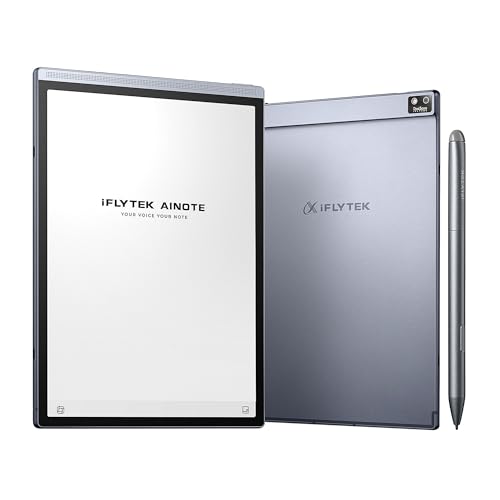
Iflytek AINOTE Air 2 8.2-Inch E Ink Tablet
Best for: meeting notes and document annotation
- Screen Size
- 8.2"
- Display Type
- E Ink
- Stylus Compatibility
- Stylus
- Features
- Stylus Included
- Use
- Note-Taking
- Length
- 8.2 inches
View on Amazon: Iflytek AINOTE Air 2 8.2-Inch E Ink Tablet Affiliate link
The Iflytek AINOTE Air 2 is an 8.2-inch E Ink tablet designed for note-taking and reading. It features a stylus with 4,096 pressure levels for a paper-like writing experience. The device supports real-time voice-to-text in 16 languages and converts handwriting in 85 languages. It includes a dual-color reading light with 24 brightness levels. Weighing 8.16 ounces, it is lightweight for portability.
Pros
- 8.2-inch E Ink display with 4,096 pressure levels
- Voice-to-text transcription in 16 languages
- Handwriting conversion for 85 languages
- Dual-color reading light with 24 brightness levels
Cons
- Voice transcription and handwriting conversion cannot run simultaneously
- Stylus is required for full functionality
- Limited to note-taking and reading tasks
Good fit if
- You need accurate meeting summaries and voice transcription
- You prefer a paper-like writing feel with high pressure sensitivity
- You read PDFs or eBooks in low light
Skip if
- You require simultaneous voice and handwriting input
- You need a color display for media consumption
- You want a larger screen for detailed design work
Verdict: Iflytek AINOTE Air 2 8.2-Inch E Ink Tablet suits professionals who rely on voice-to-text meetings and need a portable, eye-friendly device for reading and annotating documents.
Specifications side by side
| Spec | Iflytek AINOTE Air 2 8.2-Inch E Ink Tablet |
|---|---|
| Screen Size | 8.2" |
| Display Type | E Ink |
| Stylus Compatibility | Stylus |
| Features | Stylus Included |
| Use | Note-Taking |
| Length | 8.2 inches |
| Width | 8.2 inches |
| Weight | 8.16 ounces |
| Color | Grey |
| Model | Air 2 |
Frequently asked questions
Is the Iflytek AINOTE Air 2 good for meeting notes?
Yes, it is best for meeting notes and document annotation. The device supports voice-to-text features, which helps professionals capture verbal discussions accurately. You can annotate documents directly on the screen while reviewing content. This makes it a practical tool for summarizing meetings and organizing key points in real time.
What is the screen size of the Air 2?
The screen size is 8.2 inches. This diagonal measurement provides enough space for reading text and viewing documents clearly. It is larger than standard 6-inch e-readers, offering a better balance between portability and readability. You get a dedicated display area that fits comfortably in one hand while holding a stylus.
Does the bundle include a stylus?
Yes, the bundle includes a stylus. This pen is essential for the primary note-taking function of the device. You do not need to pair external accessories, as the tablet is designed for immediate use with the provided pen. The stylus supports 4,096 pressure levels for precise writing and drawing.
How heavy is the Iflytek AINOTE Air 2?
The device weighs 8.16 ounces. This light mass makes it easy to hold for extended periods without fatigue. You can carry it comfortably during commutes or long study sessions. The compact weight complements the 8.2-inch display, ensuring the tablet remains portable for daily use on the go.
What color is the Iflytek AINOTE Air 2?
The device comes in Grey. This neutral color offers a professional appearance suitable for business environments. The finish is designed to resist fingerprints and smudges during daily handling. You get a clean, minimalist look that matches standard office equipment and personal accessories.
Is this tablet suitable for general use?
No, it is a specialized tool for digital note-taking. You cannot install standard Android apps or use it as a general-purpose tablet. The device focuses on E Ink display functionality and stylus input. You must check if your workflow relies on third-party productivity suites before purchasing.