Lenovo Idea Tab Plus 12.1-Inch Review: Specs, Pros and Cons
As an Amazon Associate we earn from qualifying purchases. Links on this page are affiliate links.
This lenovo idea tab plus review focuses on a large, lightweight tablet designed for study and media. It features a 12.1-inch 2.5K IPS display with 90Hz refresh rate and is powered by a MediaTek Dimensity 6400 processor. The device weighs just 1.17 pounds, making it easy to hold for long periods. You get 8GB of RAM and 128GB of storage for your files. The screen offers 800 nits of brightness and TÜV Rheinland Low Blue Light certification. This combination of size and power targets students and casual users who need a portable screen for reading and video.
What stands out
- 12.1-inch 2.5K IPS touchscreen with 90Hz refresh rate
- MediaTek Dimensity 6400 processor with 8GB RAM
- Lightweight 1.17-pound build with 0.25-inch thickness
- Quad Dolby Atmos speakers for immersive audio
- Circle to Search feature using Google integration
Who it fits
Good fit for
You should consider this tablet if you need a large screen for reading, note-taking, or watching videos without carrying a heavy laptop. The 12.1-inch display is ideal for students who want to write with the Lenovo Tab Pen or use learning apps like Nebo and MyScript Calculator. The lightweight design makes it perfect for carrying between classes or cafes. If you prioritize portability and a sharp, bright screen for media consumption, this device fits your needs well.
Who should skip it
You should look elsewhere if you require high-end gaming performance or professional creative tools. The MediaTek Dimensity 6400 processor is suitable for everyday tasks but may struggle with intensive 3D games or heavy video editing. If you need more than 128GB of storage, you will find the capacity limiting for large media libraries. Also, if you prefer a compact device for one-handed use, the 12.1-inch size and 11-inch width will feel too large and unwieldy for your hands.
Verdict: The Lenovo Idea Tab Plus offers a compelling balance of large screen size and lightweight portability for students and media consumers. Its sharp display and decent processing power make it a practical choice for daily use.
Key specs explained for this tablet
Screen Size: 12.1″
This diagonal measurement gives you a large canvas for reading documents or watching videos. The extra space compared to smaller tablets lets you see more text at once. You get better visibility for split-screen multitasking or detailed maps. It is large enough for comfortable media consumption but still portable enough to hold for extended periods without fatigue.
Display Type: IPS
IPS technology provides wide viewing angles and consistent color reproduction from different positions. You can pass the tablet to a friend without the image washing out. This panel type offers reliable performance for general use, ensuring that images and text remain clear regardless of how you hold the device. It is a standard choice for balanced visual quality.
RAM: 8GB
Eight gigabytes of random access memory allows the tablet to handle multiple apps simultaneously. You can switch between web browsing, video streaming, and note-taking without significant lag. This amount of memory supports smoother multitasking compared to devices with less RAM. It helps keep your workflow efficient when running several programs in the background.
Storage Capacity: 128GB
This internal storage limit holds your apps, photos, videos, and downloaded files. You have ample space for a large media library or extensive document collections without needing external drives. It reduces the need to manage cloud storage for everyday items. This capacity supports long-term use by keeping your essential data readily accessible on the device.
Processor: MediaTek Dimensity 6400
This chipset powers the tablet’s operations, handling everyday tasks like web browsing and app usage. It provides the computational speed needed for a smooth user experience. You benefit from responsive performance when opening applications or navigating the interface. This processor choice supports the device’s overall efficiency for standard computing needs.
Design and build details
The Lenovo Idea Tab Plus measures 11 inches wide, 7.13 inches long, and 0.25 inches thick. It weighs 1.17 pounds. This weight is just over a pound, which makes it light enough to carry from morning to night. The thin profile allows you to slip it easily between your notebooks. You get a device that fits comfortably in one hand or a bag without adding bulk.
The listing describes the finish as Luna Gray. It is designed to feel soft and fresh. This color choice is intended to look stylish while you use it anywhere. The tablet comes in a Folio form factor. You can choose a version with or without a Folio Keyboard. This option lets you pick the setup that matches your workflow.
According to the listing, the build is slim and light. This design supports mobile use. You can hold it for long reading sessions or video watching without fatigue. The dimensions ensure it stays portable. The folio option adds protection and a typing surface if you need it. The materials and size work together to keep the device practical for students and casual users who move between locations.
Setup and everyday use guide
The Lenovo Idea Tab Plus is designed for straightforward daily use. You start by powering on the device. The tablet runs on Android, which provides a familiar interface for navigating apps and settings. You can customize your home screen with widgets and app shortcuts to suit your workflow.
For input, you can use the touchscreen directly or pair the Lenovo Tab Pen for more precise tasks. The Circle to Search feature allows you to highlight items on screen using your fingertip or the stylus. This tool connects to Google for instant search results or translation without switching applications. This integration helps you stay focused within your current app.
Content consumption is supported by quad speakers tuned with Dolby Atmos. You can stream video or listen to music with spatial audio. The MediaTek Dimensity 6400 processor handles these tasks alongside the 8GB of RAM. This combination supports smooth multitasking between apps.
Battery life is rated for up to 13 hours of YouTube streaming. Quick charge capabilities allow you to top up power rapidly when needed. For file management, the tablet supports drag-and-drop sharing across devices. You can move documents and photos without cables or email attachments. The 128GB storage capacity provides ample space for your files and apps. The setup process is minimal, requiring only standard account connections to sync your data.
Before You Buy This Tablet
The Lenovo Idea Tab Plus is a substantial 12.1-inch device. You should verify if your current cases fit its specific 11-inch by 7.13-inch dimensions. Since it weighs 1.17 pounds, holding it for long reading sessions may cause fatigue. Consider the Folio Keyboard option if you type often. The 128GB storage might fill up quickly with 2.5K media. You may need external storage for large files. Check that your apps support the MediaTek Dimensity 6400 processor for smooth performance. The Circle to Search feature requires Google integration. Ensure your Wi-Fi network supports the tablet’s connectivity. This tablet suits students and media consumers who need a large screen. It differs from smaller e-readers by offering video playback. It is heavier than basic tablets. Verify your carrying habits before purchasing. The slim build fits easily between notebooks.
Check before you buy
- Check if your existing cases fit the 11-inch width.
- Verify if 128GB storage meets your media needs.
- Confirm your apps support the MediaTek Dimensity 6400.
- Decide if you need the Folio Keyboard option.
The product at a glance
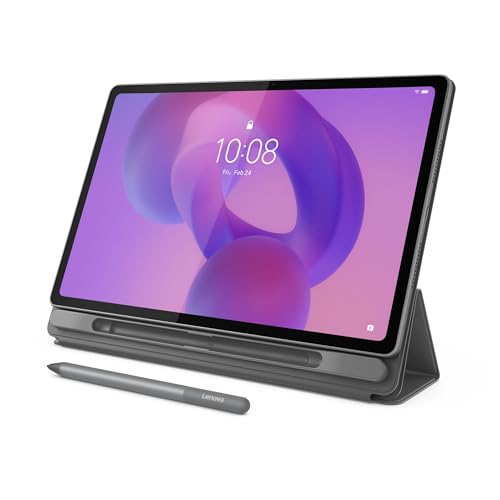
Lenovo Idea Tab Plus 12.1-Inch Tablet
Best for: Students and casual media users
- Screen Size
- 12.1″
- Storage Capacity
- 128GB
- Display Type
- IPS
- Processor
- MediaTek Dimensity 6400
- RAM
- 8GB
- Stylus Compatibility
- Lenovo Tab Pen
View on Amazon: Lenovo Idea Tab Plus 12.1-Inch Tablet Affiliate link
The Lenovo Idea Tab Plus is a lightweight 12.1-inch tablet designed for learning and media consumption. It features a 2.5K IPS display with 90Hz refresh rate and 800 nits brightness. Powered by a MediaTek Dimensity 6400 processor with 8GB RAM, it handles multitasking smoothly. The 128GB storage and quad speakers support entertainment. Its slim build and Circle to Search functionality make it practical for students and casual users.
Pros
- 12.1-inch 2.5K IPS touchscreen with 90Hz refresh rate
- MediaTek Dimensity 6400 processor paired with 8GB RAM
- Lightweight 1.17-pound design for easy portability
- Quad Dolby Atmos speakers for immersive audio
- Circle to Search feature using Google integration
Cons
- 128GB storage may fill quickly for large media libraries
- No mention of expandable storage via microSD
- Requires separate purchase of Folio Keyboard for typing
Good fit if
- You need a large, bright screen for reading and streaming
- You want a lightweight device for carrying between classes
- You value sharp visuals and smooth scrolling for web browsing
Skip if
- You require high-end gaming performance with advanced graphics
- You need extensive internal storage without cloud reliance
- You prefer a tablet with a built-in keyboard included
Verdict: The Lenovo Idea Tab Plus 12.1-Inch suits students and media consumers who prioritize screen quality and portability over raw processing power. Its balanced specs make it a solid daily driver for light tasks and entertainment.
Specifications side by side
| Spec | Lenovo Idea Tab Plus 12.1-Inch Tablet |
|---|---|
| Screen Size | 12.1″ |
| Storage Capacity | 128GB |
| Display Type | IPS |
| Processor | MediaTek Dimensity 6400 |
| RAM | 8GB |
| Stylus Compatibility | Lenovo Tab Pen |
| Storage | 128GB |
| Features | Touchscreen |
| Form Factor | Folio |
| Resolution | 2.5K |
| Dimensions | 7.13 × 11 × 0.25 inches |
| Weight | 1.17 pounds |
| Size | 12.1 inch w/o Folio Keyboard |
| Color | Luna Gray |
| Model | ZAG70917US |
Frequently asked questions
Is the Lenovo Idea Tab Plus good for students?
Yes, it suits students well. The 12.1-inch 2.5K screen offers ample space for reading documents and taking notes. Its 90Hz refresh rate ensures smooth scrolling through textbooks. The lightweight design at 1.17 pounds makes it easy to carry between classes without adding bulk to your backpack.
What resolution does the Lenovo Idea Tab Plus display have?
It features a 2.5K resolution. This high pixel density provides sharp text and clear images on the 12.1-inch panel. You get enhanced visibility for detailed media consumption and document editing. The 90Hz refresh rate also contributes to a smoother visual experience compared to standard 60Hz displays.
How heavy is the Lenovo Idea Tab Plus?
The tablet weighs 1.17 pounds. This weight makes it relatively portable for a 12.1-inch device. You can hold it for extended periods, though fatigue may occur during long reading sessions. The slim 0.25-inch profile also aids in carrying it comfortably in a bag or case.
Does the Lenovo Idea Tab Plus come with storage?
Yes, it includes 128GB of internal storage. This capacity allows you to store numerous apps, photos, and documents locally. You do not need to rely solely on cloud services for your files. The storage is sufficient for casual media users and students who need space for educational materials.
What is the form factor of the Lenovo Idea Tab Plus?
It uses a folio form factor. This design typically pairs with a protective cover or keyboard case. The tablet measures 11 inches wide and 7.13 inches long. You should verify that any existing cases fit these specific dimensions to ensure proper protection and compatibility with your accessories.
Is the Lenovo Idea Tab Plus suitable for media consumption?
It is well-suited for casual media users. The large 12.1-inch display provides an immersive viewing experience for videos. The 2.5K resolution ensures crisp visuals. Combined with its lightweight build, it offers a balanced device for entertainment on the go, prioritizing screen quality and portability over raw processing power.