Best reMarkable Tablets: 11 Models Compared
As an Amazon Associate we earn from qualifying purchases. Links on this page are affiliate links.
This guide compares the best reMarkable tablets to help you choose the right device for your workflow. The lineup includes models with varying screen sizes from 7.3 to 11.8 inches, different form factors like folios and sleeves, and color capabilities. We analyzed 11 products based strictly on their published specifications.
The reMarkable Paper Pro 11.8-Inch Color Tablet ranks first for users seeking a large color canvas and premium folio protection. Its larger display and included leather case make it the top choice for those prioritizing screen real estate and build quality over portability.
Quick picks
Our 11 picks

reMarkable Paper Pro 11.8-Inch Color Tablet
Best for: Large color canvas and premium folio users
- Screen Size
- 11.8"
- Display Type
- Canvas Color
- Stylus Compatibility
- Marker Plus
- Material
- Leather
- Form Factor
- Folio
- Dimensions
- 14.2 × 8.93 × 1.42 inches
The reMarkable Paper Pro features an 11.8-inch Canvas Color display, marking the brand's first color paper tablet. It includes the Marker Plus pen with a built-in eraser and a black leather Book Folio. The device offers an adjustable reading light and low-glare screen for comfortable reading day or night. You get a paper-like writing experience with realistic friction. This model suits those who need a large canvas for sketching and note-taking in color.
Pros
- 11.8-inch Canvas Color display for writing and reading in color
- Includes Marker Plus pen with built-in eraser
- Adjustable reading light for low-light conditions
- Low-glare display reflects natural light to reduce eye strain
- Comes with premium black leather Book Folio
Cons
- Heavier build at 1.16 pounds compared to standard tablets
- Thicker profile at 1.42 inches including the folio
- No mention of wireless connectivity options like Wi-Fi or Bluetooth
Good fit if
- You want a large 11.8-inch screen for detailed sketches
- You need color display capabilities for your notes
- You prefer a physical folio case for protection
Skip if
- You require a lightweight device under one pound
- You need a thin profile under one inch
- You prefer a smaller 10.3-inch display size
Verdict: reMarkable Paper Pro 11.8" Color Tablet is the top choice for users who prioritize a large color canvas and a premium leather folio. It fits those who want a distraction-free writing tool with natural light reflection.

reMarkable Paper Pro 11.8" Color Paper Tablet
Best for: Large color sketching and reading
- Screen Size
- 11.8"
- Display Type
- Canvas Color
- Stylus Compatibility
- Marker Plus
- Color
- Gray
- Dimensions
- 14.2 × 8.93 × 0.79 inches
- Weight
- 1.16 pounds
View on Amazon: reMarkable Paper Pro 11.8" Color Paper Tablet
The reMarkable Paper Pro features an 11.8-inch Canvas Color display, the largest in this guide. It includes the Marker Plus pen with a built-in eraser. The device weighs 1.16 pounds and measures 0.79 inches thick. You get six spare tips. This model suits users who need a large color screen for sketching and reading in any light.
Pros
- 11.8-inch Canvas Color display
- Marker Plus pen with built-in eraser
- Adjustable reading light
- Low-glare screen for outdoor use
- Handwriting to text conversion
Cons
- Heavier at 1.16 pounds
- Larger footprint than 10.3-inch models
- No mention of Bluetooth connectivity
Good fit if
- You want a large color canvas for sketching
- You prefer reading in bright or low light
- You need precise pen control with an eraser
Skip if
- You prefer a lighter, more portable device
- You only need black and white writing
- You want a smaller screen for travel
Verdict: reMarkable Paper Pro 11.8" Color Tablet is the best choice for artists and readers who prioritize screen real estate and color. It fits those who want the largest display in the lineup without sacrificing the paper-like feel.

reMarkable 2 10.3" Digital Paper Tablet
Best for: cloud-synced note-taking and paper-like writing
- Screen Size
- 10.3"
- Display Type
- CANVAS
- Stylus Compatibility
- Pen with Eraser
- Features
- Wi-Fi
- Use
- Note-Taking
- Color
- Black
The reMarkable 2 is a digital paper tablet designed for focused writing and reading. You get a 10.3-inch CANVAS display, an ultra-slim 4.7-millimeter profile, and built-in Wi-Fi for cloud synchronization. It includes a battery-free pen with a built-in eraser function and converts handwriting to text. This tablet suits you if you need a lightweight, dedicated digital notebook for daily work.
Pros
- Slim 4.7 mm body weighing 403.5 g
- 10.3-inch glare-free CANVAS display
- Included pen with eraser requires no battery or charging
- Wi-Fi cloud synchronization and handwriting-to-text conversion
Cons
- Backlight-free design requires external room light to read
- Does not come with a protective cover or folio
Good fit if
- You want a thin 4.7 mm tablet with an eraser-equipped stylus
- You need Wi-Fi synchronization for notes across devices
Skip if
- You need a built-in screen light to write in the dark
- You want a bundle that includes a protective folio
Verdict: reMarkable 2 10.3-Inch Tablet with Eraser Pen delivers a paper-like writing experience with cloud backup and an eraser pen. It suits note-takers who write in well-lit environments and prioritize slim, distraction-free hardware.
reMarkable Paper Pro Move 7.3" Color Tablet
Best for: portable color note-taking
- Screen Size
- 7.3"
- Display Type
- Canvas Color
- Stylus Compatibility
- Marker Plus
- Dimensions
- 8.9 × 5.43 × 1.3 inches
- Weight
- 8.76 ounces
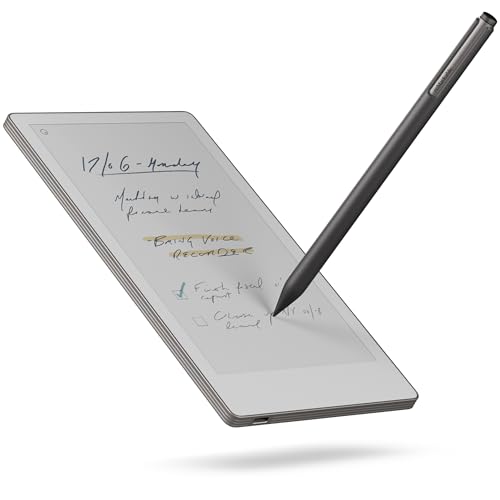
The reMarkable Paper Pro Move is a 7.3-inch color tablet designed for portability. It features a Canvas Color display and includes the Marker Plus stylus. The device weighs 8.76 ounces and measures 8.9 inches in length. This compact size allows it to fit into bags or jacket pockets. It suits users who need a distraction-free writing experience while traveling or on the go.
Pros
- 7.3-inch Canvas Color display
- Includes Marker Plus stylus
- Lightweight 8.76-ounce build
- Compact 8.9-inch length
Cons
- Smaller 7.3-inch screen limits workspace
- No protective folio included in this bundle
- Connect subscription required for handwriting search
Good fit if
- You need a tablet that fits in a jacket pocket
- You want color display for diagrams or media
- You prioritize portability over large screen real estate
Skip if
- You require a screen larger than 7.3 inches
- You need a bundled protective case for immediate use
- You want handwriting search without a subscription
Verdict: reMarkable Paper Pro Move 7.3" Color Tablet is ideal for travelers who value a pocket-sized color writing device. It offers a compact alternative to larger models for quick note-taking.
reMarkable 7.3" Paper Pro Move with Folio
Best for: portable color note-taking in meetings
- Screen Size
- 7.3"
- Display Type
- Canvas Color
- Stylus Compatibility
- Marker Plus
- Color
- Silver
- Form Factor
- Folio
- Dimensions
- 8.98 × 5.51 × 2.01 inches
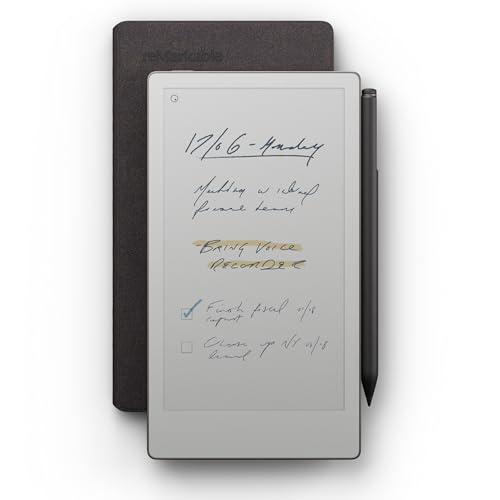
This reMarkable model features a 7.3-inch Canvas Color display. It includes the Marker Plus stylus and a Basalt Book Folio. The device measures 8.98 by 5.51 inches and weighs 1.05 pounds. You can convert handwriting to text and sync notes to the cloud. This compact silver tablet suits users who need a portable, distraction-free tool for face-to-face meetings.
Pros
- 7.3-inch Canvas Color display for color notes
- Includes Marker Plus stylus for writing
- Comes with Basalt Book Folio for protection
- Converts handwritten notes to typed text
- Compact size fits in a jacket pocket
Cons
- 7.3-inch screen is smaller than the 10.3-inch models in this list
- Requires a Connect subscription to search handwritten notes
- 1.05 pounds weight is higher than the base Paper Pro Move
Good fit if
- You need a compact tablet for travel
- You want color display capabilities
- You prefer a bundled folio case
Skip if
- You need a larger 10.3-inch screen
- You want to avoid subscription fees for search features
- You prefer a lighter device without a folio
Verdict: reMarkable Paper Pro Move 7.3" Silver is a portable option for users who prioritize color and portability over screen size. It fits those who need a compact, distraction-free device for meetings.

reMarkable 2 10.3" Paper Tablet with Marker Plus
Best for: distraction-free writing with an eraser stylus
- Screen Size
- 10.3”
- Display Type
- Digital Paper
- Stylus Compatibility
- Marker Plus
- Color
- Black
- Dimensions
- 9.69 × 7.4 × 0.19 inches
- Weight
- 1.05 pounds
View on Amazon: reMarkable 2 10.3" Paper Tablet with Marker Plus
This 10.3-inch digital paper tablet measures 0.19 inches thick and weighs 1.05 pounds. It includes the Marker Plus stylus with a built-in eraser for writing and sketching. The glare-free screen lacks a backlight, relying on ambient light. It suits you if you need distraction-free note-taking and direct cloud syncing with Google Drive, Dropbox, and OneDrive.
Pros
- Marker Plus stylus includes an integrated eraser
- Slim 0.19-inch profile and 1.05-pound weight
- 10.3-inch glare-free digital paper display
- Direct integration with Google Drive, Dropbox, and OneDrive
Cons
- Screen has no built-in backlight for dark settings
- Package does not include a protective folio cover
Good fit if
- You want an included stylus with a built-in eraser function.
- You need direct document integration with Google Drive, Dropbox, or OneDrive.
- You prefer a slim 0.19-inch chassis for portable note-taking.
Skip if
- You need a lighted screen for reading in low-light environments.
- You want a bundled protective folio case included in the box.
Verdict: reMarkable 2 10.3-Inch Tablet with Marker Plus fits note-takers who want a slim 0.19-inch digital notebook with eraser-enabled stylus input and cloud storage integration.

reMarkable Paper Pure 10.3-Inch Tablet with Marker
Best for: document review and text conversion
- Screen Size
- 10.3-inch
- Stylus Compatibility
- Marker
- Length
- 8.98 inches
- Width
- 7.37 inches
- Weight
- 12.7 ounces
View on Amazon: reMarkable Paper Pure 10.3-Inch Tablet with Marker
The reMarkable Paper Pure is a 10.3-inch digital paper tablet designed for focused note-taking. It features a third-generation display with high contrast and 21 ms ink response. You can edit handwritten notes into text and organize files with tags. The device weighs 12.7 ounces and measures 8.98 by 7.37 inches. It supports the Marker stylus for smooth writing. This model offers a streamlined experience for document review and sketching.
Pros
- 10.3-inch third-generation display with high contrast
- 21 ms digital ink response time
- Handwriting-to-text conversion feature
- Organized note management with tags and folders
- Lightweight 12.7-ounce build
Cons
- Includes only the standard Marker, not the Plus version
- Limited to black-and-white display
- No mention of wireless charging capability
Good fit if
- You want a large 10.3-inch screen for detailed documents
- You prefer a lightweight device for portability
- You need handwriting-to-text conversion for efficiency
Skip if
- You require the advanced pressure sensitivity of the Marker Plus
- You need a color display for graphics work
- You want a bundle that includes a protective folio case
Verdict: The reMarkable Paper Pure 10.3-Inch Tablet is a focused tool for users who prioritize screen real estate and fast ink response over stylus extras. It suits professionals who convert notes to text regularly and carry their device frequently.

reMarkable 2 10.3-Inch Paper Tablet
Best for: focused digital drafting with hardware erasing
- Screen Size
- 10.3"
- Stylus Compatibility
- Marker Plus
- Color
- Gray
- Length
- 12.6 inches
- Width
- 8.66 inches
- Weight
- 14.2 ounces
This digital notebook gives you a 10.3-inch black-and-white display paired with the Marker Plus stylus, which includes a built-in eraser and nine replacement tips. At 4.7 millimeters thick and 14.2 ounces, it delivers up to two weeks of battery life. It suits you if you review documents, convert handwriting to typed text, and sync with external cloud drives.
Pros
- Marker Plus stylus includes a built-in eraser and 9 replacement tips
- Slim 4.7 mm profile weighing 14.2 ounces
- Battery life rated for up to 2 weeks
- Native sync with Google Drive, Dropbox, and Microsoft OneDrive
Cons
- Display is limited to black and white
- Does not include a protective folio in the package
- Continuous cloud sync requires a Connect subscription after the 100-day trial
Good fit if
- You want a digital pen with a built-in eraser for direct corrections.
- You need long battery life that lasts up to two weeks on a charge.
- You frequently annotate PDFs and transfer Word or PowerPoint files.
Skip if
- You need a color screen for viewing charts or illustrations.
- You want a bundled protective cover included in the box.
Verdict: reMarkable 2 with Marker Plus delivers an ultra-slim monochrome drafting setup with hardware erasing and multi-week battery life for focused document workflows.

reMarkable Paper Pure with Marker Plus & Sleeve
Best for: Users wanting a protective sleeve included
- Screen Size
- 10.3-inch
- Stylus Compatibility
- Marker Plus
- Form Factor
- Sleeve
- Length
- 8.98 inches
- Width
- 7.37 inches
- Weight
- 12.7 ounces
View on Amazon: reMarkable Paper Pure with Marker Plus & Sleeve
The reMarkable Paper Pure with Marker Plus and Desert Pink Sleeve Folio offers a 10.3-inch digital paper display with a third-generation screen. It features a 21 ms refresh rate and supports the Marker Plus stylus. The device includes a specific sleeve folio in Desert Pink. This bundle suits users who want a dedicated note-taking tablet with organized storage and a protective case included.
Pros
- 10.3-inch third-generation digital paper display
- 21 ms digital ink refresh rate
- Includes Marker Plus stylus
- Comes with Desert Pink Sleeve Folio
Cons
- Heavier at 12.7 ounces compared to bare tablets
- Larger dimensions at 8.98 by 7.37 inches
- Requires subscription for unlimited cloud storage
Good fit if
- You want a protective sleeve included
- You prefer the Desert Pink color option
- You need a 10.3-inch display size
Skip if
- You prefer a lighter bare tablet
- You want color display capabilities
- You dislike carrying a folio case
Verdict: reMarkable Paper Pure with Sleeve bundles the 10.3-inch display with a Desert Pink folio for users who prioritize portability and protection. It fits those who want a ready-to-use package without buying accessories separately.
reMarkable 2 10.3" Tablet with Marker Plus
Best for: minimalist note-takers wanting a white tablet
- Screen Size
- 10.3"
- Display Type
- Digital Paper
- Stylus Compatibility
- Marker Plus
- Color
- White
- Length
- 9.69 inches
- Width
- 7.4 inches
The reMarkable 2 Paper Tablet in white features a 10.3-inch Digital Paper Display and includes the Marker Plus pen. It measures 4.7 mm thick and weighs 1.05 pounds. The device offers an adjustable reading light and supports handwriting conversion to typed text. It connects to cloud services like Google Drive and Dropbox. This model suits users who prefer a minimalist, paper-like writing experience on a lightweight device.
Pros
- 10.3-inch Digital Paper Display for natural writing feel
- Includes Marker Plus pen with eraser for precise control
- Adjustable reading light for day or night use
- Handwriting conversion to typed text for easy reuse
Cons
- No color display support despite marketing claims
- USB-A to C cable included limits charging options
- 1.05 pounds weight is higher than some competitors
Good fit if
- You want a white tablet with a 10.3-inch screen
- You need handwriting conversion to typed text
- You prefer a thin, portable device for notes
Skip if
- You require a color display for media
- You need a lighter device than 1.05 pounds
- You want a device with wireless charging
Verdict: reMarkable 2 White 10.3" Tablet delivers a focused note-taking experience with its 10.3-inch Digital Paper Display and Marker Plus. It fits users who prioritize a paper-like feel and cloud integration over multimedia features.

reMarkable 2 10.3" Digital Paper Bundle
Best for: distraction-free note-taking and reading
- Screen Size
- 10.3"
- Display Type
- Digital Paper
- Stylus Compatibility
- Marker Plus
- Color
- Black
- Form Factor
- Folio
- Length
- 0.19 inches
The reMarkable 2 bundle includes the 10.3-inch digital paper tablet, Marker Plus, and a gray polymer weave book folio. It measures 4.7 mm thick and weighs 2.87 pounds. This device offers a distraction-free writing experience with cloud sync via the included 12-month Connect Plan. It suits users who prioritize a paper-like feel and organized note-taking over multimedia features.
Pros
- 10.3-inch digital paper display
- 4.7 mm ultra-thin profile
- Includes Marker Plus and folio
- 12-month cloud sync subscription
Cons
- No color display capability
- No built-in backlight for dark environments
- USB-A to C cable included, not USB-C charger
Good fit if
- You want a distraction-free writing tool
- You value a paper-like writing feel
- You need organized cloud-synced notes
Skip if
- You require a color screen
- You need a backlit display
- You want multimedia entertainment
Verdict: reMarkable 2 with Folio Bundle delivers a focused note-taking experience with its 10.3-inch digital paper display and included accessories. It fits users who prioritize writing clarity and organization over visual richness.
Specifications side by side
| Spec | reMarkable Paper Pro 11.8-Inch Color Tablet | reMarkable Paper Pro 11.8" Color Paper Tablet | reMarkable 2 10.3" Digital Paper Tablet | reMarkable Paper Pro Move 7.3" Color Tablet | reMarkable 7.3" Paper Pro Move with Folio | reMarkable 2 10.3" Paper Tablet with Marker Plus | reMarkable Paper Pure 10.3-Inch Tablet with Marker | reMarkable 2 10.3-Inch Paper Tablet | reMarkable Paper Pure with Marker Plus & Sleeve | reMarkable 2 10.3" Tablet with Marker Plus | reMarkable 2 10.3" Digital Paper Bundle |
|---|---|---|---|---|---|---|---|---|---|---|---|
| Screen Size | 11.8" | 11.8" | 10.3" | 7.3" | 7.3" | 10.3” | 10.3-inch | 10.3" | 10.3-inch | 10.3" | 10.3" |
| Display Type | Canvas Color | Canvas Color | CANVAS | Canvas Color | Canvas Color | Digital Paper | not specified | not specified | not specified | Digital Paper | Digital Paper |
| Stylus Compatibility | Marker Plus | Marker Plus | Pen with Eraser | Marker Plus | Marker Plus | Marker Plus | Marker | Marker Plus | Marker Plus | Marker Plus | Marker Plus |
| Features | not specified | not specified | Wi-Fi | not specified | not specified | not specified | not specified | not specified | not specified | not specified | not specified |
| Use | not specified | not specified | Note-Taking | not specified | not specified | not specified | not specified | not specified | not specified | not specified | not specified |
| Material | Leather | not specified | not specified | not specified | not specified | not specified | not specified | not specified | not specified | not specified | not specified |
| Color | reMarkable Paper Pro + Black Leather Folio | Gray | Black | Gray, Silver, Dual Color | Silver | Black | Grau | Gray | Desert Pink Sleeve | White | Black |
| Form Factor | Folio | not specified | not specified | not specified | Folio | not specified | not specified | not specified | Sleeve | not specified | Folio |
| Dimensions | 14.2 × 8.93 × 1.42 inches | 14.2 × 8.93 × 0.79 inches | 9.7 × 7.36 × 0.19 inches | 8.9 × 5.43 × 1.3 inches | 8.98 × 5.51 × 2.01 inches | 9.69 × 7.4 × 0.19 inches | not specified | not specified | not specified | not specified | not specified |
| Weight | 1.16 pounds | 1.16 pounds | not specified | 8.76 ounces | 1.05 pounds | 1.05 pounds | 12.7 ounces | 14.2 ounces | 12.7 ounces | 1.05 pounds | 2.87 pounds |
| Length | not specified | not specified | not specified | not specified | not specified | not specified | 8.98 inches | 12.6 inches | 8.98 inches | 9.69 inches | 0.19 inches |
| Width | not specified | not specified | not specified | not specified | not specified | not specified | 7.37 inches | 8.66 inches | 7.37 inches | 7.4 inches | 0.19 inches |
| Size | reMarkable Paper Pro + Black Leather Folio | reMarkable Paper Pro Bundle | 10.3 inches | 7.3" | 7.3" | 9.69 x 7.4 x 0.19 inches | not specified | reMarkable 2 Bundle | not specified | reMarkable 2 Bundle | not specified |
| Model | RM83C-1005NW | RM81C-1000NW | 2 | Model # RM89A-1000NW | RM03A | reMarkable 2 | RM92A-1000NW | RM113 | RM95A-1001NW | ReMarkable 2 | RM911 |
reMarkable Tablets Compared
You can choose between large color displays or compact monochrome screens. The 11.8-inch Paper Pro offers a wide canvas for detailed work, while the 7.3-inch Paper Pro Move fits easily in a pocket. Both provide color capabilities, but the Paper Pure remains a focused tool for text conversion and document review.
Form factors also vary significantly. Some models include premium leather folios or protective sleeves for added durability. Others are sold as bare tablets for minimalists. You should select based on whether you need portability or a larger writing surface. The lineup covers everything from basic note-taking to professional annotation tasks.
Where reMarkable Fits
The reMarkable range spans from the pocket-sized 7.3-inch Paper Pro Move to the expansive 11.8-inch Paper Pro. You can choose between portable folios, slim tablets, or protective sleeves. Most models use a paper-like display without backlighting, reflecting ambient light for a natural reading experience. The lineup covers focused note-taking, color sketching, and document annotation. None of the listed products offer video playback or multimedia apps. You get a distraction-free environment for writing and reading. Choose based on your need for color versus monochrome clarity and portability versus screen real estate.
If you need extra battery runtime, compare the best portable power banks for tablets by capacity and charging speeds.
How to choose the right reMarkable tablet
-
Match screen size to use
Screen size determines how much content fits on the display. If you annotate large documents or sketch, the 11.8-inch Paper Pro provides a wide canvas. For pocket-friendly portability, the 7.3-inch Paper Pro Move is compact. The standard 10.3-inch models offer a middle ground for general note-taking. You should check the physical dimensions in the specs to ensure the device fits your bag. Larger screens require more desk space, while smaller ones prioritize mobility over workspace.
-
Decide on color capability
Color support changes the visual experience significantly. The Paper Pro and Paper Pro Move models display color, which helps when reviewing colored diagrams or highlighting text. The reMarkable 2 and Paper Pure series are monochrome, focusing on grayscale clarity. If you only read text or take simple notes, black and white is sufficient. You should verify if the specific model supports color in the product name. Color displays may have different refresh rates compared to monochrome screens, affecting writing feel.
-
Check form factor and protection
Form factor indicates how the device is protected. Folio covers, like the one for the Paper Pro, offer full protection and a writing surface. Sleeves, such as the one for the Paper Pure, provide basic shielding. Some bundles include the cover, while others sell it separately. You should look for the form factor in the attributes. A folio adds thickness and weight, which may affect portability. Choose a form factor that matches your carrying habits and protection needs.
-
Evaluate weight for portability
Weight affects comfort during long writing sessions or travel. The 7.3-inch Paper Pro Move weighs only 8.76 ounces, making it very light. Heavier bundles, like the Paper Pro with folio, weigh 1.16 pounds. The standard 10.3-inch models typically weigh around 1.05 pounds. You should compare the weight in the specs if you carry the device daily. Heavier devices may cause fatigue during extended use. Lighter models are easier to hold in one hand for extended periods.
-
Consider included accessories
Accessories impact the initial setup and functionality. Some models come with a Marker Plus, which offers extra features like eraser and highlighter. Others include only the basic marker. Bundles may also include folios or sleeves. You should check the product name and attributes for included items. Buying accessories separately can increase the overall cost. Ensure the marker type matches your writing preferences. Some markers offer different tip feels or additional buttons for shortcuts.
Frequently asked questions
Which reMarkable tablet has the largest screen?
The reMarkable Paper Pro 11.8-Inch Color Tablet offers the largest display in the lineup. It measures 14.2 inches in length and 8.93 inches in width. This size provides a wide canvas for detailed sketching and reading. The model fits users who prioritize screen real estate and color capabilities.
Does the reMarkable 2 have Wi-Fi connectivity?
Yes, the reMarkable 2 10.3" Digital Paper Tablet includes Wi-Fi features. This connectivity allows for cloud integration and document syncing without physical cables. The device weighs 1.05 pounds and measures 9.7 inches in length, making it portable for focused note-taking and reading sessions.
What is the smallest reMarkable tablet available?
The reMarkable Paper Pro Move 7.3" Color Tablet is the most compact option. It measures 8.9 inches in length and 5.43 inches in width. Weighing just 8.76 ounces, it fits easily in a pocket. This model is ideal for travelers who need a portable color writing device.
Are there reMarkable tablets with leather folios?
The reMarkable Paper Pro 11.8-Inch Color Tablet comes with a Black Leather Folio. This form factor combines the large color display with a premium protective cover. The bundled unit weighs 1.16 pounds and measures 14.2 inches in length. It suits users who want a distraction-free tool with natural light reflection.
Which model is best for pocket-sized color note-taking?
The reMarkable Paper Pro Move 7.3" Color Tablet is designed for portable color note-taking. It features a 7.3-inch display and weighs only 8.76 ounces. The compact dimensions allow for quick note-taking while traveling. It offers a pocket-sized alternative to larger models without sacrificing color capabilities.
Does the reMarkable Paper Pure include a sleeve?
One version of the reMarkable Paper Pure 10.3-Inch Tablet includes a Desert Pink Sleeve. This bundle provides protection and portability for the 10.3-inch display. The device weighs 12.7 ounces and measures 8.98 inches in length. It is ready to use without purchasing accessories separately.
How thick is the standard reMarkable 2 tablet?
The standard reMarkable 2 10.3" Digital Paper Tablet is 0.19 inches thick. This slim profile contributes to its portability for note-taking. The device measures 9.7 inches in length and 7.36 inches in width. Its lightweight design makes it easy to carry for focused document annotation.
What color options exist for the reMarkable Paper Pro Move?
The reMarkable Paper Pro Move 7.3" Color Tablet is available in Gray, Silver, and Dual Color. A silver version with a folio is also offered for meetings. These options allow users to choose a style that fits their professional environment while maintaining the device's compact and portable nature.