BOOX Tab X C 13.3" Color E Ink Tablet Review (2026)
As an Amazon Associate we earn from qualifying purchases. Links on this page are affiliate links.
This listing is the BOOX Tab X C, a 13.3-inch Kaleido 3 colour e-ink tablet. BOOX lists 3200 x 2400 (300 ppi) for black-and-white content and 1600 x 1200 (150 ppi) for colour, a warm and cold front light, InkSpire stylus input plus capacitive touch (EMR pens do not work), a 2.8GHz octa-core chip with 6GB of memory and 128GB of storage, Android 13, dual speakers, a microphone and a 5,500mAh battery, at about 625 g and 5.3 mm thick. Our verdict: one of very few e-ink tablets that shows a letter-size page at close to full size in colour, which makes it a strong pick for sheet music, textbooks with coloured diagrams, magazines and marked-up contracts. It is heavy for hand-held reading and colour looks muted next to an LCD. This listing's title reads only "BOOX"; another Tab XC listing names the model and states that a pen is included, so confirm the box contents with the seller. Based on BOOX's listings and specs, without hands-on testing.
What stands out
- 13.3-inch Kaleido 3 colour e-ink
- 300 ppi black and white, 150 ppi colour
- InkSpire pen input, no EMR
- Android 13, 6GB/128GB, 2.8GHz octa-core
- 5,500mAh battery, about 625 g, 5.3 mm
Who it fits
Good fit for
Musicians, students and office workers who read or annotate full-size documents with colour, want Android apps and mostly use the tablet on a desk or stand.
Who should skip it
Skip it if you read hand-held for long periods (625 g is heavy), if your pages are black text only (the Note Max 13.3 is sharper and cheaper), or if you need bright, saturated colour.
Verdict: Top large colour e-ink tablet for full-size pages; heavy and muted, as all Kaleido 3 is.
Tab X C specs explained
13.3-inch Kaleido 3, 4,096 colours
Fits a letter or A4 page at near real size.
3200 x 2400 B/W, 1600 x 1200 colour
Text stays sharp at 300 ppi; colour layers are half that density.
InkSpire stylus + capacitive touch
Pressure-sensitive notes; EMR pens are not supported.
6GB/128GB, 2.8GHz octa-core with BSR
Room for big PDF libraries and smoother page refresh.
Warm and cold front light
Read in dim rooms and shift to warm tones at night.
5,500mAh, 625 g, 287.5 x 243 x 5.3 mm
Long sessions per charge; best on a stand or desk.
Build
The Tab X C has a flat glass cover lens over its Kaleido 3 screen, a G-sensor for auto-rotation, dual speakers, a microphone and USB-C that supports OTG and works as an audio jack. BOOX gives the body as 287.5 x 243 x 5.3 mm and about 625 g; the spec fields (12.2 x 8.98 x 0.27 in, 3.09 lb) describe the package. A keyboard cover that fits the Tab X C and Note Max is sold separately.
Reading and annotating large pages
PDF, DJVU, EPUB, MOBI, AZW3, CBZ, CBR and Office files open natively, and Android 13 runs reading, music-score and cloud apps. A 13.3-inch page means less zooming for scores, scanned books and two-column papers, and colour helps with highlights and diagrams. Kaleido 3 colour is darker and paler than a tablet LCD, and refresh is slower, so this is a reading and writing tool, not a video tablet.
Tab X C, Note Max 13.3, or a smaller colour BOOX
Choose the Tab X C if you need colour and a front light on a full-size page. Choose the Note Max 13.3 if your documents are black and white: it has a sharper monochrome screen and costs less, but no front light. Choose the 10.3-inch Note Air C line if you want colour in a lighter, more hand-holdable size. Whichever listing you buy, check that the pen is included, since the Tab X C listings disagree.
Check before you buy
- You mostly use it on a desk or stand
- Muted colour is acceptable
- Pen in the box confirmed with the seller
- Android apps matter to you
The product at a glance
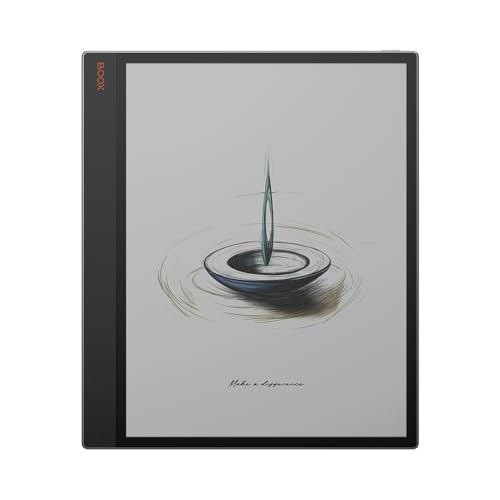
BOOX Tab X C 13.3-Inch Color Tablet
Best for: Sheet music and textbooks
- Screen Size
- 13.3"
- Storage Capacity
- 128GB
- Display Type
- Kaleido Canvas, E ink
- Processor
- 2.8GHz octa-core
- Connectivity
- Wi-Fi, Bluetooth 5.0, USB-C
- RAM
- 6GB
View on Amazon: BOOX Tab X C 13.3-Inch Color Tablet Affiliate link
BOOX Tab X C: 13.3-inch Kaleido 3 colour e-ink (300 ppi B/W, 150 ppi colour), InkSpire pen input, warm and cold light, Android 13, 6GB/128GB, 5,500mAh, 625 g.
Pros
- Full-size colour e-ink page
- Front light with warm tones
- Big 5,500mAh battery
Cons
- Heavy at 625 g
- Muted Kaleido 3 colour
- Pen inclusion unclear in this listing
Good fit if
- You read or mark up full-size colour documents
Skip if
- You read hand-held for hours
Verdict: Strong large colour e-ink tablet for desk use.
Specifications side by side
| Spec | BOOX Tab X C 13.3-Inch Color Tablet |
|---|---|
| Screen Size | 13.3" |
| Storage Capacity | 128GB |
| Display Type | Kaleido Canvas, E ink |
| Processor | 2.8GHz octa-core |
| Connectivity | Wi-Fi, Bluetooth 5.0, USB-C |
| RAM | 6GB |
| Stylus Compatibility | Smart Pen |
| Dimensions | 12.2 × 0.27 × 8.98 inches |
| Weight | 3.09 pounds |
| Model | Tab X C |
Frequently asked questions
Is the BOOX Tab X C good for sheet music?
Yes, its 13.3-inch screen shows a full score page near real size, and Android music apps run on it.
Does the Tab X C support EMR pens?
No, it uses the BOOX InkSpire stylus; EMR pens are not supported.
Does the Tab X C come with a pen?
This listing does not say; another Tab XC listing says a pen is included, so ask the seller.
What does the BOOX Tab X C weigh?
About 625 g (22 oz) per BOOX; the 3.09 lb spec field is the package.
Does the Tab X C have a front light?
Yes, a warm and cold front light.
See also
- boxwave cleartouch crystal kobo elipsa 2e screen protector review
- boxwave cleartouch crystal xp pen artist 16 2nd gen review
- boxwave anti glare film xp pen deco fun s review
- boox tablet 10 3 note air review
- boox tablet go color 7 review
- BOOX Note Air6 C 10.3" Review (2026): A Spec-Based Look
- BOOX Go 6 Gen II Review: Who It Fits and Who Should Skip It
- BOOX Go 10.3 Gen II Lumi Review: Who It Fits and Who Should Skip It
- boox tab xc 13 3 color epaper tablet review
- kenowa portable monitor 13 3 inch review