reMarkable Paper Pro 11.8" Color vs reMarkable 7.3" Paper Pro Move (2026): Key Differences
As an Amazon Associate we earn from qualifying purchases. Links on this page are affiliate links.
You are comparing the remarkable paper pro marker plus vs paper pro move marker options. Both devices feature the Canvas Color display and include the Marker Plus stylus for a natural writing experience. They share cloud sync and handwriting-to-text conversion. The main difference is the screen size. One offers a large 11.8-inch tablet for detailed work, while the other provides a compact 7.3-inch form factor for portability. This choice affects how you carry and use the device daily.
Key differences
| Aspect | reMarkable Paper Pro 11.8" Color Paper Tablet | reMarkable 7.3" Paper Pro Move with Folio |
|---|---|---|
| Screen Size | 11.8 inches | 7.3 inches |
| Dimensions | 14.2 x 8.93 x 0.79 inches | 8.98 x 5.51 x 2.01 inches |
| Weight | 1.16 pounds | 1.05 pounds |
| Included Accessories | Digital notebook | Basalt Book Folio, USB-C cable |
| Color | Gray | Silver |
Which one should you choose?
Choose reMarkable Paper Pro 11.8" Color Paper Tablet if
- You need a large 11.8-inch Canvas Color display for sketching or reading documents.
- You prefer a slim, tablet-like profile that weighs 1.16 pounds.
- You want to write directly on PDFs with ample screen space.
Choose reMarkable 7.3" Paper Pro Move with Folio if
- You prioritize portability with a compact 7.3-inch device.
- You want a folio case included for protection and stand functionality.
- You need a device that slips into a jacket pocket or small bag.
Verdict: Choose the 11.8-inch model if your workflow requires a large canvas for detailed notes and reading. Select the 7.3-inch Move if you need a lightweight, pocketable device for meetings and travel. Both provide the same color display and marker experience, so your decision rests on preferred screen real estate.
Size and Portability Comparison
Screen size
The reMarkable Paper Pro 11.8" Color Paper Tablet offers a large 11.8-inch Canvas Color display. This full-size screen is ideal for sketching and reading documents with ample space. In contrast, the reMarkable 7.3" Paper Pro Move with Folio features a smaller 7.3-inch Canvas Color display. This compact size makes it easier to hold in one hand and carry around. Both devices use the same color display technology, but the size difference significantly impacts how much content you can view at once. You must choose between the expansive workspace of the larger model or the compact convenience of the smaller one.
Portability
Portability is a major factor when choosing between these two tablets. The reMarkable 7.3" Paper Pro Move with Folio is designed to be ultraportable. It is smaller than a paperback book and slips easily into a bag or jacket pocket. Its dimensions are 5.51 inches wide and 8.98 inches long. The reMarkable Paper Pro 11.8" Color Paper Tablet is larger, measuring 8.93 inches wide and 14.2 inches long. While still slim, its full-size format makes it less convenient for quick note-taking on the go. If you travel frequently or need a device that fits in a small bag, the smaller model is the better choice.
Weight
Weight affects how comfortable the device is to hold for extended periods. The reMarkable 7.3" Paper Pro Move with Folio weighs 1.05 pounds. The reMarkable Paper Pro 11.8" Color Paper Tablet weighs 1.16 pounds. The difference is small, but the lighter model is easier to hold for long writing sessions. Both devices are relatively light compared to traditional laptops. The slight weight advantage of the 7.3-inch model supports its focus on portability and on-the-go use. For most users, this difference may not be noticeable, but it adds to the overall ease of carrying the smaller tablet.
Included accessories
The packages included with each device differ in what they provide. The reMarkable Paper Pro 11.8" Color Paper Tablet comes with the tablet and the Marker Plus stylus. It also includes six spare Marker tips. The reMarkable 7.3" Paper Pro Move with Folio includes the tablet, the Marker Plus stylus, six spare Marker tips, a USB-C cable, and a Basalt Book Folio. The inclusion of the folio with the smaller model adds value and protection right out of the box. If you need a case for your device, the smaller model includes one, whereas the larger model does not.
Use case
Each device is designed for different primary use cases. The reMarkable Paper Pro 11.8" Color Paper Tablet is positioned as the ultimate paper tablet for writing, sketching, and reading in color. Its large screen is better for detailed work and document review. The reMarkable 7.3" Paper Pro Move with Folio is designed for distraction-free meetings and quick note-taking. Its smaller size allows you to focus on the person in front of you without a large screen in the way. If you need a dedicated workspace, choose the larger model. If you need a meeting companion, choose the smaller one.
Choose the right reMarkable tablet for you
Users needing a large screen for detailed work
The 11.8-inch Canvas Color display provides ample space for sketching and reading documents. Its full-size format suits those who prefer a notebook-like experience. At 1.16 pounds, it is portable but larger. The adjustable reading light ensures comfort in any lighting condition, making it ideal for stationary desk use or travel where screen real estate matters most.
Travelers seeking a compact, pocketable device
This 7.3-inch tablet slips into bags or jacket pockets with ease. It is smaller than a paperback, weighing just 1.05 pounds. The included Basalt Book Folio adds protection and style. Its compact size supports distraction-free note-taking during meetings or on the go. You can carry all your ideas without the bulk of a larger tablet, maintaining focus wherever you are.
Readers who want a paper-like large format
The 11.8-inch size offers a superior reading experience for PDFs and documents. The low-glare display reflects natural light, reducing eye strain during long sessions. Combined with the Marker Plus for precise control, this device delivers a realistic writing feel. It is designed for users who value a distraction-free environment with a large canvas for both writing and reading in color.
The products compared

reMarkable Paper Pro 11.8" Color Paper Tablet
Best for: large-screen color note-taking and PDF annotation
- Screen Size
- 11.8 inches
- Display Type
- Canvas Color
- Stylus Compatibility
- Marker Plus
- Use
- Reading
- Color
- Gray
- Dimensions
- 14.2 × 8.93 × 0.79 inches
View on Amazon: reMarkable Paper Pro 11.8" Color Paper Tablet Affiliate link
The reMarkable Paper Pro 11.8 Color is a tablet with an 11.8-inch Canvas Color display. It includes the Marker Plus pen for writing and sketching. The device weighs 1.16 pounds and measures 14.2 by 8.93 inches. It features an adjustable reading light and low-glare screen. This model suits you if you need a large, portable screen for color notes and PDFs.
Pros
- 11.8-inch Canvas Color display for writing and reading in color
- Includes Marker Plus pen with built-in eraser and 6 spare tips
- Adjustable reading light and low-glare screen for outdoor use
- Converts handwriting to typed text and organizes files with folders
Cons
- Heavier at 1.16 pounds compared to smaller tablets
- Thicker profile at 0.79 inches
- No mention of Bluetooth connectivity in specifications
Good fit if
- You need a large 11.8-inch screen for detailed work
- You want to write and read in color
- You prefer a device with an adjustable reading light
Skip if
- You prioritize a lightweight device under 1 pound
- You need a very thin tablet under 0.5 inches
- You require Bluetooth connectivity for wireless accessories
Verdict: reMarkable Paper Pro 11.8 Color fits professionals who need a large color display for extensive note-taking and PDF annotation. Its size and weight make it less ideal for one-handed portability.
reMarkable 7.3" Paper Pro Move with Folio
Best for: portable color note-taking
- Screen Size
- 7.3"
- Display Type
- Canvas Color
- Stylus Compatibility
- Marker Plus
- Features
- Color Display
- Use
- Reading
- Color
- Silver
View on Amazon: reMarkable 7.3" Paper Pro Move with Folio Affiliate link
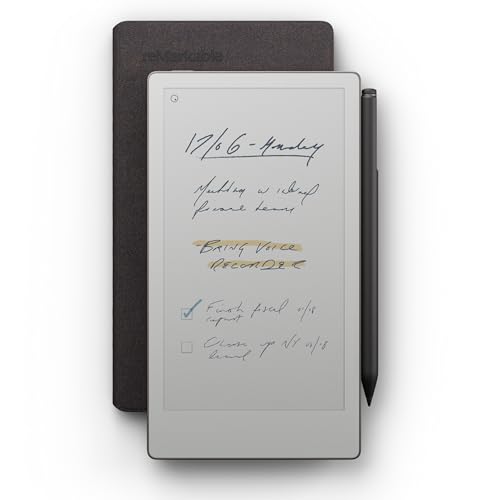
The reMarkable Paper Pro Move is a compact 7.3-inch color e-reader designed for distraction-free note-taking. It features a Canvas Color display and pairs with the Marker Plus stylus. At 1.05 pounds, it is small enough to fit in a jacket pocket. This device suits users who need a portable, paper-like writing experience that syncs to cloud apps.
Pros
- 7.3-inch Canvas Color display
- Compatible with Marker Plus stylus
- Weighs only 1.05 pounds
- Searchable handwritten notes
- Cloud sync with mobile and desktop apps
Cons
- Smaller 7.3-inch screen limits writing space
- Heavier than typical e-ink-only tablets
- Requires Connect subscription for search features
Good fit if
- You need a pocket-sized color tablet
- You prefer handwriting over typing
- You want distraction-free focus
Skip if
- You need a large screen for drawing
- You require offline note search without subscription
- You prioritize ultra-lightweight portability
Verdict: reMarkable Paper Pro Move 7.3" Color is ideal for professionals who need a compact, color-capable device for quick notes on the go. It fits users who value portability and a paper-like feel over large screen real estate.
Specifications side by side
| Spec | reMarkable Paper Pro 11.8" Color Paper Tablet | reMarkable 7.3" Paper Pro Move with Folio |
|---|---|---|
| Screen Size | 11.8 inches | 7.3" |
| Display Type | Canvas Color | Canvas Color |
| Stylus Compatibility | Marker Plus | Marker Plus |
| Features | not stated | Color Display |
| Use | Reading | Reading |
| Color | Gray | Silver |
| Form Factor | not stated | Folio |
| Dimensions | 14.2 × 8.93 × 0.79 inches | 8.98 × 5.51 × 2.01 inches |
| Weight | 1.16 pounds | 1.05 pounds |
| Size | reMarkable Paper Pro Bundle | 7.3" |
| Model | RM81C-1000NW | RM03A |
Frequently asked questions
Which device is better for one-handed use?
The 7.3-inch model is the superior choice for one-handed use. It measures 5.51 inches wide and weighs 1.05 pounds with its folio. The larger 11.8-inch tablet is 8.93 inches wide and weighs 1.16 pounds. Its substantial size and weight make it difficult to hold comfortably with a single hand for extended periods.
Does the larger tablet include a folio case?
The product listing for the 11.8-inch tablet does not mention a folio or case. It is sold as a bundle. The 7.3-inch device explicitly includes a folio in its name and description. You should check the specific bundle contents for the larger model if a protective case is required.
What is the thickness of the 11.8-inch tablet?
The 11.8-inch tablet has a thickness of 0.79 inches. This slim profile helps keep the device relatively portable despite its large screen area. The 7.3-inch model with folio is thicker at 2.01 inches, largely due to the included protective cover adding to the overall bulk.
Is the 7.3-inch tablet suitable for PDF annotation?
Yes, the 7.3-inch tablet supports PDF annotation. It features the Canvas Color display and handwriting-to-text conversion. However, the smaller screen size offers less space for detailed work compared to the 11.8-inch model. It is best suited for quick notes or reviewing smaller documents on the go.
How do the colors of the devices differ?
The 11.8-inch tablet is available in a Gray color. The 7.3-inch model with folio comes in Silver. These are the only color options listed for each respective device. The choice between gray and silver depends on your aesthetic preference and how the device matches your other tech gear.
Can I use the Marker Plus with both tablets?
Yes, both devices include the Marker Plus stylus. This ensures a consistent writing experience across both screen sizes. The stylus is designed to work with the Canvas Color display technology found in both the 11.8-inch and 7.3-inch models. You get the same natural writing feel regardless of which size you choose.
Which tablet is lighter overall?
The 7.3-inch tablet with folio is slightly lighter at 1.05 pounds. The 11.8-inch tablet weighs 1.16 pounds. While the difference is small, the smaller device offers a more compact form factor. The larger tablet carries more weight due to its significantly bigger screen and internal components.